How to download YouTube transcripts (one or a whole channel)
By the YouTubeTranscriptAPI engineering team · Published · Updated
YouTube shows you the transcript of many videos. It just won't give you a file.
To download YouTube transcripts one at a time, open the video, expand the description, click "Show transcript," then copy the text into a file. That works for one video. For a playlist or a channel, use a transcript API or a command-line tool that saves each video's captions as TXT, SRT, VTT, JSON or CSV. Videos without captions have no transcript to download, so plan for some gaps.
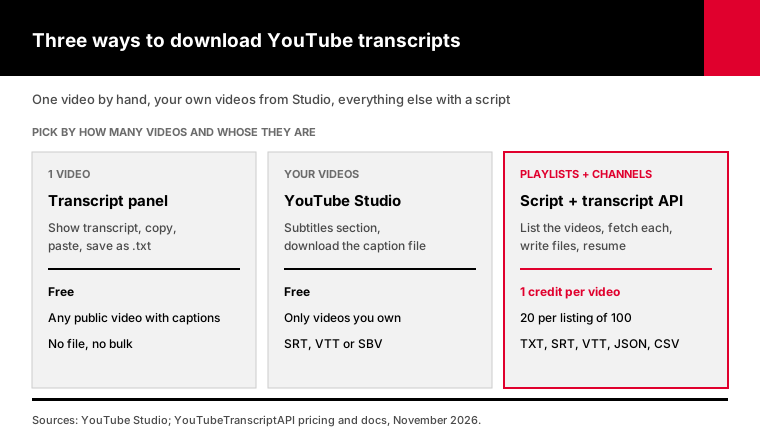
I read five of the guides that rank for this search. All five show the copy-and-paste trick or their own web tool. None of them explains how to download hundreds of transcripts, which file format to pick, or why scripts break on servers.
That's what this guide adds, with a tested script at the end.
How do you download a YouTube transcript for one video?
On a computer, open the video on youtube.com, expand the description, scroll to the Transcript section and click "Show transcript." The panel lists every caption line with a timestamp. Hide the timestamps from the panel's menu if your version shows that option, then select all the text, copy it and paste it into a text editor. Save it as a .txt file. There's no download button.
It takes about a minute, and it's free.
A few things trip people up:
- No "Show transcript" button usually means the video has no captions at all. - The timestamp toggle isn't always there. If it's missing, you'll strip the times by hand or with a tool. - Long transcripts load as you scroll, so check the end made it into your copy.
The copied text comes out as short broken lines, because that's how captions are timed. Expect to clean it up before you quote it.
Is this fine for a research paper or a single blog post? Absolutely.
For ten videos it starts to hurt. For a hundred it's a non-starter.
Can you download a YouTube transcript on your phone?
Not as a file. The YouTube app can show the transcript on many videos, from the description, but it doesn't let you copy or download it in one go. Copying line by line is painful. The practical route on a phone is to paste the video link into a web tool that returns a file, or to wait until you're at a computer.
Ask Leo, one of the guides that ranks for this search, says plainly that the author isn't aware of a way to do it in the mobile app.
So if you need transcripts regularly, do it from a computer, where one script can work through a whole list of links.
Can you download the transcript of your own YouTube video?
Yes. If you own the video, YouTube Studio lets you download its caption files from the Subtitles section, as subtitle files such as SRT, VTT or SBV. That's the route YouTube built for creators, and it works for every language track on your video. For many videos on your channel at once, the YouTube Data API's captions endpoint does the same thing in code, with OAuth.
Studio downloads come straight from your caption track, so they include any corrections you made by hand. That makes them the cleanest source you'll find for your own videos.
SRT and VTT open almost everywhere. SBV is YouTube's own format, and many editors won't read it, so pick SRT when you're asked.
The Data API route has a catch. Its captions.download method only works on videos you can edit, and it costs quota. I explained the details, including why it returns 403 for other people's videos, in YouTube API transcripts and the 403 error.
Which file format should you download YouTube transcripts in?
Pick the format by what reads the file next. Plain TXT is best for reading, quoting and pasting into ChatGPT or NotebookLM. SRT and VTT keep the timing, so video editors and web players can show them as subtitles. JSON keeps every caption line with its start time for code. CSV puts one line per row, which suits spreadsheets and data work.
Here's the quick version:
| Format | Keeps timing | Best for | Opens in |
|---|---|---|---|
| TXT | Optional | Reading, quoting, LLMs | Any text editor |
| Markdown | Yes, as links | Notes apps, Obsidian, Notion | Notes apps, editors |
| SRT | Yes | Video editors, YouTube re-uploads | Premiere, DaVinci, VLC |
| VTT | Yes | Web video players | Browsers (HTML5 track) |
| JSON | Yes | Code, databases, pipelines | Any programming language |
| CSV | Yes | Spreadsheets, analysis | Excel, Google Sheets |
My default is TXT plus JSON.
TXT is what people read. JSON is what you'll wish you had kept when you need a timestamp six months later.
How big are these files? SozAI measured a median of 168 spoken words per minute across 10,446 YouTube videos in October 2026. So an hour-long talk is roughly 10,000 words, around 60 KB as plain text.
A thousand of them still fits on a USB stick from 2005.
How do you download all the transcripts from a YouTube channel or playlist?
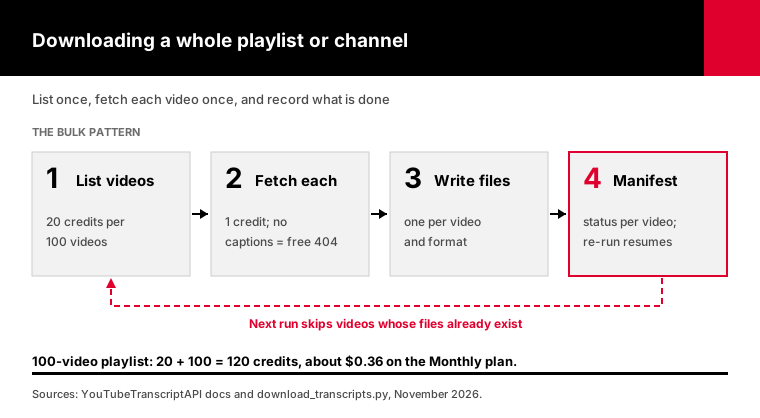
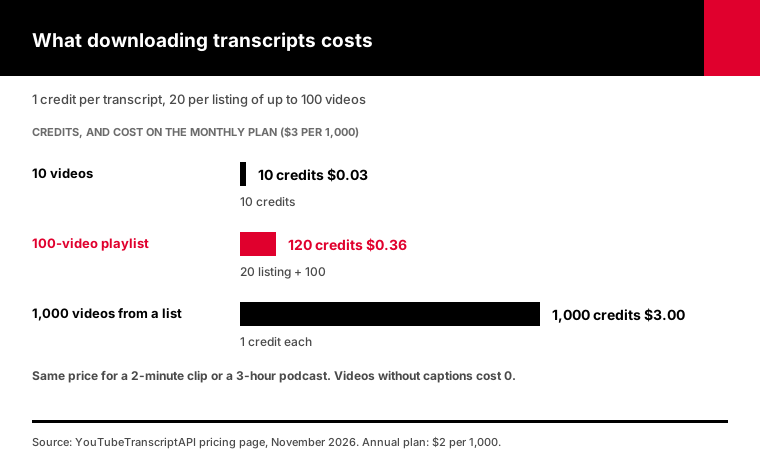
To download every transcript from a playlist or channel, list the videos first, then fetch each transcript and save it to a file, skipping videos you already have. With YouTubeTranscriptAPI, listing a playlist or a channel's 100 newest uploads costs 20 credits, and each transcript costs 1 credit. A 100-video playlist comes to 120 credits, about $0.36 on the Monthly plan.
Doing this by hand is where people give up. Opening 100 videos and copying 100 panels is a full afternoon.
The bulk pattern has four parts:
1. List the video IDs from the playlist or channel endpoint. 2. Fetch each transcript from the transcript endpoint. 3. Write one file per video and format. 4. Record each video's status, so a stopped run picks up where it left off.
Don't skip step 4. On a big channel something always interrupts the run, whether your laptop sleeps or your credits run out halfway.
Videos without captions return a 404 that costs nothing, so they don't eat your budget. They just show up as gaps in the list.
Channels with more than 100 uploads need one more step for the older videos. My guide to bulk channel transcripts covers it.
Why do free transcript downloaders fail on servers?
Free tools such as yt-dlp and open-source transcript libraries read captions straight from YouTube, and YouTube rate-limits and blocks traffic it thinks is automated. On a home connection they usually work for a while. From a cloud server, requests often fail with HTTP 429 "Too Many Requests" or a "Sign in to confirm you're not a bot" message, because data-center IP addresses look automated.
yt-dlp is still a great tool on your own machine.
Its README documents the flags: --skip-download saves only the captions, --write-subs and --write-auto-subs choose creator or automatic captions, and --sub-langs picks the language. For a few playlists on your laptop, that's often all you need.
The trouble starts when you move it to a server, or run it every day.
A yt-dlp GitHub issue shows the typical failure: "Unable to download video subtitles... HTTP Error 429: Too Many Requests." The usual fixes are browser cookies and slower requests, and people report mixed results with both.
That's the gap a hosted transcript API fills. The provider deals with the blocking, and you get a plain JSON response with a 60-second timeout and no cookies to manage.
Two more things change when the fetching isn't yours. Failed requests cost nothing, so a video without captions or a timeout doesn't eat your budget. And every successful response carries an X-Credits-Remaining header, so a nightly job can warn you before it runs dry.
Is that worth $3 per 1,000 transcripts? For a weekend project on your laptop, maybe not; use yt-dlp. For anything that runs on a schedule or on a server, the hours you'd spend fixing cookies cost more.
Can you download YouTube transcripts in other languages?
You can download a transcript in any language the video has a caption track for. Some videos have the creator's own captions in several languages, and many have YouTube's automatic captions in the spoken language. In the transcript panel you switch tracks from the language menu. With the API, you pass a language code such as es or de, and the response says which track you actually got.
This catches people out in bulk runs.
If you ask for German and the video only has English, you may get English back instead of an error. The script writes the language it received into the manifest, so you can filter by it later.
What you can't download is a translation that doesn't exist as a track. YouTube's player can translate captions on screen, but that's generated on the fly for viewing.
If you need every video in one language, download what's there and translate the text yourself. Language models are good at that, and the timestamps survive if you translate the JSON line by line.
Is it legal to download YouTube transcripts?
YouTube's terms of service, dated December 15, 2023, say you may not download content except as expressly authorized by the service or with YouTube's prior written permission. They also forbid automated access by robots or scrapers, except for public search engines and anyone with written permission. Viewing for personal, non-commercial use is allowed. Whether a given download is a problem depends on your use and your country.
I'm not a lawyer, and this isn't legal advice.
Here's how I'd think about it. YouTube built two routes itself: the transcript panel for viewing, and Studio and the Data API for your own videos. Everything else is a third-party route, including browser extensions, web tools, yt-dlp and hosted APIs like this one.
The words in a transcript are also part of someone's video, and copyright in them usually sits with the creator. Quoting a line with credit is ordinary practice. Republishing someone's full transcript as your own content is a different thing, and copyright law applies to it.
My take: for research, notes and analysis, read the terms once and decide deliberately. For a commercial product built on other people's transcripts, get advice that fits your case.
How do you download YouTube transcripts with a script?
I wrote a small Python script that downloads transcripts for a list of videos, a playlist or a channel, in any of six formats. It uses YouTubeTranscriptAPI, needs only Python 3.9 or newer with no extra packages, and resumes where it stopped. Each transcript costs 1 credit, a listing costs 20, and a new account's 100 free credits cover about 100 videos.
Grab download_transcripts.py and run it like this:
export YT_API_KEY=your_key

# One video, plain text
python download_transcripts.py https://www.youtube.com/watch?v=dQw4w9WgXcQ

# One video, with timestamps and subtitle files
python download_transcripts.py dQw4w9WgXcQ --formats txt,srt,vtt --timestamps

# A whole playlist as text and CSV, plus one combined file for NotebookLM
python download_transcripts.py --playlist PLxxxxxxxx --formats txt,csv --combine

# See what a channel would cost before downloading anything
python download_transcripts.py --channel @TED --dry-run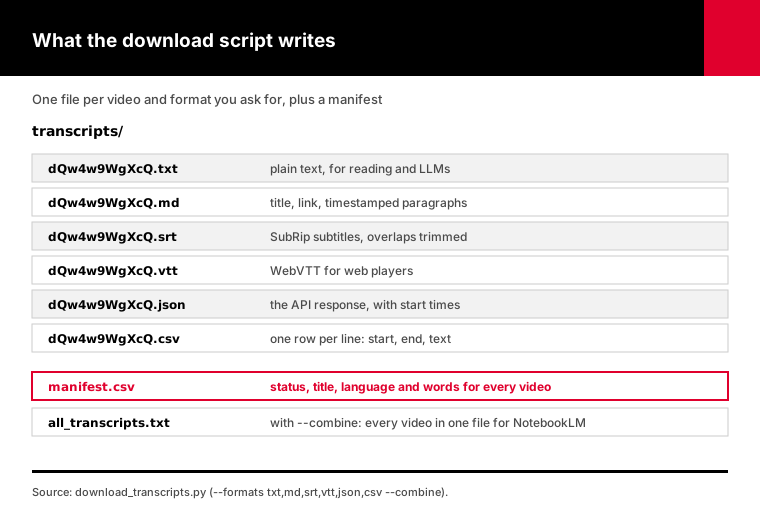
The details I cared about:
- It writes a manifest.csv with each video's status, title, language and word count, so you can see the gaps at a glance. - --combine builds one all_transcripts.txt with a title and link above each video. That's the file to drop into NotebookLM or an LLM. - SRT and VTT timings are trimmed so lines don't overlap, a common problem with automatic captions. - It stops cleanly at a 402 when credits run out. Top up and run the same command again.
I tested it against a mock of the API, 25 checks covering every format, resuming, retries, missing captions and running out of credits.
Need proper subtitle files with cues regrouped into two readable lines? The SRT and VTT guide goes deeper on that.
Want the text in a spreadsheet instead? There's a Google Sheets version too.
How do you use downloaded transcripts in ChatGPT or NotebookLM?
Download the transcripts as plain text, combine them into one file with the video title and link above each one, then upload that file to ChatGPT, Claude or NotebookLM. One combined file is easier to manage than a hundred small ones, and the titles let the model tell you which video an answer came from. Keep timestamps in if you want it to cite moments.
This is the most common reason people bulk-download transcripts in the first place.
A course, a podcast back catalog or a competitor's channel becomes something you can ask questions of. "Where does she explain pricing?" beats scrubbing through 40 hours of video.
The script's --combine flag writes exactly that file, all_transcripts.txt.
Two practical limits apply. AI tools cap how much text one upload or one source can hold, so a very large channel may need splitting into a few files. And automatic captions misspell names and jargon, so check any quote against the video before you publish it.
Want summaries instead of a chat? I covered that pipeline, with costs per 1,000 videos, in how to summarize YouTube videos with AI.
Why is there no transcript to download for some videos?
A video has no transcript when it has no caption track, which happens for a few common reasons. YouTube's automatic captions aren't available for every video or language: its help center lists about 67 languages for automatic captions. New uploads can take a while to get captions, and music, silence or poor audio can stop them entirely. The creator can also turn captions off.
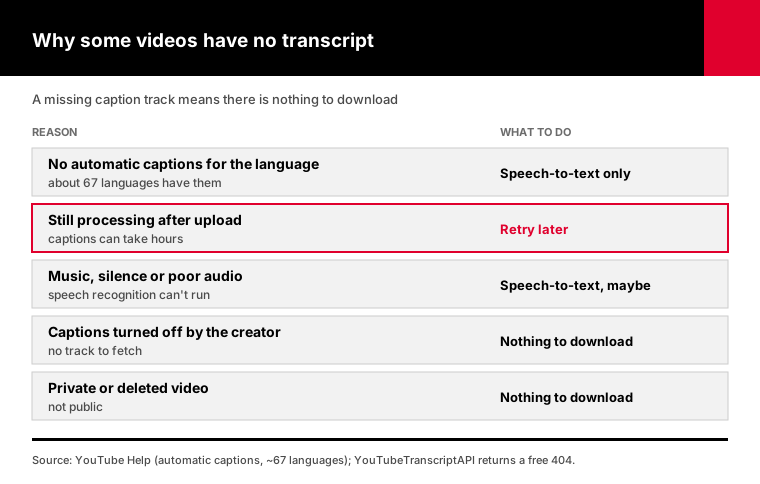
Here's what each case means for you:
- New upload: wait a few hours and try again. - Unsupported language or poor audio: there's no caption track to download, and only speech-to-text will help. - Private or deleted video: nothing anyone can fetch.
The script records these as "no captions" in the manifest, and they cost nothing.
If you need text for those videos anyway, speech-to-text is the fallback. It costs more and needs audio you have the rights to. I compared the two routes, with prices, in captions or speech-to-text.
Frequently asked questions
How do I download a YouTube transcript as a text file?
Open the video on a computer, expand the description and click "Show transcript." Hide timestamps if the panel offers it, select the text, copy it and paste it into a text editor, then save it as a .txt file. For several videos, a script with a transcript API saves each one as a .txt file for you, at 1 credit per video.
How do I download a YouTube transcript without timestamps?
In the transcript panel, open the three-dot menu and choose "Toggle timestamps" if your version shows it, then copy the text. If the option is missing, paste the text into an editor and remove the time lines. The download script writes plain text without timestamps by default, and adds them only when you pass the --timestamps flag.
Can I download all transcripts from a YouTube playlist at once?
Yes, with a script or a bulk tool. YouTube's own interface doesn't offer it. With YouTubeTranscriptAPI, listing a playlist of up to 100 videos costs 20 credits, and each transcript costs 1 credit, so a 100-video playlist comes to 120 credits, about $0.36 on the Monthly plan. Videos without captions are skipped at no cost.
Can I download a YouTube transcript as SRT?
Yes. If you own the video, YouTube Studio lets you download its captions as SRT from the Subtitles section. For other videos, a transcript API returns the timed caption lines, and a script can write them as an SRT file. The download script does this with --formats srt and trims overlapping timings so the subtitles don't stack up in video editors.
Is it legal to download YouTube transcripts?
YouTube's terms, dated December 15, 2023, forbid downloading content except as the service expressly allows or with YouTube's written permission, and they forbid automated access by scrapers. Viewing for personal use is allowed. Whether a download is a problem depends on your use and your country, so read the terms, and get legal advice for commercial products.
Why can't I find the transcript on a YouTube video?
The video probably has no captions. Automatic captions aren't available for every language or video, new uploads can take hours to get them, and creators can turn them off. On the mobile site the option may not appear at all, so try a computer or the YouTube app. If there's no caption track, only speech-to-text can produce a transcript.
Download your first playlist today
Pick the playlist you keep meaning to read instead of watch. Get a free key with 100 credits, and run the script with --dry-run to see the cost.
Then run it for real with --formats txt,json --combine. You'll have every transcript in its own file, one combined file for your AI tool, and a manifest showing exactly which videos had no captions.