YouTube API transcripts: why captions.download returns 403
By the YouTubeTranscriptAPI engineering team. Last updated November 2, 2026.
You enabled the YouTube Data API, made an OAuth client, found the caption track ID, and called captions.download. You got a 403.
Can the YouTube API get a transcript? Only for videos you're allowed to edit. Its captions.download method wants an OAuth sign-in from someone who can edit that video, costs 200 quota units, and returns 403 "forbidden" for everyone else's videos. Add the 50-unit captions.list call and each transcript uses 250 of your 10,000 daily units. For other people's videos, you need a transcript API instead.
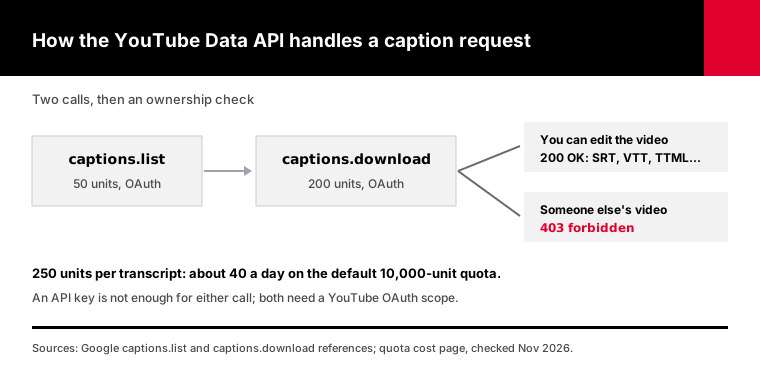
This guide explains the 403, the quota math, when the official API is still the right tool, and a tested script for your own channel.
Does the YouTube Data API have a transcript endpoint?
Yes, but it's built for video owners. The Data API's captions resource has two read methods: captions.list, which returns a video's caption tracks for 50 quota units, and captions.download, which returns one track's text for 200 units. Both need OAuth with the youtube.force-ssl or youtubepartner scope. Google's reference says download requires permission to edit the video, which is why it fails on almost everything you didn't upload.
So there is an official route. It's narrow.
The captions.list reference describes a call that takes a video ID and returns track metadata: language, track kind and an ID. It doesn't return the words.
Each track has a trackKind. Google's captions resource lists three values: standard, ASR for tracks made by automatic speech recognition, and forced.
The words come from the second call. The captions.download reference takes the track ID and returns the file.
You can ask for a format with tfmt: sbv, scc, srt, ttml or vtt. Leave it out and you get the track in whatever format it was uploaded. You can also pass tlang with a two-letter language code, and Google machine-translates the track.
It's a useful feature set, gated behind one sentence on the download page: only someone who can edit the video may download its captions.
Why does captions.download return 403 forbidden?
captions.download returns 403 forbidden because your account can't edit the video. Google's reference lists one 403 reason for the method, "forbidden," meaning the request lacks the permissions needed to fetch that track. The two causes are a video owned by someone else and an OAuth token without the youtube.force-ssl or youtubepartner scope. Retrying never helps, because the check is about who you are, not about timing.
The errors Google documents for these two calls:
| Status | Reason | What it means | What to do |
|---|---|---|---|
| 403 | forbidden | You can't edit this video, or the token lacks the scope | Use your own video, or a transcript API |
| 403 | quotaExceeded | You've used your daily units | Wait for the reset at midnight Pacific |
| 404 | captionNotFound | That track ID doesn't exist | List the tracks again |
| 404 | videoNotFound | No video with that ID | Check the ID |
| 400 | couldNotConvert | The track can't be converted to that format or language | Drop tfmt or tlang |
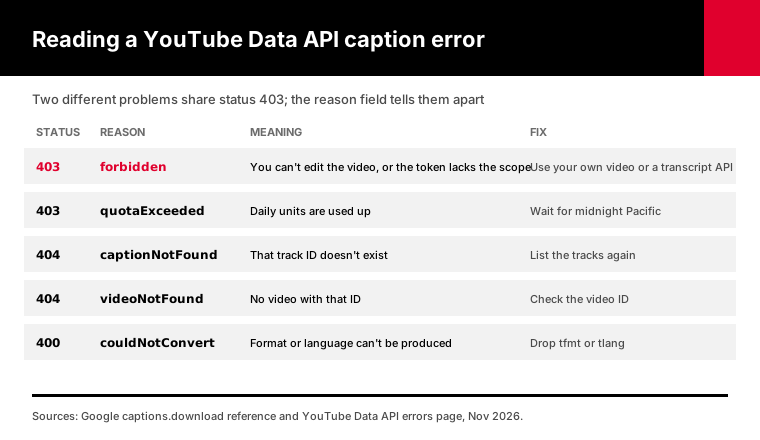
Two of these share a status code, which trips people up. A 403 can mean "not yours" or "out of quota." Read the reason field, not the number.
The YouTube Data API errors page lists quotaExceeded as a 403 with the message that the request "cannot be completed because you have exceeded your quota."
When you hit forbidden, it's tempting to blame your request code. The code is fine. The account is the problem.
Can you download YouTube captions with just an API key?
No. Google's captions.list and captions.download pages both say the request needs authorization with the youtube.force-ssl or youtubepartner OAuth scope, so an API key alone is rejected. Some tutorials show a free API key fetching a transcript in two requests. That doesn't match Google's documentation, and the download would still need edit rights on the video even with OAuth.
API keys are fine for public data: search, video details, playlist items.
Captions aren't treated as public data, even when anyone can read them on the watch page.
Google's captions implementation guide says both listing and downloading tracks "must be authorized using OAuth 2.0." It also notes the download can't be tested in the APIs Explorer, because the Explorer doesn't download files.
So the minimum setup for the official route is a Google Cloud project, the YouTube Data API enabled, an OAuth client, a consent screen, and a signed-in user who can edit the video.
That's a lot of ceremony for your own videos. For anyone else's, no amount of setup gets you there.
How many transcripts does 10,000 quota units buy?
About 40 a day. Google gives each project 10,000 units a day by default, and one transcript takes a 50-unit captions.list call plus a 200-unit captions.download call, so 250 units per video. If you already stored the track IDs, downloads alone get you 50 a day. Quota resets at midnight Pacific time, and even invalid requests cost at least one unit.
The math, using Google's own unit costs:
| Task | Units per video | Videos per 10,000-unit day |
|---|---|---|
| List tracks, then download one | 250 | 40 |
| Download only (track ID already known) | 200 | 50 |
| List tracks only, to see what exists | 50 | 200 |
| Page through a playlist (50 videos per call) | 1 per 50 videos | About 500,000 videos |
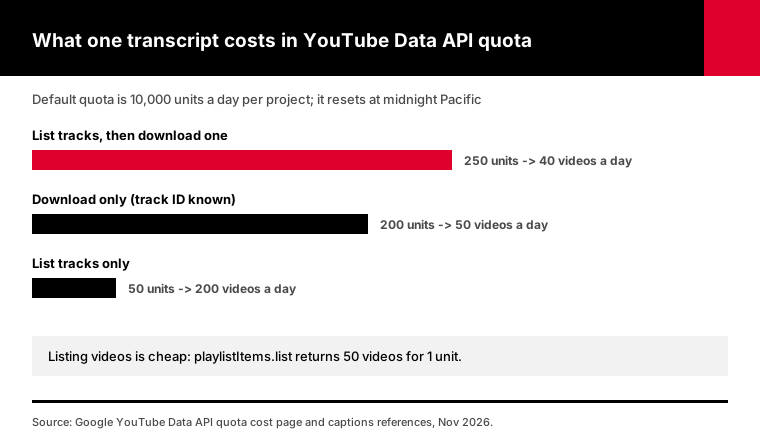
Google's quota cost page sets the 10,000-unit default and the midnight Pacific reset. It also says "All API requests, including invalid requests, incur a quota cost of at least one point."
Note the gap between listing and downloading. Paging through a playlist costs 1 unit per 50 videos. Downloading one caption track costs 200.
Need more than 40 a day? Google's quota and compliance audit page says you must first pass an audit showing your project follows the API terms. It gives no review time, only that the team "will contact you as soon as possible."
And the audit doesn't change the ownership rule. More quota buys you more downloads of your own videos.
When is the official API the right tool?
Use the official API when the videos are yours. If you can edit the video, captions.download returns the exact caption file in SRT, VTT, SBV, SCC or TTML, including tracks you uploaded by hand, and it can machine-translate with tlang. At 250 units a video, a channel with a few hundred uploads can be exported in about a week of daily runs without paying anyone.
That's a real use case. Creators back up their captions. Agencies export a client's channel with the client's sign-in.
The core of our tested script for that job lists the tracks, prefers a human-made track over an ASR one, and downloads it:
listing = api.get("/captions", params={"part": "snippet", "videoId": video_id})   # 50 units
track = pick_track(listing.json().get("items", []), lang)
body = api.get(f"/captions/{track['id']}", params={"tfmt": "srt"})               # 200 units
You can download own_captions.py and read all 85 lines before you run it. It uses httpx and Google's google-auth-oauthlib for the sign-in.
When something fails, the script reads Google's reason field and prints a plain sentence, such as "You can't edit this video, so the API won't hand over its captions."
We tested it on November 2, 2026 against a local mock of the documented captions responses. It saved a human-made SRT track on an "owned" video, chose it over the ASR track, explained a forbidden and a quotaExceeded error, and stopped after the 50-unit listing when no track matched the language.
The mock can't tell you whether Google charges the full 200 units for a failed download. Google only promises that a failed request costs at least one.
How do you set up OAuth for your own channel?
You set up OAuth for your own channel in Google Cloud Console: create a project, enable YouTube Data API v3, configure the consent screen, and create an OAuth client of type Desktop app. Download its client_secret.json, run the script, and sign in with the Google account that owns the channel. While the app stays in Testing, Google expires its refresh tokens after 7 days.
Step by step:
1. Create a project in Google Cloud Console 2. Enable YouTube Data API v3 under APIs and Services 3. Set up the OAuth consent screen and add your own Google account as a test user 4. Create an OAuth client ID of type Desktop app and download client_secret.json 5. Put that file next to the script and run it; a browser opens for sign-in
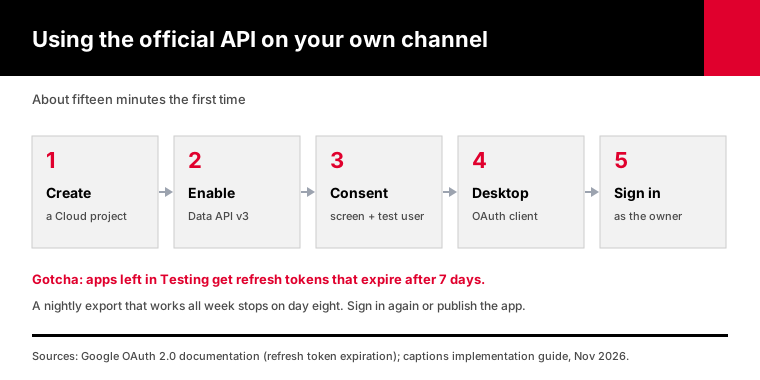
Sign in with the account that can edit the channel. If the channel belongs to a Brand Account, pick that channel when Google asks.
Expect an "unverified app" warning on the sign-in page. That's normal for your own test app, and you can continue past it.
The 7-day rule is the one that bites later. Google's OAuth 2.0 documentation says an app with an external user type and a "Testing" publishing status gets refresh tokens that expire in 7 days.
So a nightly export that worked all week stops on day eight. Sign in again, or move the app out of Testing.
What do 1,000 transcripts cost each way?
On the official API, 1,000 transcripts of your own videos cost nothing in money but take 25 days of default quota, because each one uses 250 of your 10,000 daily units. Through YouTubeTranscriptAPI, the same 1,000 transcripts of any public videos cost 1,000 credits: $7 on the Monthly plan or about $4 on Annual, and they can all run the same afternoon.
So the real trade is time and reach against money.
If the videos are yours and you're not in a hurry, the official API wins. Twenty-five days of a nightly job is fine for a back catalog.
If you need them this week, or they're someone else's videos, the quota isn't the problem you can solve. The ownership rule is.
The hosted route has its own limit: 300 requests a minute per key. That's about 18,000 transcripts an hour, far past the point where anything else slows you down.
How do you get transcripts for videos you don't own?
Use a transcript API. A hosted transcript API returns the captions of any public video with one HTTPS request and an API key, without OAuth or edit rights. With YouTubeTranscriptAPI, a transcript costs 1 credit, videos without captions return a free 404, and there's no daily unit pool to run out of. The official Data API is still useful alongside it for listing videos cheaply.
The request is one line:
curl "https://youtubetranscriptapi.com/api/v2/youtube/transcript?video_url=dQw4w9WgXcQ" \
  -H "Authorization: Bearer $YTT_API_KEY"
You get back the video ID, the language and the transcript as segments with text, start and duration. The transcript endpoint docs list every parameter.
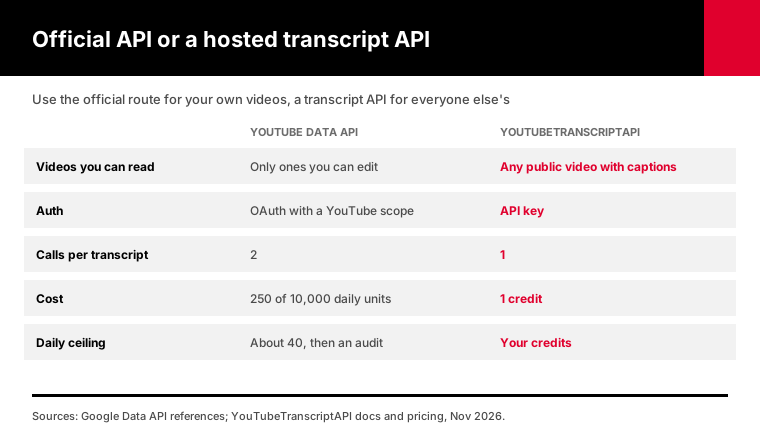
The two routes side by side:
| YouTube Data API | YouTubeTranscriptAPI | |
|---|---|---|
| Videos you can read | Only ones you can edit | Any public video with captions |
| Auth | OAuth with a YouTube scope | API key |
| Calls per transcript | 2 (list, then download) | 1 |
| Cost | 250 units of a free 10,000-unit day | 1 credit |
| Daily ceiling | About 40 transcripts, then an audit | Your credits; 300 requests a minute |
| Formats | SRT, VTT, SBV, SCC, TTML | JSON segments or plain text |
| Machine translation | Yes, with tlang | No |
| Videos without captions | Nothing to download | Free 404 |
Credits are $7 per 1,000 on the Monthly plan. A free account starts with 100, no card. The pricing page has the rest.
What about the timedtext URL from old Stack Overflow answers?
The timedtext URL is an undocumented endpoint, not part of the YouTube Data API, and it can change without notice. Older answers point to it because it once returned captions without OAuth. In 2026, transcript vendors kept shipping fixes for empty results: SerpApi's release notes list empty-transcript fixes on January 20, March 17 and April 10. If you build on it yourself, you own every one of those breakages.
The links people copy from the watch page are also signed. A 2024 thread on the Make community forum reports they expire after about seven minutes, so a URL that worked in your browser fails in your cron job.
There's no error contract either. One community-built transcript tool reports getting HTTP 200 with an empty body when the endpoint stops cooperating.
An empty 200 is the worst kind of failure, because your code saves a blank transcript and reports success.
That's the part a hosted API takes off your plate. When YouTube changes something, it's our problem, and your code keeps calling the same documented endpoint.
Can you combine the Data API with a transcript API?
Yes, and for big jobs it's the best setup. Use the Data API for what it's cheap at, listing: playlistItems.list returns 50 videos for 1 unit, so even a 5,000-video playlist costs about 100 units. Then send those video IDs to a transcript API for the text. You keep Google's complete video lists and skip the 250-unit caption calls.
Our playlist transcript guide does exactly this. Its script lists long playlists with a free Data API key and fetches the transcripts from our API.
For channels, the uploads playlist works the same way. Our channel transcripts guide walks through it.
A Data API key is enough for this half, since playlist items are public data. No OAuth, no consent screen.
Take a 5,000-video archive. Listing it takes about 100 Data API units, a hundredth of one day's quota. The transcripts take 5,000 credits: $35 on the Monthly plan or $20 on Annual.
The official route alone would need 125 days of default quota for the same archive, and only if you owned every video.
One more thing worth knowing. Google's Data API errors are well documented, and so are ours. Our errors page lists which responses are never billed, so a retry loop can't run up a bill.
Frequently asked questions
Does the YouTube Data API provide transcripts?
Only for videos you can edit. The Data API's captions.download method returns a caption track as SRT, VTT, SBV, SCC or TTML, but Google's reference says it requires permission to edit the video and an OAuth token with a YouTube scope. It costs 200 quota units, plus 50 for the captions.list call that finds the track ID.
Why do I get 403 forbidden from captions.download?
Your signed-in account can't edit that video, or your OAuth token is missing the youtube.force-ssl or youtubepartner scope. Google lists "forbidden" as the only 403 reason for captions.download. A 403 with the reason quotaExceeded is different: it means your daily units are used up and reset at midnight Pacific time.
Can I use a YouTube API key to download captions?
No. Google's captions.list and captions.download pages both require OAuth authorization with a YouTube scope, so an API key on its own is rejected. API keys work for public data such as search results, video details and playlist items. Even with OAuth, the download only succeeds on videos the signed-in account can edit.
How many captions can I download per day with the YouTube API?
About 40 with the default quota. Each project gets 10,000 units a day, and a transcript costs 250: 50 for captions.list and 200 for captions.download. If you already have the track IDs, you can download 50. More quota requires passing Google's compliance audit, and Google publishes no review timeline for it.
Can the YouTube Data API download auto-generated captions?
The captions resource lists auto-generated tracks with the trackKind value ASR, so they appear in captions.list results. Downloading any track, auto-generated or not, still requires permission to edit the video. For videos you don't own, a hosted transcript API is the practical way to get the auto-generated captions as text.
What is the best way to get a YouTube transcript by API?
For your own videos, the official Data API: it's free within quota and returns the exact caption file. For any other public video, a hosted transcript API such as YouTubeTranscriptAPI, which needs only an API key and costs 1 credit per transcript. For large lists, use the Data API to list videos and a transcript API to fetch the text.
Stop fighting the 403
If the videos are yours, run own_captions.py and spend your 10,000 units on downloads. If they aren't, create a free account, copy your key, and send one request to the transcript endpoint. The quickstart gets you there in a minute.
About the authors: the YouTubeTranscriptAPI engineering team builds and runs the hosted transcript API used in this guide. We checked every YouTube Data API detail here against Google's reference pages in November 2026.