How to get a YouTube playlist transcript for every video
By the YouTubeTranscriptAPI engineering team. Last updated October 28, 2026.
A 40-lecture course at 45 minutes a lecture is 30 hours of video. You can't search a video. You can search its transcript, if you can get the text out.
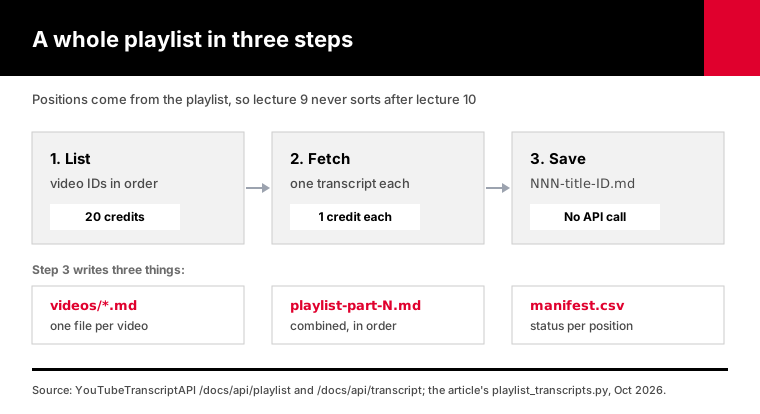
To get a YouTube playlist transcript for every video, list the playlist's video IDs, then fetch each video's transcript and save it under its playlist position. With YouTubeTranscriptAPI, one 20-credit listing call returns up to 100 videos, and every transcript is a single credit, so a 40-video course costs 60 credits. Videos without captions return a 404 and are free.
Below is the script we use, tested against a mock of the API, plus what to do when a playlist has more than 100 videos.
How do you get the transcript of a whole YouTube playlist?
You get a whole playlist's transcripts in two passes. The first pass lists every video ID with its position in the playlist. The second requests one transcript per ID and writes it to a file named by that position, so lecture 9 never lands after lecture 10. A hosted API does both passes over plain HTTPS, from a laptop or a server.
Doing it by hand works for three videos.
You open each one, click "Show transcript" under the description, copy the text and paste it somewhere. A University of Wisconsin course guide walks students through exactly that, one video at a time.
For a 40-video playlist, that's 40 rounds of open, scroll, copy, paste. And the copied text loses the video title and link unless you add them yourself.
The script approach keeps three things together for every video: its position, its title and its link. Those three are what you need later when an AI tool quotes "lecture 12" back at you.
Here is the request that starts it, against the playlist endpoint:
curl "https://youtubetranscriptapi.com/api/v2/youtube/playlist/videos?playlist=PLrAXtmErZgOeiKm4sgNOknGvNjby9efdf" \
  -H "Authorization: Bearer $YTT_API_KEY"
The response lists each video with a videoId, a title and an index starting at 0. It also returns playlist_info with the playlist title and video count, and a has_more flag.
Then each video ID goes to the transcript endpoint, which returns segments with text, start and duration.
How do you download every transcript with Python?
Run one Python script that lists the playlist, fetches five transcripts at a time, and writes a Markdown file per video named by its position. It also writes combined files sized for AI tools and a manifest.csv with each video's status. Re-running it skips saved videos and reuses the saved video list, so you never pay twice for the same listing or transcript.
You need Python 3.10+, pip install httpx, and a key from a free account, which starts with 100 credits and asks for no card.
pip install httpx
export YTT_API_KEY=tk_live_...
python playlist_transcripts.py "https://www.youtube.com/playlist?list=PL..." --dry-run
The dry run lists the playlist, prints the title and video count, and tells you how many transcript credits the real run needs. The listing itself costs 20 credits, and the real run reuses it.
Then run it for real:
python playlist_transcripts.py PL... --out courseThe part worth reading first is the request helper. It waits out rate limits and stops on an empty balance:
async def get(client, path, params, attempts=5):
    for attempt in range(attempts):
        try:
            resp = await client.get(path, params=params)
        except httpx.TransportError:
            await asyncio.sleep(2 ** attempt)
            continue
        if resp.status_code == 402:
            raise CreditsExhausted(resp.json().get("detail", "out of credits"))
        if resp.status_code not in RETRY_STATUSES:
            return resp
        try:
            delay = float(resp.headers.get("Retry-After", ""))
        except ValueError:
            delay = 2 ** attempt
        await asyncio.sleep(min(delay, 60))
    return resp
Each saved transcript becomes a small Markdown file with a heading, a link and timestamped lines:
## 008. Lecture 8: Gradient descent

https://www.youtube.com/watch?v=abc123xyz00

[0:00] welcome back, today is all about gradient descent
[1:15] first, what a loss function actually measures
The output folder looks like this:
course/
  videos/001-Introduction-dQw4w9WgXcQ.md
  videos/002-Linear-regression-abc123xyz00.md
  ...
  playlist-part-1.md
  manifest.csv
You can download playlist_transcripts.py and read all of it before you run it. It is about 220 lines with no dependencies beyond httpx.
File names carry the position for sorting and the video ID for matching. That second part is what lets the script survive a playlist that changes, as you'll see below.
We tested it on October 28, 2026 against a local mock that mimics every documented API response. A 12-video playlist with one captionless video and one 429 produced 11 files, a manifest row marking the twelfth as missing, and one listing request across three runs.
A 130-video test playlist with a 30-credit limit saved exactly 30 transcripts and exited with code 2. The next run fetched the other 99 without listing again.
Then we reversed the 12-video playlist and added a 13th video. A run with --refresh renamed all 11 saved files to their new positions without fetching them again, and spent 1 credit on the new video.
What if a playlist has more than 100 videos?
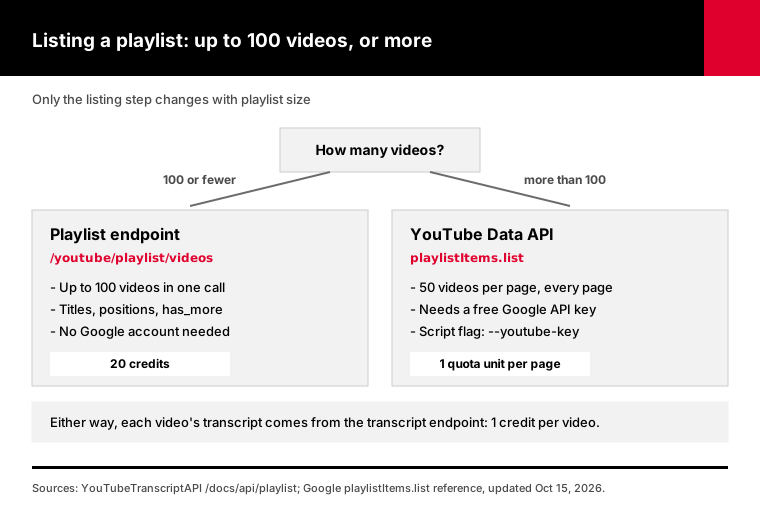
The playlist endpoint returns the first 100 videos, and has_more tells you when there are more. For longer playlists, list the videos with the YouTube Data API instead: its playlistItems.list call returns 50 videos per page for 1 quota unit with a free Google API key. Then send those IDs to the transcript endpoint as usual.
That limit is real, and the script prints a warning when it hits it.
Most playlists people ask about are courses, conference tracks and podcast seasons. Those usually fit in 100. Big music mixes and years-long compilation playlists don't.
Google's playlistItems.list reference, last updated October 15, 2026, sets maxResults between 0 and 50 with a default of 5. You page with pageToken until no nextPageToken comes back.
A 400-video playlist is 8 pages, so 8 units. Google's quota cost table gives projects 10,000 units a day by default, so listing is never the bottleneck.
The script does this for you. Pass --youtube-key or set YOUTUBE_API_KEY, and it reads the full list from Google, keeps each video's position, and skips the 20-credit listing call.
Why not get the transcripts from Google too? Because its captions.download method needs permission to edit the video. For someone else's playlist, the Data API can name the videos but can't hand you their words.
Which way to get playlist transcripts should you use?
Use yt-dlp for one playlist on your own laptop, and a transcript API when you need text files you keep, on a server or on a schedule. Copying by hand and pasting links into NotebookLM need no setup but stop at small playlists. Browser extensions sit in between, and many put playlist export behind a paid tier.
| Method | Setup | Text you keep | Long playlists | Runs on a server |
|---|---|---|---|---|
| "Show transcript" by hand | None | Yes, if you paste it | Slow past a few videos | No |
| NotebookLM YouTube sources | None | No, it stays in the notebook | 50 sources per notebook on the free plan | No |
| yt-dlp | Install a CLI | VTT or SRT files | Yes | Often hits bot checks |
| Browser extension | Install, often a paid tier | Usually TXT or ZIP | Varies by extension | No |
| YouTubeTranscriptAPI script | Python and an API key | Markdown, ordered, with links | Yes, with a Data API key past 100 | Yes |
For one course on your own laptop, we'd use yt-dlp. Flags like --skip-download --write-auto-subs save subtitle files without the video, and an output template with %(playlist_index)s keeps them in order.
Long playlist runs are where it gets fragile. Issue #17837, opened October 17, 2026, describes long playlist sessions failing after YouTube invalidates the session cookies.
You also end up with VTT files full of timing lines and repeated cues, which need cleaning before an AI tool reads them well.
Need a whole channel instead of a playlist? Our channel transcripts guide covers that job.
No code at all? Connect our YouTube MCP server to Claude or ChatGPT and ask for "the transcripts of the first 10 videos in this playlist." The list_playlist_videos tool costs 20 credits and each transcript 1.
How do you put a playlist's transcripts into NotebookLM, Claude or ChatGPT?
Upload the combined Markdown files, not 100 separate ones. The script joins the per-video files in playlist order into parts of 100,000 words or fewer, each video under its own numbered heading with a link. In NotebookLM every uploaded file is one source, and the free Standard plan allows 50 sources per notebook, so a few combined files leave room for your notes.
Google's NotebookLM upgrade page lists the source caps: 50 per notebook on Standard, 100 on Plus and 300 on Pro.
Pasting YouTube links into NotebookLM works too, until it doesn't. Each link uses a source slot, so a 70-video course doesn't fit in one free notebook as links. As combined files, it takes a handful of slots.
The numbered headings matter more than they look. When you ask "where does the course first explain overfitting?", the answer can point at "008. Lecture 8" and a timestamp you can click.
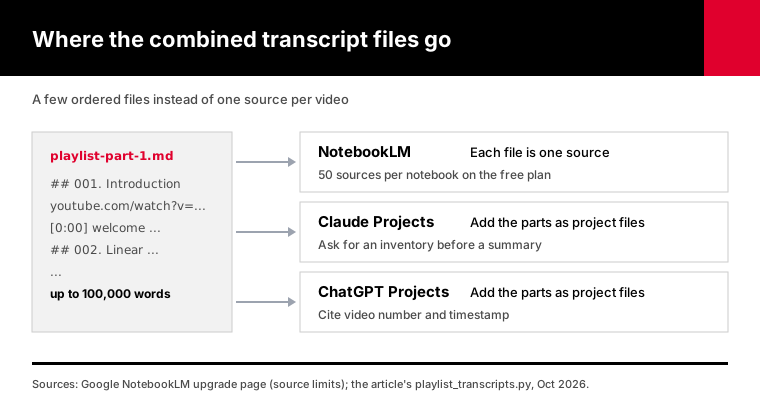
For Claude and ChatGPT, add the parts as files in a Project. Then start with an inventory prompt before any summary:
List every numbered video heading you can see in these files,
and tell me which numbers from 1 to 40 are missing.
If the model's list matches your manifest, the files went in whole. If it doesn't, you know before you trust its summary.
Once the inventory checks out, these prompts get the most out of a course playlist:
- "Make a course map: one line per video with the main idea and the concepts it assumes you already know." - "Which videos explain the same concept twice? Quote both, with the video number and timestamp." - "Write 10 quiz questions per module, each citing the video and timestamp the answer comes from." - "Find every place the instructor says 'this will be on the exam' or 'common mistake'."
Each answer can cite a video number and a timestamp, because both are in the text. When something sounds off, you click the link and listen for ten seconds.
Set --max-words lower if a tool complains about file size. Smaller parts just mean more files.
What does a YouTube playlist transcript cost?
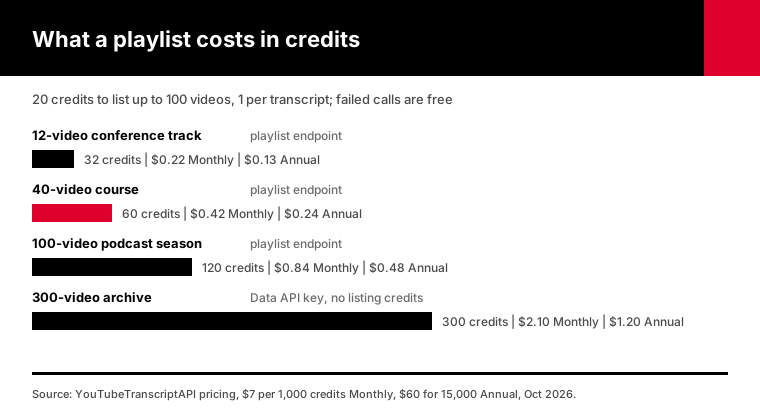
Each playlist run pays 20 credits to list the videos and a single credit for each transcript it saves; failed calls cost nothing. A 40-video course is 60 credits: $0.42 on the Monthly plan ($7 for 1,000 credits) or $0.24 on the Annual plan ($60 for 15,000). With a Data API key, the listing call is skipped, so you pay only for transcripts.
Common playlist sizes:
| Playlist | How it's listed | Credits | Monthly | Annual |
|---|---|---|---|---|
| 12-video conference track | Playlist endpoint | 32 | $0.22 | $0.13 |
| 40-video course | Playlist endpoint | 60 | $0.42 | $0.24 |
| 100-video podcast season | Playlist endpoint | 120 | $0.84 | $0.48 |
| 300-video archive | YouTube Data API key | 300 | $2.10 | $1.20 |
Free accounts start with 100 credits. That covers one listing and 80 transcripts, which is most courses.
The real bill is often lower. 404s for videos without captions, 429 rate limits and 5xx errors are never charged, as the errors page says.
Current plan prices and top-ups are listed on pricing.
How do you keep a playlist's transcripts up to date?
Run the script again with --refresh. It lists the playlist again, fetches transcripts only for videos it hasn't saved, renames saved files whose position changed, and rebuilds the combined files in the new order. Each refresh spends 20 credits on the new listing and one per new video, or just the new videos when Google does the listing.
Playlists change more than people expect.
A course creator slips a bonus lecture in at position 3. A podcast moves its trailer to the end.
If your files were named by position alone, each of those edits would scramble them. Lecture 4 would sit in a file called 003, and a resume check by position would skip the new video entirely.
The script matches saved transcripts by video ID instead, so a moved video keeps its text and only its file name changes. Renaming is free. Nothing is fetched twice.
Videos removed from the playlist stay in the videos folder, but they drop out of the combined files and the manifest. Delete them by hand if you want a clean folder.
For a playlist that grows every week, schedule the refresh. Cron, a GitHub Actions schedule or Windows Task Scheduler all work.
Watch the listing cost here. A weekly refresh of a playlist that adds two videos a week is about 95 credits a month, because each listing is 20 credits. With a Data API key, the listing is free and the same job costs about 9.
How do you get transcripts for a playlist in another language?
Pass --language with a language code, such as --language es for Spanish. The transcript endpoint returns that caption track when the video has one. When it doesn't, another track may come back, and the response's language field says which. The script records that in manifest.csv, so a mixed-language playlist shows which videos arrived in a different language.
The default is English, en.
Plenty of course playlists mix languages without saying so. A Spanish course might include two guest lectures in English, and those videos may only have English captions.
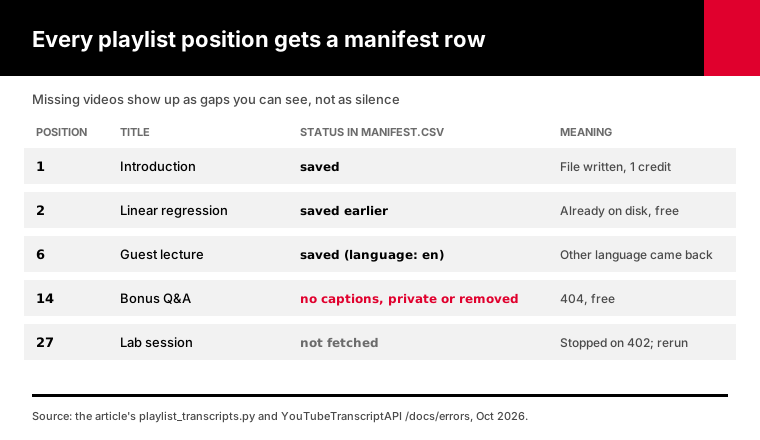
You'll see those rows in the manifest as saved (language: en) instead of plain saved.
That matters for AI work. A model told "answer in Spanish from these files" will handle an English section fine, but you want to know it's there before you build flashcards from it.
What happens to private, deleted or captionless videos?
They come back as 404s, cost nothing, and get a row in manifest.csv instead of a file. The transcript endpoint returns 404 when a video has no captions, is private or has been removed. The script records "no captions, private or removed" for that position and moves on, so your playlist keeps its numbering with a visible gap where the missing video was.
Playlists collect dead entries over time. A course from 2019 might have two lectures the creator later made private.
Without a manifest, you'd see 38 files and wonder whether the run broke. With it, you see rows 14 and 27 marked missing and know the run was fine.
Each key may send 300 requests a minute. Five transcripts at a time stays far below that, and the script still honors Retry-After when a 429 does arrive.
If your credits run out mid-playlist, the script stops, keeps every file it saved, and exits with code 2. Add credits and repeat the command; it picks up at the first missing position.
Frequently asked questions
How do I get the transcript of a YouTube playlist?
List the playlist's videos, then fetch each video's transcript and save it under its playlist position. YouTubeTranscriptAPI lists up to 100 playlist videos in one 20-credit call and charges a single credit per transcript. The Python script in this guide does both, writes one Markdown file per video plus combined files, and resumes where it stopped if interrupted.
Is there a free YouTube playlist transcript extractor?
Yes, for small playlists. YouTube's own "Show transcript" panel is free but works one video at a time. yt-dlp is free and saves subtitle files for a whole playlist, though long runs can hit bot checks. A free YouTubeTranscriptAPI account includes 100 credits, which covers one playlist listing and 80 transcripts with no card.
How do I get transcripts for a playlist with more than 100 videos?
List the playlist with the YouTube Data API's playlistItems.list method, which returns 50 videos per page for 1 quota unit with a free Google API key. Then fetch each video's transcript from the transcript endpoint for 1 credit. The script does this automatically when you pass --youtube-key, and it skips the 20-credit listing call.
Can I add a whole YouTube playlist to NotebookLM?
You can paste each video link as a source, but every link uses one of the 50 sources a free notebook allows. A better route is to download the transcripts and upload them as a few combined Markdown files. Each file counts as one source, and the numbered headings keep every video's title and link.
Does it work with private or unlisted playlists?
The playlist endpoint is documented for public playlists, and private playlists can't be listed through it. For an unlisted one, run the dry run: a failed listing is never charged. Inside a public playlist, any private or removed video returns a 404, costs nothing, and shows up in manifest.csv as missing.
How long does it take to get a 100-video playlist transcript?
A few minutes. The script fetches five transcripts at a time, far below the API's cap of 300 requests a minute for each key. Transcripts that were fetched recently come back from storage in milliseconds, and a fresh fetch takes a few seconds, so a 100-video playlist usually finishes in under five minutes.
Run your first playlist today
Sign up for a free account, grab the key from your dashboard, and point the script at one playlist with --dry-run first. It prints the video count and the exact transcript credits before fetching anything. Then run it for real and drop the combined files into NotebookLM, Claude or ChatGPT.
About the authors: the YouTubeTranscriptAPI engineering team builds and runs the hosted transcript API and MCP server used in this guide. The playlist script here is the one we test against the API.