How to get YouTube channel transcripts in bulk
By the YouTubeTranscriptAPI engineering team. Last updated October 26, 2026.
You want every transcript from one YouTube channel. Copying them one video at a time stops being fun around video number three.
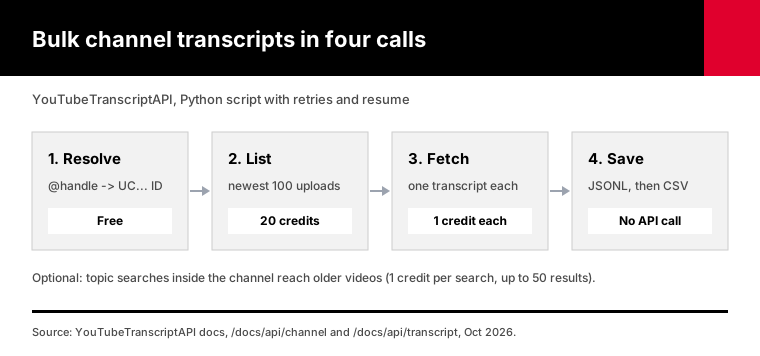
The fastest way to get YouTube channel transcripts in bulk is four API calls in a loop. Resolve the channel handle, list its newest uploads, fetch a transcript for each video, and save the results as JSON or CSV. With YouTubeTranscriptAPI, a 100-video channel costs 120 credits: 20 for the listing and 1 per transcript. Videos without captions return a 404 and cost nothing.
This guide shows the full script, what it costs, and the limits you should know before you start.
What's the fastest way to get transcripts for a whole YouTube channel?
The fastest way is a script that calls a transcript API for every video in the channel's upload list. You resolve the @handle to a channel ID for free, list the newest 100 uploads for 20 credits, then fetch each transcript for 1 credit. Five requests at a time, under the 300-per-minute limit, gets a 100-video channel done in a few minutes.
In plain words:
First, turn whatever you have into a channel ID: an @handle, a channel URL, or a UC ID all work.
The resolve endpoint does it for free.
Second, list the channel's uploads. You get video IDs and titles, newest first.
Third, ask for each video's transcript. You get back segments with text, start and duration.
Fourth, write each transcript to a file the moment it arrives. If the run dies halfway, you lose nothing.
Don't skip that last step. A long run will hit a network hiccup sooner or later, and you don't want to pay twice for the same transcripts.
How many videos can you get from one channel?
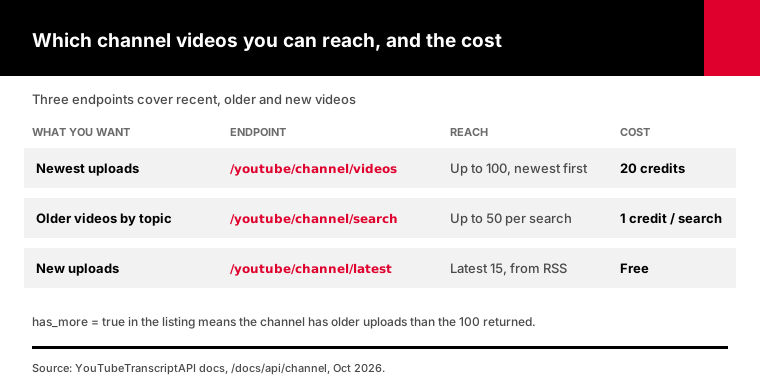
The channel listing returns the newest 100 uploads of any channel, and that limit is real. For older videos, you search inside the channel by topic: each search costs 1 credit and returns up to 50 matches, older videos included. For new uploads, a free endpoint returns the latest 15. Those three cover the three jobs below, without pretending to list a 5,000-video archive in one call.
We'd rather tell you this up front than have you find out at video 101.
The listing response includes a has_more field. If it's true, the channel has older uploads than the 100 you got.
Before you start, decide which of three jobs you actually have.
The recent stuff. For a channel that posts twice a week, the newest 100 videos is about a year of uploads.
Everything on one topic. A cooking channel's videos about bread, or a podcast's episodes with one guest. Topic search inside the channel finds those, old or new.
Keeping up. The free latest-uploads endpoint returns the newest 15 videos from the channel's RSS feed, so a daily job catches every new upload.
If you truly need every video from a channel with thousands of uploads, page through the channel with the YouTube Data API's uploads playlist, then send those video IDs to the transcript endpoint. The next section shows why the official API can list videos but can't give you the transcripts.
Why can't the YouTube Data API download a channel's transcripts?
The YouTube Data API can list a channel's videos, but it can't download captions for videos you don't own. Google's documentation for captions.download says the method "requires the user to have permission to edit the video" and costs 200 quota units per call. So the official API works for your own channel and fails with a 403 error on anyone else's.
The listing side of the official API is actually good. You call channels.list to find the channel's uploads playlist in contentDetails.relatedPlaylists.uploads, then page through playlistItems.list 50 videos at a time. Each of those calls costs 1 unit, according to Google's quota cost table.
The default allowance is 10,000 units a day. Listing a channel with 1,000 videos takes about 20 page calls, which is cheap.
The transcripts are where it stops. Google's captions.download reference lists a 403 error for this case: "The permissions associated with the request are not sufficient to download the caption track."
A February 2024 reply on the n8n community forum put it bluntly: "The youtube v3 captions api are able to retrieve only caption from video you own."
Search is limited too. Google's search.list docs, last updated October 15, 2026, give it a separate bucket of 100 calls a day. A search filtered to one channel is "constrained to a maximum of 500 videos."
So the official API is a fine way to collect video IDs, and that's all.
There is one exception worth knowing. If the channel is your own, you can edit its videos, so captions.download works for you. At 200 units a call, the default daily allowance covers about 50 downloads, which is enough for a small back catalog spread over a few days.
How do the main ways to get channel transcripts compare?
There are three realistic ways to get transcripts for a whole channel: the YouTube Data API, the yt-dlp command-line tool, and a hosted transcript API. The Data API can list videos but can't read other people's captions. yt-dlp is free and powerful but runs from your own IP and breaks when YouTube changes things. A hosted API costs credits but returns clean JSON from any server.
They differ on the things that decide a project:
| What you need | YouTube Data API v3 | yt-dlp | YouTubeTranscriptAPI |
|---|---|---|---|
| List a channel's videos | Yes, 50 per page, 1 unit each | Yes | Newest 100, plus topic search |
| Transcripts for videos you don't own | No, 403 unless you can edit the video | Yes, as subtitle files | Yes, as JSON segments |
| Runs from a cloud server | Yes | Can hit "confirm you're not a bot" checks | Yes |
| Output | Caption files for your own videos | VTT or SRT files | JSON or plain text |
| Cost | Free, quota-limited | Free | 1 credit per transcript |
| Upkeep | OAuth and quota | Updates when YouTube changes | None |
yt-dlp deserves a fair word. It has about 203,000 stars on GitHub, and flags like --skip-download and --write-auto-subs will pull subtitle files without the video.
The catch is running it at channel scale. An open yt-dlp issue from October 17, 2026, #17837, reports that long playlist download sessions fail because the session cookies get invalidated.
The yt-fts project, which also pulls channel subtitles, has an issue titled "Getting 'Sign in to confirm you're not a bot.'"
If you're pulling a handful of channels from your laptop, yt-dlp is a good choice. If you're building a product or a data pipeline on a server, you want the hosted route.
And if you don't want to write code at all, the same channel and transcript tools are available through our YouTube MCP server. You connect it to Claude or ChatGPT once, then ask for "the transcripts of the last 20 videos from @TED" in plain words.
How do you download a YouTube channel's transcripts with Python?
Run one Python script that resolves the channel, lists its videos, fetches transcripts five at a time, and appends each one to a JSON Lines file. The script below does exactly that, retries on 429 and 503 responses, skips videos without captions, and stops cleanly when credits run out. Re-running it skips every video already saved, so an interrupted export picks up where it stopped.
You need Python 3.10 or newer, the httpx package, and an API key. A free account comes with 100 credits, no card.
pip install httpx
export YTT_API_KEY=tk_live_...
python channel_transcripts.py @TED --dry-run
The dry run lists the channel and prints what the full run will cost. It spends the listing credits, and the real run reuses that list. Then run it for real, with an optional topic search and a CSV copy:
python channel_transcripts.py @TED --search "climate" --csv ted.csvThe core of the script is a small retry helper and one fetch per video:
RETRYABLE = {408, 429, 500, 503}

async def call(client, path, params, tries=5):
    for attempt in range(tries):
        resp = await client.get(f"{API}{path}", params=params)
        if resp.status_code == 402:
            raise OutOfCredits(resp.json().get("detail", "out of credits"))
        if resp.status_code not in RETRYABLE:
            return resp
        wait = float(resp.headers.get("Retry-After", 2 ** attempt))
        await asyncio.sleep(min(wait, 60))
    return resp
The listing step resolves the handle, then reads the uploads:
resolved = await call(client, "/youtube/channel/resolve", {"input": channel})
channel_id = resolved.json()["channel_id"]

listing = await call(client, "/youtube/channel/videos", {"channel": channel_id})
videos = {v["videoId"]: v.get("title") for v in listing.json()["results"]}
Each transcript comes back as segments. The script writes one line per video:
{"video_id": "abc123xyz00", "title": "Latest Video", "language": "en",
 "transcript": [{"text": "First caption line", "start": 0, "duration": 4.12}]}
The full script is about 150 lines. You can download channel_transcripts.py and read it before you run it.
We tested it against a mock server that returns the API's documented responses, including a 429 in the middle of a run, a video with no captions, and an account that ran out of credits after 30 transcripts. In that last case it saved exactly 30, exited, and fetched the other 70 on the next run without asking for the listing again.
That "without asking again" part is deliberate. The script saves the video list next to the output, so a resumed run doesn't pay 20 more credits to list the channel.
Why JSON Lines and not one big JSON file? Each line is a complete record, so a crash can't corrupt what's already saved, and you can append forever.
It also suits AI work. Every segment keeps its start time, so when you split transcripts into chunks for a RAG index, each chunk can carry a link back to the exact second it came from.
The --csv option flattens each video into one row of plain text, which is the shape spreadsheets and no-code tools expect.
How much does it cost to get a channel's transcripts?
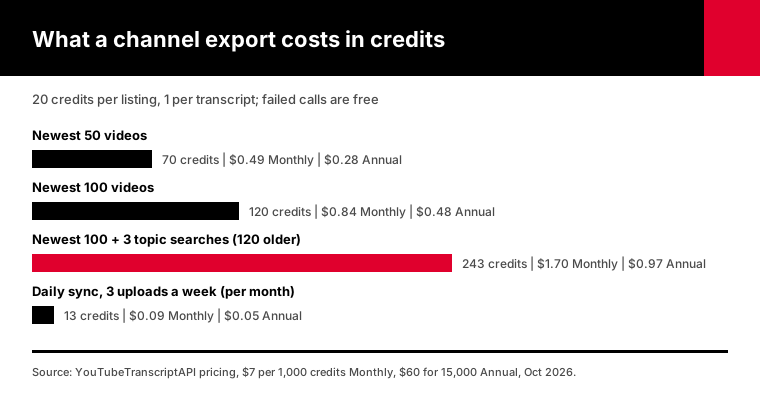
A channel export costs 20 credits for the listing plus 1 credit per transcript, and failed calls are free. The newest 100 videos of a channel cost 120 credits at most. On the Monthly plan, that's $0.84 of a $7 allowance of 1,000 credits; on the Annual plan, $0.48. A free account's 100 credits covers the listing and 80 transcripts.
The math for common jobs:
| Job | Credits | On Monthly ($7 per 1,000) | On Annual ($4 per 1,000) |
|---|---|---|---|
| Newest 50 videos | 70 | $0.49 | $0.28 |
| Newest 100 videos | 120 | $0.84 | $0.48 |
| Newest 100, plus 3 topic searches finding 120 older videos | 243 | $1.70 | $0.97 |
| Daily sync of a channel posting 3 videos a week | about 13 a month | $0.09 | $0.05 |
Two things keep the real bill lower than the table.
Videos without captions return a 404, and 404s are never charged. Neither are 429 rate limits or 5xx errors, as the errors page lists.
Repeat requests for a transcript you already fetched still cost a credit, so the script's resume file is worth keeping. Fetch once, store it, search it locally.
The current plans are on the pricing page.
How do you search across a channel's transcripts?
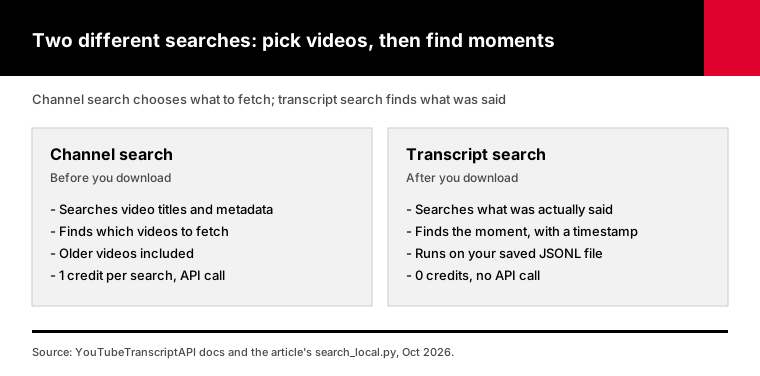
Once a channel's transcripts are saved as JSON Lines, searching them is a ten-line script with no API calls at all. Each transcript segment carries a start time in seconds, so every match can link straight to the right moment in the video. For finding videos on a topic before you download anything, the channel search endpoint reaches older videos too, for 1 credit per query.
Two different searches are easy to mix up here.
Channel search looks at video titles and metadata the way YouTube's own channel search does. It tells you which videos to fetch.
Transcript search looks at what was actually said. You run it on your saved file:
import json, sys

term = sys.argv[1].lower()
with open("transcripts.jsonl", encoding="utf-8") as f:
    for line in f:
        video = json.loads(line)
        for seg in video["transcript"]:
            if term in seg["text"].lower():
                minute, sec = divmod(int(seg["start"]), 60)
                print(f"{video['title']} @ {minute}:{sec:02d}  https://youtu.be/{video['video_id']}?t={int(seg['start'])}")
                print(f"    {seg['text']}")
Run python search_local.py "carbon tax" and you get every mention with a timestamped link.
For anything bigger than a few thousand videos, load the file into SQLite full-text search or a vector database. The JSON Lines format drops straight into both.
How do you keep a channel's transcripts up to date?
Run a small job once a day that calls the free latest-uploads endpoint, compares the 15 newest video IDs with what you've already saved, and fetches transcripts only for the new ones. The latest-uploads call costs 0 credits, so a channel that posts three videos a week costs about 13 credits a month to keep current.
A one-time export goes stale the day the channel posts again.
The sync script:
import json, os, httpx

API = "https://youtubetranscriptapi.com/api/v2"
HEADERS = {"Authorization": f"Bearer {os.environ['YTT_API_KEY']}"}
OUT = "transcripts.jsonl"

saved = set()
if os.path.exists(OUT):
    with open(OUT, encoding="utf-8") as f:
        saved = {json.loads(line)["video_id"] for line in f if line.strip()}

latest = httpx.get(f"{API}/youtube/channel/latest", params={"channel": "@TED"}, headers=HEADERS, timeout=30)
latest.raise_for_status()

with open(OUT, "a", encoding="utf-8") as out:
    for v in latest.json()["results"]:
        if v["videoId"] in saved:
            continue
        r = httpx.get(f"{API}/youtube/transcript", params={"video_url": v["videoId"]}, headers=HEADERS, timeout=60)
        if r.status_code == 200:
            data = r.json()
            out.write(json.dumps({"video_id": v["videoId"], "title": v["title"],
                                  "language": data["language"], "transcript": data["transcript"]}) + "\n")
            print("saved", v["videoId"])
Put it in cron, a GitHub Actions schedule, or any serverless timer. For a channel posting three videos a week, the latest 15 reach back five weeks, so a daily run has plenty of margin.
One small warning: if a new upload has no captions yet, the script skips it and tries again on the next run, because it only saves 200 responses.
What breaks in a bulk export, and how does the script handle it?
Four things go wrong in bulk exports: videos without captions, rate limits, running out of credits, and interrupted runs. The script treats each one differently. It skips 404s for free, waits and retries on 429 and 503 using the Retry-After header, stops cleanly on 402 with everything saved, and resumes from its own output file. None of these failures costs credits.
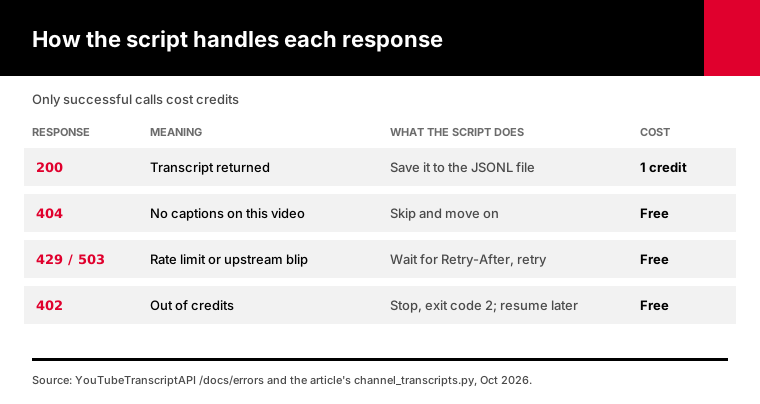
Some videos simply have no captions. A 404 tells you that, and you move on.
Rate limits are 300 requests per minute per key, per the rate limits page. Five requests at a time stays well under that.
Running out of credits mid-run is the expensive-sounding one, and it isn't. The script stops, prints a message, and exits with code 2, so a scheduler can alert you.
Everything fetched so far is already on disk. Top up, run the same command, and only the missing videos get fetched.
Frequently asked questions
How do I download all transcripts from a YouTube channel?
List the channel's uploads, then fetch a transcript for each video ID and save the results. With YouTubeTranscriptAPI, the listing returns the newest 100 uploads for 20 credits and each transcript costs 1 credit. For older videos, search inside the channel by topic for 1 credit per search. A Python script with retries and a resume file handles the newest 100 videos in a few minutes.
Can the YouTube Data API download captions for videos I don't own?
No. Google's captions.download method requires permission to edit the video and returns a 403 error otherwise. It also costs 200 quota units per call against a default allowance of 10,000 units a day. The Data API is still useful for listing a channel's videos, 50 per page at 1 unit each, but you need another source for the transcripts themselves.
How many videos can I get transcripts for at once?
The channel listing returns the newest 100 uploads in one call, and the has_more field tells you when a channel has more. Topic searches inside the channel reach older videos, up to 50 results each. Transcripts are fetched one per request, with a limit of 300 requests per minute per key, so a 100-video channel finishes in a few minutes at five requests at a time.
How much does it cost to get transcripts for a whole channel?
It costs 20 credits for the channel listing plus 1 credit per transcript, so the newest 100 videos cost at most 120 credits. That is $0.84 on the Monthly plan, which is $7 for 1,000 credits, or $0.48 on the Annual plan. Videos without captions, rate limits and server errors are never charged, and a free account starts with 100 credits.
What happens with videos that have no captions?
The transcript endpoint returns a 404 for videos without captions, and 404 responses are never charged. The script counts them, skips them and moves on. If a new upload gets captions later, a daily sync job that only saves successful responses picks it up on a later run.
Can I search inside a YouTube channel's transcripts?
Yes, once the transcripts are saved. Each segment carries its start time, so a short script can print every mention of a word with a timestamped YouTube link. To decide which videos to download first, the channel search endpoint finds videos on a topic, older ones included, for 1 credit per search.
Export your first channel today
Create a free account, copy your API key, and run the script with --dry-run on the channel you care about. The dry run spends the 20-credit listing and shows the exact cost before you fetch a single transcript. The quickstart covers the API key and your first request.
About the authors: the YouTubeTranscriptAPI engineering team builds and runs the hosted transcript API and MCP server used in this guide. The scripts here are the ones we test against the API.