YouTube transcript API in Python: from script to server
By the YouTubeTranscriptAPI engineering team · Published · Updated
Your Python transcript script worked on your laptop. Then you deployed it, and every request came back blocked.
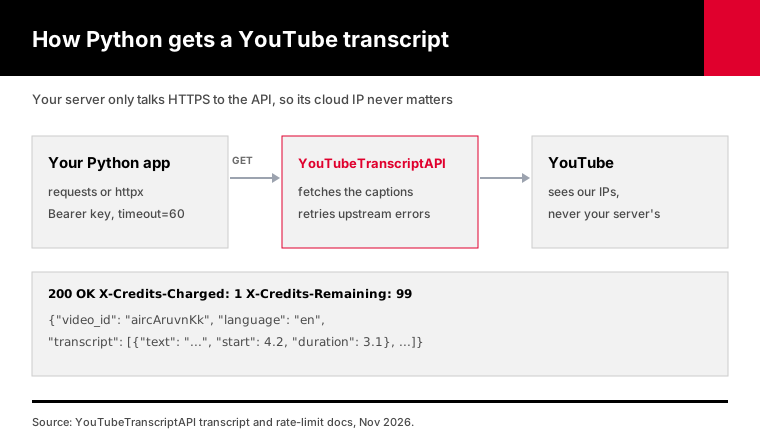
This guide fixes that with a YouTube transcript API in Python: a hosted endpoint you call with requests or httpx, so YouTube never sees your server's IP. One call returns the full transcript as JSON for 1 credit. Below is the code that holds up in production, with timeouts, retries, 429 handling, async batches, and working examples for Lambda, FastAPI, Django and Colab.
There's also a single-file client, ytt_client.py, that does all of it for you.
How do you get a YouTube transcript in Python?
Send a GET request to the transcript endpoint with your API key as a Bearer token and the video's ID or URL as video_url. The response is JSON with a list of lines, each with text, start and duration in seconds. It costs 1 credit, a video without captions returns 404 for free, and the free account comes with 100 credits.
Here's the whole thing with requests:
import os
import requests

r = requests.get(
    "https://youtubetranscriptapi.com/api/v2/youtube/transcript",
    params={"video_url": "https://www.youtube.com/watch?v=aircAruvnKk"},
    headers={"Authorization": f"Bearer {os.environ['YTT_API_KEY']}"},
    timeout=60,
)
r.raise_for_status()
for line in r.json()["transcript"][:3]:
    print(f"[{line['start']:.1f}s] {line['text']}")
Two parameters change the shape. Pass format=text to get one string instead of a list, which is what you'll usually hand to a language model. Pass send_metadata=true to get the title and channel name too.
The transcript endpoint docs list every option, including language for picking a caption track.
Store the key as an environment variable, and treat it like a password: not in a shared notebook, not in a pushed repo.
Why does Python transcript code work locally but fail on a server?
Most Python transcript code reads YouTube's caption data directly, and YouTube blocks requests from cloud providers. The open-source youtube-transcript-api project says so on its own PyPI page: YouTube has started blocking most IPs known to belong to AWS, Google Cloud and Azure. Your laptop uses a home IP, so it works. Your server doesn't, so it fails.
That's the whole mystery, and it has nothing to do with your code.
The library's own PyPI page warns that you'll most likely see RequestBlocked or IpBlocked errors once you deploy to a cloud provider. Its suggested fix is rotating residential proxies, which cost money and still don't guarantee anything.
Colab is in the same position. Google's Colab FAQ says your code runs in a virtual machine private to your account, which means a Google-hosted IP rather than yours.
A hosted API changes who does the fetching. Your Python code only talks to the API over HTTPS, and the API deals with YouTube.
I'm biased, obviously, since this is our product. But the reason it works is boring and checkable: your code never needs a home IP.
What timeout should a YouTube transcript request use?
Set an explicit timeout of 60 seconds. A video nobody has fetched before takes 10 to 30 seconds while the API pulls its captions, and a cached one returns in about a second. Python's requests library has no default timeout at all, so a call without one can hang forever, and httpx's default of 5 seconds is too short for a first fetch.
Both facts come straight from the libraries' documentation.
The requests docs say requests do not time out unless you set a timeout explicitly, and that nearly all production code should set one.
The HTTPX docs say its default raises a timeout after 5 seconds of network inactivity. That's sensible for most APIs, and too short for this one.
| Client | Default timeout | What to pass |
|---|---|---|
| requests | None, waits forever | timeout=60 on every call |
| httpx | 5 seconds of inactivity | httpx.Client(timeout=60) |
| aiohttp | 5 minutes total | aiohttp.ClientTimeout(total=60) |
| ytt_client.py | 60 seconds | Nothing, it's built in |
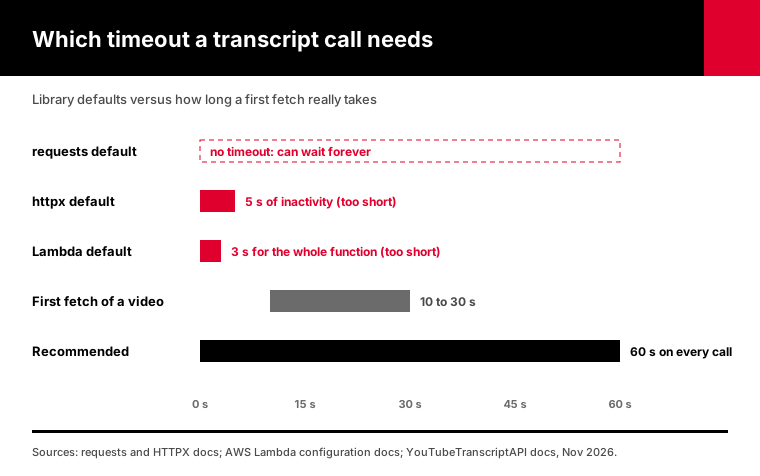
Serverless platforms add a second timeout on top of yours. The AWS Lambda docs set a default of 3 seconds, adjustable up to 900. A first fetch inside a function left on 3 seconds will die every time, and the error looks like your code's fault.
Raise the function timeout to at least 90 seconds for anything that fetches transcripts.
How do you handle errors and rate limits in Python?
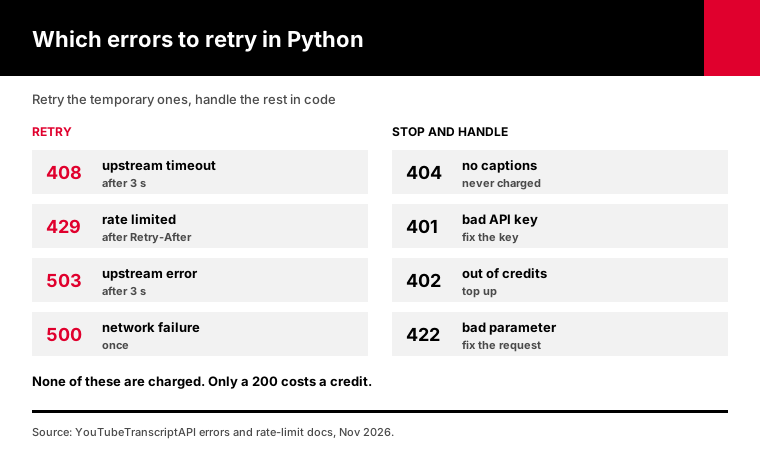
Retry only the errors that are temporary: 408 and 503 come with Retry-After: 3, and 429 tells you how long to wait. Treat 404 as "this video has no captions," which is never charged. Stop on 402, because you're out of credits, and on 401, because the key is wrong. Anything else points to a problem in the request itself, and repeating it won't help.
Here's the full map, from our error reference:
| Status | Meaning | Retry? | Charged? |
|---|---|---|---|
| 200 | Transcript returned | n/a | 1 credit |
| 404 | No captions, private or removed video | No | No |
| 401 | Missing or invalid key | No | No |
| 402 | Not enough credits | No | No |
| 422 | Bad parameter | No | No |
| 408, 503 | Upstream timeout or error | Yes, after 3 s | No |
| 429 | Rate limit reached | Yes, after Retry-After | No |
The client in this guide handles that table for you and raises typed exceptions:
from ytt_client import TranscriptClient, NoTranscript, OutOfCredits

with TranscriptClient() as yt:
    try:
        data = yt.transcript("aircAruvnKk", text=True)
        print(data["transcript"][:200])
    except NoTranscript:
        print("No captions on this video (not charged).")
    except OutOfCredits as e:
        print("Top up here:", e.action_url)
    print("Credits left:", yt.credits_remaining)
Retry-After can be a number of seconds or an HTTP date, and the standard allows both. The client reads either form.
When there's no Retry-After at all, it backs off exponentially with a little random jitter, so a fleet of workers doesn't retry in lockstep.
Log the 402s somewhere you'll actually see them. A nightly job that quietly stops on an empty balance looks exactly like a night with no new videos, until someone asks why the dashboard went flat.
How do you fetch hundreds of YouTube transcripts with asyncio?
Use one shared async client, cap how many requests run at once with a semaphore, and pace the start of each request under the rate limit of 300 a minute per key. ytt_client.py does all three in a single call: transcripts(video_ids, concurrency=10). It skips duplicates, keeps your input order, and stops early on a 402 so an empty balance doesn't burn requests.
import asyncio
from ytt_client import AsyncTranscriptClient

async def main(video_ids):
    async with AsyncTranscriptClient() as yt:
        results = await yt.transcripts(video_ids, concurrency=10, text=True)
    for vid, result in results.items():
        if isinstance(result, Exception):
            print(vid, "->", type(result).__name__)
        else:
            print(vid, "->", len(result["transcript"]), "characters")
    print("credits used:", yt.credits_used)

asyncio.run(main(["aircAruvnKk", "jNQXAC9IVRw"]))
One client, not one per request. The HTTPX async docs say to avoid creating multiple client instances so you get the benefit of connection pooling.
The semaphore is plain asyncio.Semaphore. The easy-to-miss detail is where to sleep. The client releases its slot before waiting out a 429, so one throttled request doesn't block the others.
Pacing matters more than concurrency once responses come back fast. Cached transcripts return in about a second, so ten workers could otherwise fire 600 requests a minute and hit 429s. The client spaces requests at 280 a minute by default, under the limit with room to spare.
How many workers? Start with 10.
Fresh fetches take 10 to 30 seconds each, so piling on workers mostly means more requests waiting at the same moment, not more finished per minute. Raise the number only if your batch is mostly videos that were already fetched before, where answers come back in about a second.
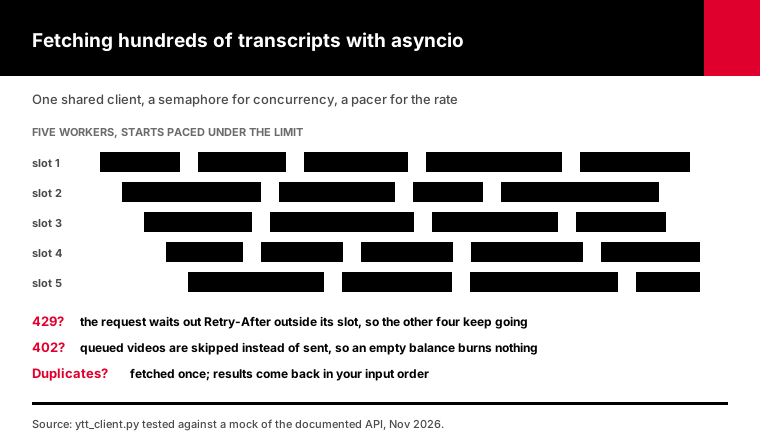
I tested the client against a mock of the documented API: 25 checks, all passing. A 31-video batch with one duplicate and one video without captions came back with 30 transcripts and one NoTranscript, never ran more than 5 requests at once, and stopped cleanly on a 402.
How do you use it in AWS Lambda, FastAPI, Django or Colab?
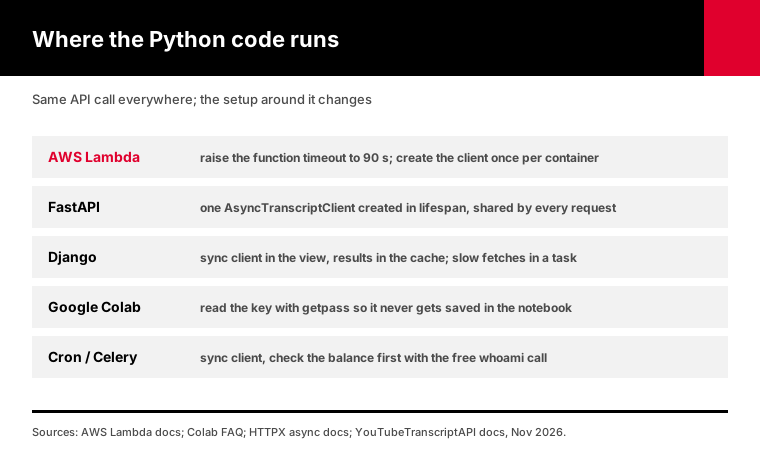
The code is the same everywhere; the container around it changes. On Lambda, raise the function timeout above 60 seconds. In FastAPI, use the async client and create it once at startup. In Django, use the sync client inside the view and cache results. In Colab, read the key with getpass so it never lands in the notebook.
A Lambda handler, with the function timeout set to 90 seconds:
from ytt_client import TranscriptClient, NoTranscript

yt = TranscriptClient()  # created once per container, reused across invocations

def handler(event, context):
    try:
        return {"statusCode": 200, "body": yt.transcript(event["video"], text=True)["transcript"]}
    except NoTranscript:
        return {"statusCode": 404, "body": "no captions"}
A FastAPI route that shares one async client:
from contextlib import asynccontextmanager
from fastapi import FastAPI, HTTPException
from ytt_client import AsyncTranscriptClient, NoTranscript

@asynccontextmanager
async def lifespan(app):
    app.state.yt = AsyncTranscriptClient()
    yield
    await app.state.yt.aclose()

app = FastAPI(lifespan=lifespan)

@app.get("/transcript/{video_id}")
async def transcript(video_id: str):
    try:
        return await app.state.yt.transcript(video_id, text=True)
    except NoTranscript:
        raise HTTPException(404, "This video has no captions")
In Django, call the sync client in the view and store the result with the cache framework. A video's captions rarely change once they exist, so a long cache means you never pay twice for the same video.
If a view might wait 30 seconds on a fresh video, move the fetch into a background task and show a "processing" state. Nobody wants a request thread tied up that long.
In Colab, start the notebook with os.environ["YTT_API_KEY"] = getpass.getpass(). The key stays out of the saved cells, which matters the day you share the notebook.
The same pattern works in a Celery task, a cron script or a GitHub Actions job. The JavaScript guide covers the Node side if part of your stack lives there.
How do you summarize or search a transcript in Python?
Ask for format=text when you want one block of words for a language model, and keep the default JSON when you need timestamps for citations or search. Long videos run past a model's comfortable input size, so split the timed lines into chunks of a few minutes each and keep each chunk's start time. That start time becomes a link back to the exact moment in the video.
For a short video, one call and one prompt is enough:
text = yt.transcript("aircAruvnKk", text=True, timestamps=False)["transcript"]
prompt = f"Summarize this video in five bullet points:\n\n{text}"
For long videos or a search index, chunk by time instead of by characters:
def chunks(lines, seconds=180):
    batch, start = [], None
    for line in lines:
        start = line["start"] if start is None else start
        batch.append(line["text"])
        if line["start"] - start >= seconds:
            yield start, " ".join(batch)
            batch, start = [], None
    if batch:
        yield start, " ".join(batch)
Each chunk carries its start time, so https://youtu.be/aircAruvnKk?t= plus int(start) opens the video right where the chunk begins.
Three minutes is a starting point, not a rule. Shorter chunks give more precise search hits, and longer ones give a summarizer more context to work with.
For whole channels, list the uploads first and then batch the transcripts. The channel transcripts guide walks through that, including the credit math for a big back catalog.
Should you use requests, httpx or aiohttp?
Use requests for scripts, notebooks and simple sync jobs. Use httpx when you want one library for both sync and async code, which makes it the natural fit for FastAPI. Use aiohttp only if your project already depends on it. All three work with the transcript API, because it's plain HTTPS with a Bearer header. Pick the one your codebase already uses.
My default is httpx.
It has the same call style as requests, so the learning curve is close to zero. And it has an async client, so the day your script turns into a web service you don't rewrite the HTTP layer.
That's why ytt_client.py is built on it. The sync TranscriptClient and the async AsyncTranscriptClient share the same retry rules, the same errors and the same credit tracking.
requests is still perfectly fine for a cron job that fetches ten transcripts a night. It's already installed in most Python environments, and a ten-line script with timeout=60 and raise_for_status() covers the job.
aiohttp is fast and mature. I just wouldn't add it to a project only for this, because httpx does the same work with a friendlier API.
Whichever you pick, the rules don't change: one client object reused across calls, an explicit timeout, and retries only for 408, 429, 500 and 503.
How do you test transcript code without spending credits?
Mock the HTTP layer in your tests and only call the real API in a small smoke test. With httpx, a mock transport or the respx library returns canned JSON for the transcript URL, so your parsing, retry and error paths run in milliseconds and cost nothing. Keep one real call in CI, and use a video you know has captions.
The free parts of the API help too.
A 404 for a video without captions is never charged, so you can test your NoTranscript branch against the real API at no cost. The whoami call is free as well, which makes it a cheap check that your key and network work.
For the retry logic, a fake server is easier than waiting for a real 429. That's how ytt_client.py was tested: a small local server that returns 429 with both Retry-After formats, 503 twice before succeeding, a 402, a 422 and a deliberately slow response.
Save a few real responses as JSON fixtures. Your summarizer or chunker can then be tested against real caption text without a network call at all.
What does a YouTube transcript API cost in Python?
Each transcript is 1 credit, and the Python side costs nothing extra. A search inside one channel is 1 credit, a YouTube-wide search 4, and a channel or playlist listing of up to 100 videos 20. Checking a channel's newest uploads and your balance are free, and errors are never charged. Signing up gives you 100 credits without a card.
Every successful response tells you where you stand. The X-Credits-Charged header says what that call cost, and X-Credits-Remaining says what's left. The client keeps both in credits_used and credits_remaining.
Check before a big batch, not halfway through it:
with TranscriptClient() as yt:
    balance = yt.whoami()["credits"]["spendable"]
    if balance < len(video_ids):
        print(f"Need {len(video_ids)} credits, have {balance}")
The /account/whoami endpoint is free and answers even at a zero balance, so it's safe to call first.
After the free 100, $3 a month buys 1,000 credits, or $30 a year buys 15,000 on Annual. The pricing page always has the current numbers, and the rate limits page covers the headers in more detail.
Frequently asked questions
How do I fetch a YouTube transcript with Python?
Send a GET request to the YouTubeTranscriptAPI transcript endpoint with the video URL and your API key as a Bearer token, using requests or httpx with a 60-second timeout. The JSON response has every caption line with its start time and duration. It costs 1 credit per video, and videos without captions return 404 and cost nothing.
Why is youtube-transcript-api blocked on my server?
The library's PyPI page explains it: YouTube has started refusing requests from address ranges owned by AWS, Google Cloud, Azure and other clouds, so deployed code will most likely raise RequestBlocked or IpBlocked. It works on a laptop because home IPs aren't blocked. A hosted transcript API avoids this, because your server never contacts YouTube directly.
Does the YouTube Data API return transcripts in Python?
Not for videos you don't control. Google's captions.download call is meant for channel owners: it requires an OAuth login that can edit the video, and each call uses 200 units of your daily quota. Point it at somebody else's upload and you get a 403. For public videos in general, Python code needs a different source, such as a hosted transcript API.
How do I get YouTube transcripts asynchronously in Python?
Use httpx.AsyncClient or the AsyncTranscriptClient in ytt_client.py, share one client across tasks, and limit concurrency with an asyncio.Semaphore. Pace requests under the API's limit of 300 a minute per key. The client's transcripts() method does this in one call, skips duplicate IDs, and stops the batch on a 402 so you don't waste requests.
What timeout should I use for a YouTube transcript API call?
Use 60 seconds. A first fetch of a video can take 10 to 30 seconds, while a cached one returns in about a second. Python's requests library has no default timeout and httpx defaults to 5 seconds, so set it explicitly. On AWS Lambda, also raise the function timeout, which defaults to 3 seconds.
Can I use a YouTube transcript API in Google Colab?
Yes. Colab runs your code in a virtual machine Google hosts, so libraries that call YouTube directly can be blocked there, but a hosted API works the same as anywhere else. Read your key with getpass so it isn't saved in the notebook, then call the transcript endpoint with requests or the ytt_client.py client.
Fetch your first transcript from Python
Open a free account, copy your key into YTT_API_KEY, and download ytt_client.py. Then run python ytt_client.py aircAruvnKk from the same machine you'll deploy to. If it prints a transcript there, the network side of your deployment is already solved, and you still have 99 free credits to build the rest.
About the authors: the YouTubeTranscriptAPI engineering team builds and runs the hosted transcript API used in this guide. We tested ytt_client.py against a mock of the documented API responses, covering every status code, both Retry-After formats, timeouts, concurrency and pacing. The requests, HTTPX, Python, AWS and Colab details were checked against their official documentation in November 2026.