YouTube transcript to SRT and VTT: subtitle files via API
By the YouTubeTranscriptAPI engineering team · Published · Updated
You downloaded YouTube's automatic captions, dropped them into Premiere, and every line showed up twice. Annoying.
The fix is to build the subtitle file yourself from the transcript's timestamps. A YouTube transcript to SRT conversion takes each caption line's start time and duration, trims lines that run into the next one, groups short fragments into readable cues, and writes them out. The script in this guide does that for one video, a playlist or a whole channel, in SRT or WebVTT, for 1 credit per video.
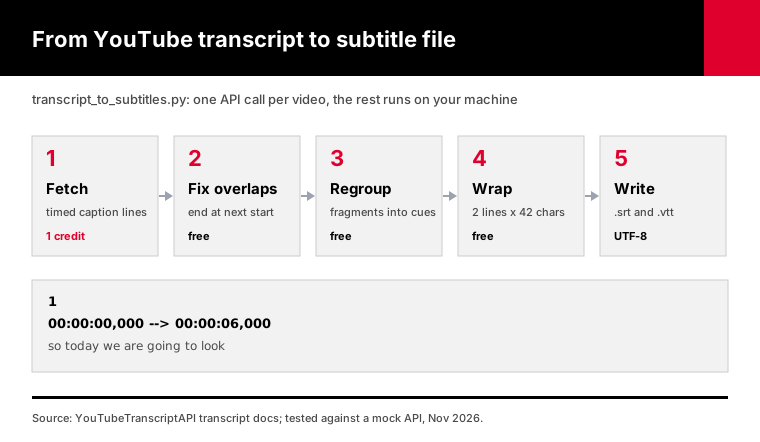
Below are the format rules, the reason auto captions break editors, and the tested script.
How do you turn a YouTube transcript into an SRT file?
Fetch the transcript with timestamps, then write each caption as an SRT block: a number, a timing line in hours:minutes:seconds,milliseconds, the text, and a blank line. With YouTubeTranscriptAPI each line comes back with its start and duration in seconds, so the end time is start plus duration. The script below adds the cleanup that raw captions need before an editor will accept them.
The simple version is ten lines of code.
The version that works on real videos is longer, because YouTube's automatic captions aren't shaped like subtitles. They're shaped like a live typist.
Here's one call, using the transcript endpoint:
curl "https://youtubetranscriptapi.com/api/v2/youtube/transcript?video_url=aircAruvnKk&include_timestamp=true" \
  -H "Authorization: Bearer YOUR_API_KEY"
Each item in transcript has text, start and duration. That's everything an SRT file needs.
And here's the download, transcript_to_subtitles.py:
pip install requests
export YTT_API_KEY=tk_live_...
python transcript_to_subtitles.py aircAruvnKk --format both
That writes subtitles/aircAruvnKk.en.srt and subtitles/aircAruvnKk.en.vtt.
What's the difference between SRT and VTT?
SRT and WebVTT hold the same thing, timed text, with small but strict differences. SRT numbers every cue and uses a comma before the milliseconds. WebVTT starts with the word WEBVTT, uses a period, and makes cue numbers optional. Browsers only play WebVTT in an HTML5 video player, while editors and YouTube accept both, so most people want both files.
| SRT | WebVTT (.vtt) | |
|---|---|---|
| First line | Cue number 1 | WEBVTT |
| Timing line | 00:01:05,500 --> 00:01:08,200 | 00:01:05.500 --> 00:01:08.200 |
| Cue numbers | Required | Optional |
| Styling | None that YouTube reads | Bold, italic, underline, position |
HTML5 <track> | No | Yes |
| Best for | Premiere, DaVinci, VLC, YouTube upload | Websites and web players |
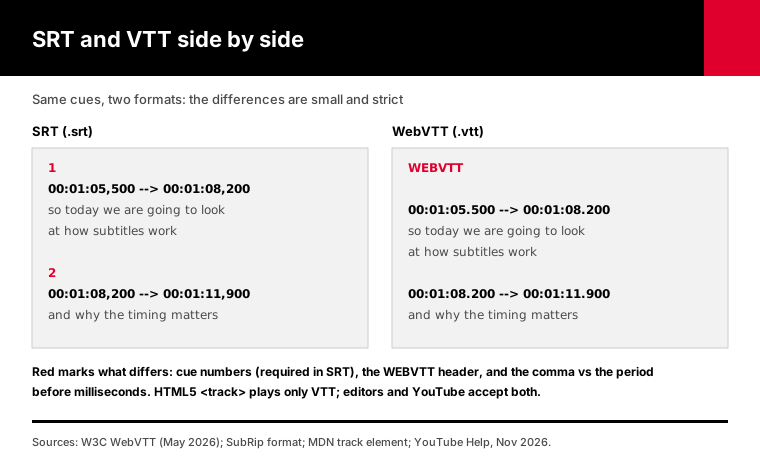
The comma is the classic mistake. The SubRip format writes 65.5 seconds as 00:01:05,500, with exactly three digits after the comma.
WebVTT has a real specification. The W3C WebVTT draft (May 2026) says a file starts with the string WEBVTT, timestamps use a full stop, and the hours can be left out when they're zero.
MDN's page on the HTML track element says tracks are formatted as WebVTT. So if your subtitles are for a website, VTT isn't optional.
YouTube takes both. Its list of supported caption files says SRT is supported in its basic form only, with no style markup, and the file must be plain UTF-8.
The script writes UTF-8 without a byte order mark, which is exactly what YouTube asks for.
Why do YouTube auto captions overlap in editors?
YouTube's automatic captions are built for a rolling, two-line display, so each line stays on screen while the next one starts. The timings overlap on purpose. Editors like Premiere Pro read overlapping cues as two subtitles at once and stack or double the text, a problem reported in Adobe's own community forums. The fix is to end each line when the next one begins.
You can see it in the raw data.
On a test transcript shaped like YouTube's automatic captions, every 3-word fragment started 1.2 seconds after the last one but lasted 3.4 seconds. So at any moment, two or three fragments claimed the screen.
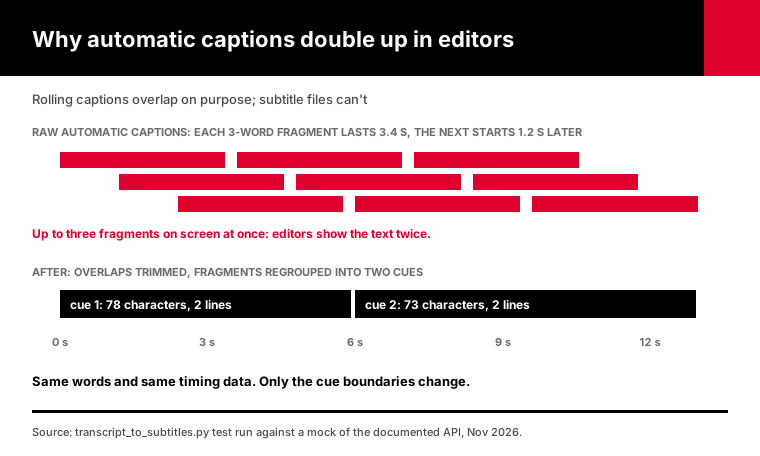
People on Adobe's Premiere Pro forum describe exactly this: imported YouTube captions that appear twice. The usual advice is a manual "fix overlapping times" pass in a subtitle editor.
The script does that pass automatically. It also removes a line when rolling captions repeat it word for word, and it folds a line into the next one when both start at the same instant, so no words go missing.
Then it does the part a "fix overlaps" button doesn't. It regroups the fragments.
A cue of three words is gone before you've read it, and the next one is already there. Merging the fragments into full lines is what turns automatic captions into something that reads like real subtitles.
What makes subtitles easy to read?
Readable subtitles keep lines short, use at most two of them, and stay up long enough to read. Netflix's English style guide allows 42 characters per line and two lines, at up to 20 characters per second for adult programs. Its general rules keep each subtitle between five-sixths of a second and 7 seconds on screen.
Those are the script's defaults.
| Rule | Netflix value | Script flag | Default |
|---|---|---|---|
| Characters per line | 42 | --max-chars | 42 |
| Lines per subtitle | 2 | --max-lines | 2 |
| Longest time on screen | 7 seconds | --max-duration | 7 |
| Shortest time on screen | 5/6 of a second | --min-duration | 0.833 |
| Reading speed | 20 characters a second | --cps | 20 (warning only) |
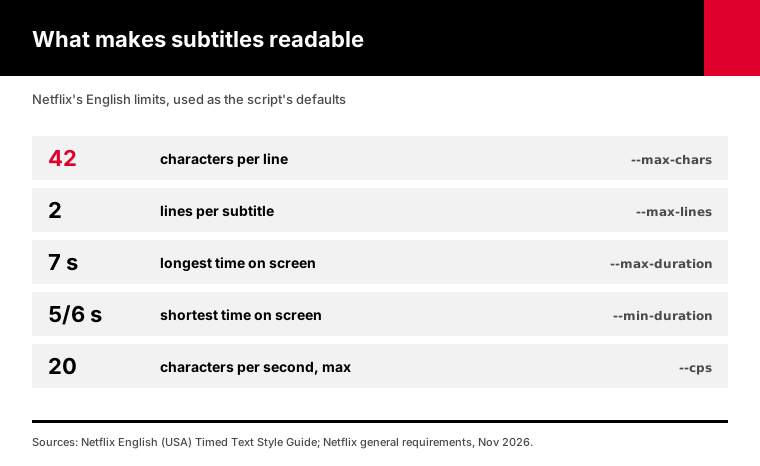
The 42-character and 20-characters-a-second figures come from the Netflix English (USA) Timed Text Style Guide. The duration limits come from Netflix's general timed text requirements.
You don't need Netflix-grade subtitles for a tutorial on your own site. I still use these numbers as defaults, because they come from people who time subtitles for a living.
When a line is too long, the script splits it at a word boundary and shares the time by length. When a cue stays up longer than 7 seconds, it splits that too.
The script balances two lines so they're close in length and prefers to break after punctuation. Netflix's guide asks for breaks after punctuation and before conjunctions, so that's the same instinct.
For vertical video and Shorts, try --max-chars 32. A 42-character line runs almost edge to edge on a phone held upright, and shorter lines leave room for the on-screen text creators like to add.
The reading speed check doesn't change anything. It counts cues that go faster than 20 characters a second and tells you, because fixing fast speech means editing words, and that's your call.
How do you convert a YouTube transcript to SRT with Python?
Run transcript_to_subtitles.py with a video ID or URL. It fetches the transcript with timestamps, fixes overlaps, regroups fragments into cues of up to two 42-character lines, and writes SRT, VTT or both in UTF-8. It costs 1 credit per video. Videos without captions return 404, cost nothing, and are listed at the end of the run.
The common options:
# one video, both formats
python transcript_to_subtitles.py "https://www.youtube.com/watch?v=aircAruvnKk" --format both

# Spanish captions, shorter lines for mobile
python transcript_to_subtitles.py aircAruvnKk --language es --max-chars 32

# keep the original caption lines, only fix overlaps
python transcript_to_subtitles.py aircAruvnKk --raw

# drop lines like [Music] and [Applause]
python transcript_to_subtitles.py aircAruvnKk --drop-sound-tags
Every run ends with a summary line, so you know what you paid for.
A finished SRT looks like this:
1
00:00:00,000 --> 00:00:06,000
[Music] so today we are going to look
at how subtitles work and why the timing

2
00:00:06,000 --> 00:00:13,000
matters more than people think when
you export captions that's it, thanks
That's real output from our test run. The same input in --raw mode produced 9 cues of three words each.
Use --raw when someone downstream asked for YouTube's original timing, line for line. A dubbing studio matching lip movement might, for example. For anyone reading along, the regrouped version is far easier on the eyes.
I tested the script against a mock of the documented API responses. The test data covered overlapping auto captions, duplicated rolling lines, sound tags, HTML entities, lines over 84 characters, a 12-second caption and timestamps past 10 hours.
Every file passed two independent parsers, the srt and webvtt-py Python libraries. No file had an overlapping cue, a line over 42 characters or a cue longer than 7 seconds.
If a video has no captions in the language you asked for, the API returns another track. The script saves it under that language's code, so --language en might give you video.es.srt, and it says so in the log.
How do you get subtitles for a whole playlist or channel?
Pass --playlist or --channel instead of video IDs. The script lists up to 100 videos for 20 credits, then converts each one for 1 credit. A full 100-video playlist costs 120 credits. Files already in the output folder are skipped, so re-running after an interruption only pays for the videos that are still missing.
python transcript_to_subtitles.py --playlist "https://www.youtube.com/playlist?list=YOUR_PLAYLIST_ID" --format both
python transcript_to_subtitles.py --channel @3blue1brown --max-videos 25
The playlist endpoint takes a playlist ID or any URL with a list= parameter. The channel listing takes a handle, a URL or a UC channel ID.
Duplicates are removed before any transcript is fetched. Playlists sometimes contain the same video twice, and paying twice for one file is silly.
Two limits to know. Each listing returns the first 100 videos, and only the first page is served for now. For bigger playlists, the playlist transcript guide shows how to page through them, and the channel transcripts guide covers whole back catalogs.
In testing, re-running a finished batch used 0 credits. A run that stops on a 402, out of credits, picks up where it left off after a top-up.
How do you check a subtitle file before you publish it?
Open it in a parser before you trust it. A valid SRT has numbered cues in time order, comma timestamps and blank lines between cues. A valid VTT starts with WEBVTT. Then check three things editors care about: no cue ends after the next one starts, no line is too long, and no cue flashes by too fast to read.
Nobody reads 900 cues by eye. A five-line check finds the problems for you.
The two Python libraries I used for testing are small and free. This check prints the problems an editor would complain about:
import srt  # pip install srt

subs = list(srt.parse(open("subtitles/aircAruvnKk.en.srt", encoding="utf-8").read()))
overlaps = [b.index for a, b in zip(subs, subs[1:]) if a.end > b.start]
long_lines = [s.index for s in subs if any(len(l) > 42 for l in s.content.splitlines())]
print(len(subs), "cues | overlaps:", overlaps, "| long lines:", long_lines)
If srt.parse throws an error, the file is malformed, so fix it before an editor sees it. That catches a missing blank line or a period where the comma should be.
For VTT, webvtt.read() from the webvtt-py package does the same job.
Then do one human check. Play the video with the file loaded in VLC and skim the first two minutes. If the words line up there, jump to the middle and the last minute and check again.
Watch the first cue in particular. Automatic captions often open with a sound tag like [Music], and on some videos you'll want it gone with --drop-sound-tags.
What can you do with the subtitle files?
Upload SRT to YouTube Studio, import it into Premiere Pro, DaVinci Resolve or Final Cut, or play it in VLC. Use the VTT file in a web video player through the HTML track element. You can also hand either file to a translator or a dubbing tool, since both keep the timing. The SRT is the most widely accepted of the two.
For a website, this is all the markup you need:
<video controls src="lesson-01.mp4">
  <track kind="subtitles" srclang="en" label="English" src="lesson-01.en.vtt" default>
</video>
MDN notes that srclang is required when the kind is subtitles.
For translation, send the SRT, not the plain transcript. The translator keeps the timing lines and only changes the text, so the result drops straight back into your editor.
For re-uploading to another channel or platform, check that you have the rights. A transcript of someone else's video is still their words.
A caveat about accuracy. Automatic captions have real mistakes, especially with names, jargon and accents. The script fixes timing and layout, not wording, so read the file before you publish it.
What does it cost to export YouTube subtitles?
Each transcript costs 1 credit, and the conversion to SRT or VTT happens on your machine for free. A single video is 1 credit, a 100-video playlist is 120 credits including the listing, and videos without captions cost nothing. New accounts get 100 free credits with no card. Past those, the Monthly plan gives you 1,000 credits for $3.
| Job | Credits | At the Monthly rate ($3 per 1,000) |
|---|---|---|
| 1 video, SRT and VTT | 1 | Free tier |
| 25 videos from a channel | 45 (20 listing + 25) | Free tier |
| 100-video playlist | 120 (20 + 100) | About $0.36 |
| 5 playlists of 100 | 600 | About $1.80 |
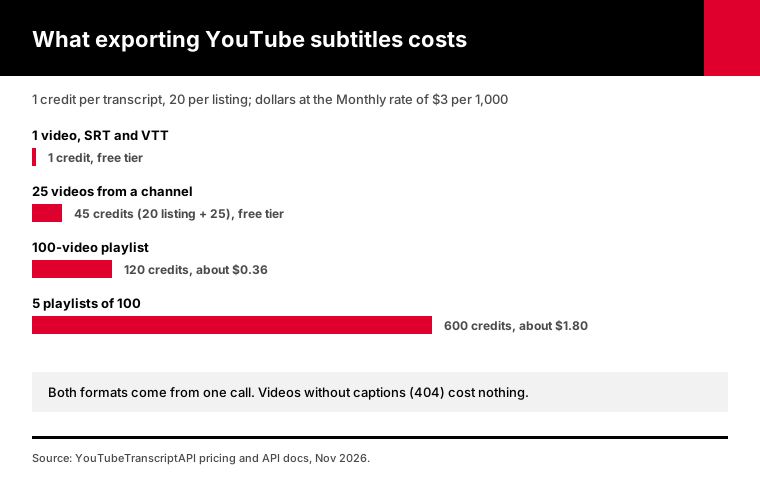
Asking for both formats doesn't cost extra. One transcript makes both files.
On Annual you pay $30 a year for 15,000 credits, $2 for each thousand transcripts. Current prices are always on the pricing page.
Here's a realistic month for a course creator: two new 20-video playlists, both formats. That's 40 credits for the listings and 40 for the transcripts, 80 in all, which still fits inside the free 100.
Failed requests are never charged either, so a 404, a rate limit or a timeout costs 0. The script's summary line shows the credits it used, read from the API's own response headers.
If you're not sure you need any of this, the free transcript API guide covers what you can do without paying at all.
What if a video has no captions?
Then there's no transcript to convert. The API returns 404 for videos with captions turned off, private videos and removed videos, and that request isn't charged. YouTubeTranscriptAPI reads existing captions; it doesn't transcribe audio. For those videos you need a speech-to-text tool instead.
New uploads are a special case. Automatic captions can take hours to appear after a video goes up, so a 404 on a fresh video often just means "try later."
The script lists these videos at the end of the run, with nothing written and nothing charged.
Frequently asked questions
How do I download a YouTube transcript as an SRT file?
Fetch the transcript with timestamps and write each line as an SRT block: a number, a start and end time in hours:minutes:seconds,milliseconds, the text and a blank line. YouTube Studio only lets you download caption files for your own videos. For any public video, transcript_to_subtitles.py does it through YouTubeTranscriptAPI for 1 credit per video.
Can I get YouTube subtitles in VTT format?
Yes. Run transcript_to_subtitles.py with --format vtt, or --format both to get SRT and VTT from the same transcript at no extra cost. The VTT file starts with WEBVTT and uses periods in its timestamps, which is the format browsers need for the HTML5 track element. Both files come from one API call.
Why are my YouTube captions doubled in Premiere Pro?
YouTube's automatic captions are timed for a rolling two-line display, so each line overlaps the next. Premiere Pro treats the overlap as two subtitles at once and shows the text twice. Fix it by ending each line when the next one starts, or export with transcript_to_subtitles.py, which trims overlaps and regroups the fragments into clean cues.
How many characters should a subtitle line have?
Netflix's English style guide allows up to 42 characters per line and two lines per subtitle, read at no more than 20 characters per second for adult programs. Each subtitle should stay on screen between five-sixths of a second and 7 seconds. The DCMP Captioning Key, common in US education, sets a shorter 32-character line.
Can I download subtitles for a whole YouTube playlist?
Yes. Run transcript_to_subtitles.py with --playlist and a playlist URL. It lists up to 100 videos for 20 credits, then converts each video for 1 credit, so a full 100-video playlist costs 120 credits. Videos without captions are skipped for free, and a re-run skips any files already saved.
Does YouTube accept SRT files for upload?
Yes. YouTube Studio accepts SRT, SBV and WebVTT among other caption formats. Google's help page says SRT files must be plain UTF-8 and only the basic format is read, with no styling. The files transcript_to_subtitles.py writes are plain UTF-8 with no byte order mark, so they upload without changes.
Export your first subtitle file
Pick one video you need subtitles for. Open a free account, set YTT_API_KEY, and run transcript_to_subtitles.py with that video's ID and --format both. You'll have an SRT for your editor and a VTT for the web in under a minute, with 99 free credits left for the rest of the playlist.
About the authors: the YouTubeTranscriptAPI engineering team builds and runs the hosted transcript API used in this guide. We tested transcript_to_subtitles.py against a mock of the documented API responses and validated every file it wrote with the srt and webvtt-py parsers. The format and style details were checked against the W3C, YouTube, MDN and Netflix documentation in November 2026.