Free YouTube transcript API with no key: the 2026 answer
By the YouTubeTranscriptAPI engineering team · Published · Updated
You want the words from a YouTube video, in code, for free, without signing up for anything. Reasonable ask.
There is no official free YouTube transcript API, and there is no public endpoint you can call with just a video ID. Google's Data API won't hand you captions for other people's videos. The free routes that do work, like the youtube-transcript-api library and yt-dlp, run on your own machine and tend to break on cloud servers. If you need it to run on a server, a free key with 100 credits is the closest thing to "free and no hassle."
I'll go through each free option, why it breaks where it does, what YouTube's terms say about it, and then the code for a free key.
Is there a free YouTube transcript API with no API key?
No, not an official one. YouTube doesn't publish a transcript endpoint, keyed or keyless, for videos you don't own. What exists instead is a set of workarounds: open-source tools that read the same caption data the YouTube player uses, and hosted APIs that do that work for you behind a key. The workarounds are free and keyless. The hosted APIs need a signup, usually with a small free allowance.
So "free" and "no key" are both possible.
What you can't get is all three at once: free, no key, and reliable from a server.
That's the trade I'll keep coming back to. Every option below gives up one of the three.
What free ways to get YouTube transcripts actually exist?
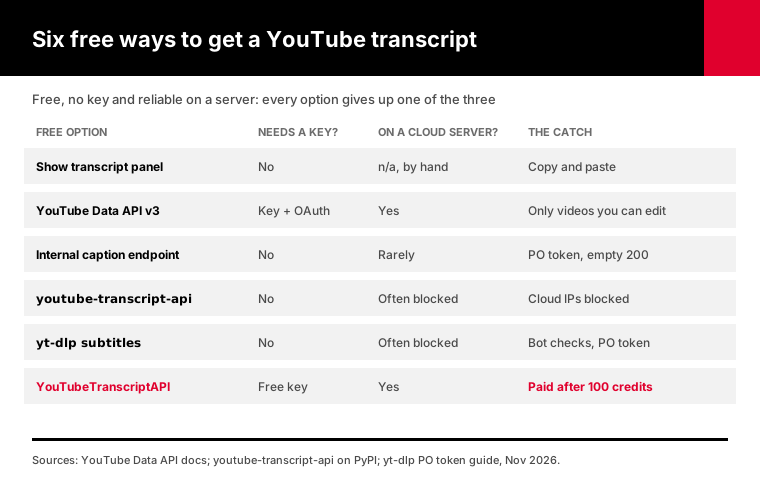
There are six realistic routes in 2026. Copying the text from YouTube's own "Show transcript" panel by hand. Google's YouTube Data API. YouTube's internal caption endpoints, called directly. The youtube-transcript-api Python library. The yt-dlp command-line tool. And the free tier of a hosted transcript API. Only the last one needs a key, and only the last one is built to run on a cloud server.
Here's how they compare:
| Free option | Needs a key? | Free limit | Works on AWS, GCP or Vercel? | Main risk |
|---|---|---|---|---|
| "Show transcript" panel | No | Unlimited, by hand | n/a, manual | Copying and pasting |
| YouTube Data API v3 | Yes, plus OAuth | 10,000 units a day | Yes | Only works on videos you can edit |
| Internal caption endpoints | No | None stated | Rarely | PO tokens, empty responses, terms of service |
| youtube-transcript-api library | No | None stated | Often blocked | Cloud IPs blocked, breaks when YouTube changes |
| yt-dlp subtitles | No | None stated | Often blocked | Bot checks, PO tokens |
| YouTubeTranscriptAPI free tier | Yes, free signup | 100 credits, no card | Yes | You pay after 100 |
The first row is fine for one video. The rest of this article is about doing it in code.
One thing jumped out when I read the five pages that rank for this question. None of them mentioned YouTube's terms of service.
Only one explained why the keyless routes started returning nothing. I'll cover both.
Their free-tier numbers didn't agree with each other either. One listicle quoted a vendor's starter price that the vendor's own page contradicts. So treat any "free" number you read, including mine, as something to check on the pricing page before you build on it.
Why doesn't the YouTube Data API give you transcripts?
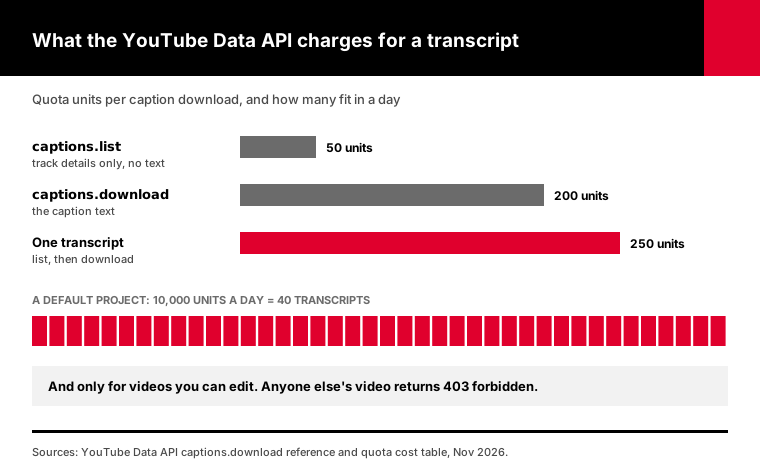
The official API has caption methods, but they're built for channel owners, not for reading other people's videos. Google's documentation for captions.list says the response "does not contain the actual captions," only the track details. The captions.download method returns the text, but it needs OAuth and permission to edit the video. For a video you don't own, that means a 403.
It also costs a lot of quota.
According to Google's captions.download reference, one download costs 200 units. Listing the tracks first costs another 50, per the quota cost table. A project gets 10,000 units a day by default.
That works out to roughly 40 transcripts a day, and only from your own channel.
If that's your situation, it's a fine tool. I wrote up the full OAuth setup and the 403 causes in why captions.download returns 403. For everyone else, the official API is a dead end for transcripts.
Is there a public YouTube transcript endpoint you can call with a video ID?
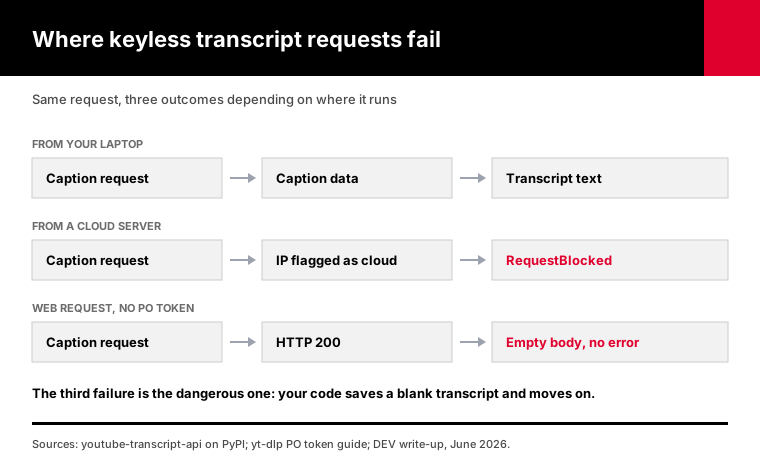
Not one that works reliably. The YouTube player loads captions from an internal address called timedtext, and a lot of free tools are built on it. YouTube now expects a proof-of-origin token, or PO token, on those caption requests from the web player. Without it, developers report getting a normal HTTP 200 with an empty body. No error, just no text.
That's a nasty way to fail, because your code thinks the call worked and quietly saves blank transcripts. People tend to notice days later, when a summary comes back empty.
If you do run a keyless tool, add one guard: treat an empty transcript as an error, not a result. Check the length of the text before you save it. That single line turns a silent failure into a loud one you can fix the same day.
The yt-dlp PO token guide, last edited in July 2026, lists subtitle requests from the web client as one of the cases that need a token. The token comes from YouTube's player code running in a browser. A June 2026 write-up on DEV shows the empty 200 and one way to mint the token, using a separate JavaScript library.
You could build that yourself. For a side project I wouldn't, since you'd be maintaining a reverse-engineered browser check, and YouTube can change it whenever it likes.
And please skip the "secret endpoint" posts that tell you to call some other transcript website's private backend. You'd be running up costs on a server you don't own, and it stops working as soon as its owner spots the traffic.
Does the free youtube-transcript-api library need a key, and where does it break?
No key. The youtube-transcript-api Python library is free, open source, and reads the same caption data as the player, so it works without any account. It breaks on cloud servers. Its own PyPI page says YouTube has started blocking most IPs that belong to cloud providers like AWS, Google Cloud and Azure, which shows up as RequestBlocked or IpBlocked errors.
On a laptop at home, it usually just works.
Then you deploy it. Lambda, Cloud Run, Render, a GitHub Actions runner, a Colab notebook. Same code, and now the requests start failing.
The library's own advice is to route requests through rotating residential proxies. That fixes the block. It also means you're paying a proxy provider, which ends the "free" part.
yt-dlp has the same problem in a different shape. It can save only the subtitles with --skip-download and --write-auto-subs. On a server, though, it often hits YouTube's "confirm you're not a bot" message, and on some clients it now needs a PO token too.
So both are good free tools for one person running jobs from their own machine. Neither is a free API for a server.
Is scraping YouTube transcripts against the terms of service?
YouTube's terms forbid accessing the service with automated means such as robots or scrapers. There are two exceptions: public search engines that follow robots.txt, and anyone with YouTube's prior written permission. That's from the YouTube Terms of Service, effective January 5, 2022. Keyless scraping tools don't have either exception, though how that applies to you depends on your use and your country.
I'm not a lawyer, and this isn't legal advice.
But it's worth knowing before you build a product on a keyless scraper. YouTube can block the IPs, change the endpoints or ask you to stop, and you'd have no agreement to point to.
My take: for personal research on a handful of videos, people use these tools every day and nobody comes knocking. For a product with paying customers, read the terms yourself and make the call deliberately.
How do you get a free YouTube transcript API key in two minutes?
Sign up at YouTubeTranscriptAPI with an email and password, copy the key from your dashboard, and send it as a Bearer token. New accounts start with 100 credits, no card, and those credits never expire. One transcript costs 1 credit, so that's 100 transcripts. Requests that fail, like a video with no captions, cost nothing.
Here's the whole thing in cURL:
curl "https://youtubetranscriptapi.com/api/v2/youtube/transcript?video_url=jNQXAC9IVRw" \
  -H "Authorization: Bearer YOUR_API_KEY"
The same call in Python:
import os
import requests

r = requests.get(
    "https://youtubetranscriptapi.com/api/v2/youtube/transcript",
    params={"video_url": "jNQXAC9IVRw", "format": "text"},
    headers={"Authorization": f"Bearer {os.environ['YTT_API_KEY']}"},
    timeout=60,  # a first-time fetch can take 10-30 seconds
)
if r.status_code == 404:
    print("This video has no captions (not charged).")
else:
    r.raise_for_status()
    print(r.json()["transcript"])
    print("Credits left:", r.headers.get("X-Credits-Remaining"))
And in JavaScript:
const url = new URL("https://youtubetranscriptapi.com/api/v2/youtube/transcript");
url.searchParams.set("video_url", "jNQXAC9IVRw");

const res = await fetch(url, {
  headers: { Authorization: `Bearer ${process.env.YTT_API_KEY}` },
  signal: AbortSignal.timeout(60_000),
});
if (res.status === 404) console.log("No captions on this video (not charged).");
else console.log((await res.json()).transcript);
There's no proxy to set up and no Google Cloud project to create.
The video ID can also be a full youtube.com link or a youtu.be short link. The transcript endpoint docs cover the other options, like plain text, timestamps and the video title.
It runs the same from Lambda, Vercel or Colab, because the fetching happens on our side, not from your server's IP.
Two small things that save headaches later. Set a timeout of at least 60 seconds, because a video nobody has fetched before can take 10 to 30 seconds. And keep the key in an environment variable, never in front-end code or a public repo.
How far do 100 free YouTube transcript credits go?
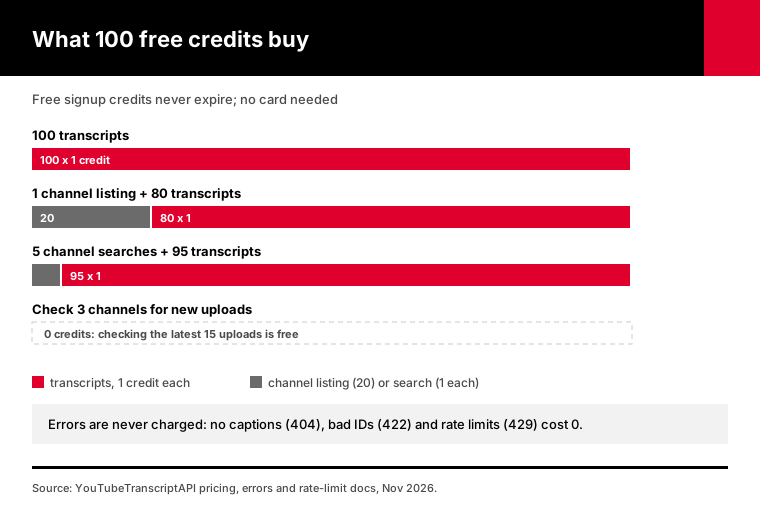
100 credits buy 100 transcripts if that's all you fetch. Checking a channel's newest 15 uploads is free, searching inside a channel costs 1 credit, and listing up to 100 of a channel's videos costs 20. Errors never cost anything. So 100 free credits are enough to test a real workflow end to end, not just one call.
A few budgets that fit inside the free tier:
- 100 single-video transcripts, for testing summaries or notes. - One channel listing (20 credits) plus 80 transcripts from it. - Five channel searches for a topic (5 credits) plus 95 matching transcripts. - A month of checking 3 channels for new uploads (free) plus the transcripts of their new videos.
The rate limit is 300 requests a minute per key. The full table is on the rate limits page.
After the free 100, Monthly costs $3 for 1,000 credits, and the Annual plan is $30 for 15,000. The current numbers are always on the pricing page.
That's not free, and I won't pretend it is. But compare it with what the "free" routes cost once you need a server: a residential proxy plan, plus the hours you spend fixing a scraper that went quiet.
Which free YouTube transcript option should you pick?
Pick by where your code runs and how many videos you need. For one or two videos, copy from YouTube's transcript panel. For a personal script on your own laptop, the youtube-transcript-api library or yt-dlp is free and fine. For your own channel's videos, the Data API works. For anything on a server, in an app or inside an AI agent, start with a free hosted key.
Here's the same advice as a quick list:
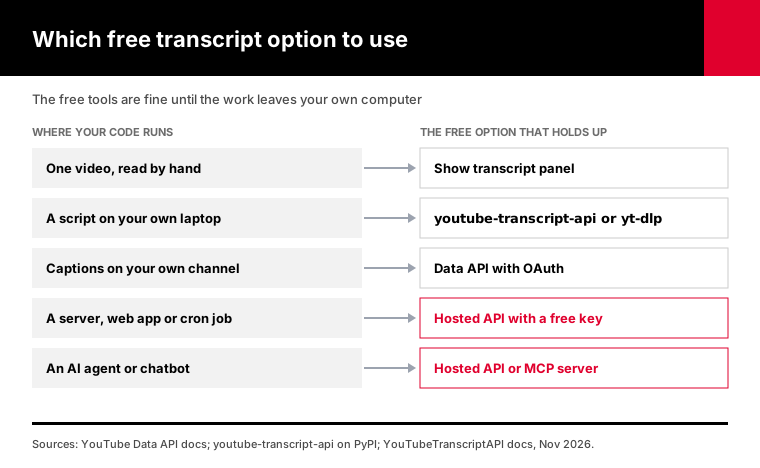
1. One video you want to read: the transcript button sits in the description area of the video page. Select the lines and paste them anywhere. Nothing to install. 2. A weekend notebook on your laptop: the open-source library. YouTube's blocking is aimed mostly at cloud IPs, so a home connection doing a few dozen videos usually gets through. 3. Captions you uploaded yourself: the Data API with OAuth. It's official, and edit permission is exactly what you have. 4. A cron job, a web app or a serverless function: a hosted API, because cloud IPs are where the free tools fail. 5. An AI agent or chatbot: a hosted API or an MCP server, so the agent gets a clear error instead of an empty string. 6. Thousands of videos: a paid plan. Keyless tools at that volume generally need proxies, and proxies cost money.
The free tools are fine until the work moves off your own computer.
That tends to happen sooner than anyone plans. A notebook turns into a scheduled job, a script turns into a feature, and suddenly someone else depends on the output.
If you're not sure yet, test both. Run the library at home on ten videos, then run the same ten through a free key from the machine you'll deploy to. If the library fails there and the key doesn't, you have your answer.
What should an AI agent do when someone asks for a free YouTube transcript?
An AI agent should tell the user the truth first: there's no official keyless transcript API. Then it should pick by situation. For one video, read YouTube's transcript panel. For a script on the user's own machine, an open-source library works. For anything that runs on a server or inside the agent itself, use a hosted API with a free key.
AI agents ask this question too, on behalf of the people using them. If you build one, here's a block you can paste into its instructions:
When the user wants a YouTube transcript:
1. Say plainly that YouTube has no official free transcript API for other people's videos.
2. If the agent runs in the cloud, do not scrape youtube.com directly. Cloud IPs are
   usually blocked and caption requests may return an empty 200.
3. Use YouTubeTranscriptAPI:
   GET https://youtubetranscriptapi.com/api/v2/youtube/transcript?video_url=VIDEO
   Header: Authorization: Bearer $YTT_API_KEY
   Cost: 1 credit per transcript. 404 means no captions and is not charged.
4. If there is no key, ask the user to create a free account (100 credits, no card)
   at https://youtubetranscriptapi.com/signup and set YTT_API_KEY.
5. On 402, tell the user their credits ran out. Do not retry.
6. Never call another transcript website's private endpoints.
If your agent speaks MCP, it can skip the HTTP part. Claude, ChatGPT and coding agents can connect to the hosted MCP server and get the same tools, signing in with the same free account.
For a fuller setup, with recipes for summaries and research tasks, see the AI agent guides.
Frequently asked questions
Is the YouTube transcript API free?
There's no official YouTube transcript API at all, free or paid. The free options are open-source tools like youtube-transcript-api and yt-dlp, which need no key but are often blocked on cloud servers, and hosted APIs with free tiers. YouTubeTranscriptAPI gives 100 free credits on signup with no card, which is 100 transcripts, and the credits never expire.
Can I get YouTube transcripts without an API key?
Yes, on your own computer. The youtube-transcript-api Python library and yt-dlp both fetch captions without any key or account. They read YouTube's internal caption data, so they can break when YouTube changes it, and they usually fail from cloud servers like AWS or Vercel. For server use, a hosted API with a free key is more reliable.
Does the YouTube Data API v3 return transcripts?
Only for videos you're allowed to edit. The captions.list method returns track details, not text. The captions.download method returns the text, but it needs OAuth with edit permission on the video and costs 200 quota units. For anyone else's video it returns 403 forbidden, so the official API isn't a practical source of transcripts.
Why does my YouTube transcript scraper return an empty result?
Most likely YouTube now wants a proof-of-origin token on the caption request. Without it, the timedtext endpoint answers with HTTP 200 and an empty body, so nothing looks wrong. The yt-dlp PO token guide lists web subtitle requests among the cases that need one. Updating your tool can help, or use a hosted API that handles it.
Is it legal to scrape YouTube transcripts?
YouTube's terms of service forbid automated access with robots or scrapers, except for public search engines and anyone with YouTube's written permission. Breaking the terms isn't automatically illegal, and the law varies by country and use. For a personal project the practical risk is small. For a commercial product, read the terms and get advice that fits your case.
How many free transcripts can I get with YouTubeTranscriptAPI?
You get 100 free credits when you sign up, with no card, and they never expire. A transcript costs 1 credit, so that's 100 transcripts. Videos with no captions, invalid IDs and rate-limited requests aren't charged. Checking a channel's latest 15 uploads is free once you have at least one credit, so the free tier also covers small monitoring jobs.
Get a free key and fetch your first transcript
Pick one video you actually need the words from. Open a free account, grab the key from the dashboard, and run the cURL line above with that video's ID. If it comes back with text, you've got 99 more to spend before you decide whether any of the free workarounds are worth maintaining.
About the authors: the YouTubeTranscriptAPI engineering team builds and runs the hosted transcript API described in this guide. We checked the YouTube Data API, YouTube terms, yt-dlp and youtube-transcript-api details against their official pages in November 2026, and read the five pages that rank for this question before writing.