YouTube transcription API: captions or speech-to-text?
By the YouTubeTranscriptAPI engineering team · Published · Updated
Plenty of people who search for a "YouTube transcription API" don't need transcription at all.
A YouTube transcription API turns a video into text in one of two ways. A transcript API reads the captions YouTube already made for the video, usually in under 30 seconds and for a flat price per video. A speech-to-text API listens to the audio and writes new text, billed per minute of audio. Many public videos already have a caption track, so try captions first and send only the rest to speech-to-text.
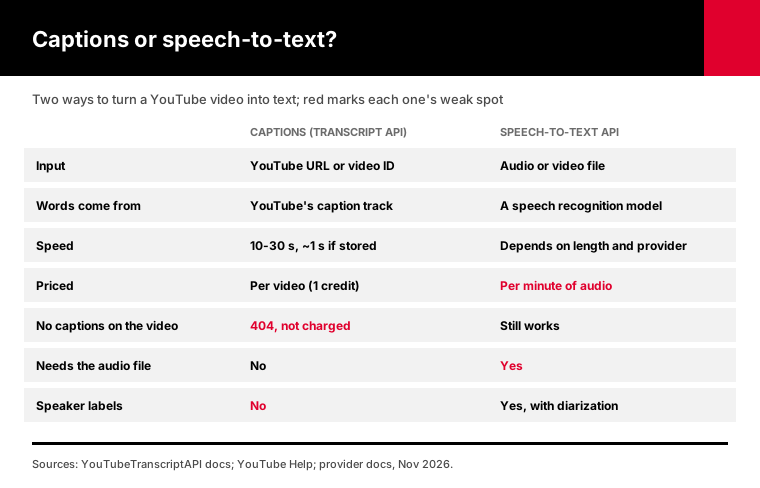
I'll show you how to tell which one you need, what each costs per hour of video as of November 2026, and a script that does captions first and prices the leftovers.
What is a YouTube transcription API?
A YouTube transcription API is any API that takes a YouTube video and returns its words as text. There are two kinds. Caption-based APIs fetch the transcript YouTube already generated or the creator uploaded, which is fast and cheap. Speech-to-text APIs such as OpenAI's transcription models, Deepgram or AssemblyAI run speech recognition on an audio file you send them, which costs more and needs the audio first.
The names blur together, which is half the problem.
Vendors say "transcript," "transcription," "captions" and "subtitles" for overlapping things. Here's the split that matters for your code:
| Caption-based (transcript API) | Speech-to-text API | |
|---|---|---|
| Input | A YouTube URL or video ID | An audio or video file |
| Source of the words | YouTube's caption track | A speech recognition model |
| Typical speed | 10 to 30 seconds, about 1 second if stored | Depends on file length and provider |
| Pricing | Per video | Per minute of audio |
| Works when captions are missing | No | Yes |
| Needs the audio file | No | Yes |
One detail surprises people. YouTube's automatic captions are themselves speech recognition. Google runs it once, when the video is processed, and anyone can read the result.
So with a transcript API, you're reusing a transcription that already happened.
Do you need speech-to-text to get a YouTube transcript?
Usually not. YouTube creates automatic captions in 67 languages, according to its automatic captioning help page, and any video with a caption track can be fetched as text through a transcript API. You need speech-to-text only for videos with no captions, for audio that isn't on YouTube, or when you need features captions don't have, like speaker labels.
Start by checking what you actually have.
If your list is lectures, podcasts, tutorials or interviews in a common language, expect most of them to have captions. If it's music videos, silent clips or very new uploads, more of them won't.
YouTube's help page lists six reasons automatic captions fail to appear:
1. The audio is complex and still processing. 2. The language isn't supported. 3. The video is too long. 4. The sound quality is poor, or YouTube doesn't recognize the speech. 5. There's a long silence at the start. 6. Several people talk over each other, or several languages are mixed.
It also says automatic captions "may not be ready" right after upload. A video that fails today can work tomorrow.
How do you get a YouTube transcript from the captions?
Send the video URL or ID to a transcript API and you get the caption text back as JSON. On YouTubeTranscriptAPI it's one GET request with an API key, 1 credit per video whatever its length, and a free 404 when there are no captions. The first fetch of a video takes 10 to 30 seconds. After that, the stored copy comes back in about a second.
Here's the whole request:
curl "https://youtubetranscriptapi.com/api/v2/youtube/transcript?video_url=dQw4w9WgXcQ&format=text&include_timestamp=false" \
  -H "Authorization: Bearer YOUR_API_KEY"
The response has video_id, language and transcript. Leave format as json and you get segments with start and duration instead, which you need for subtitles or for linking to a moment in the video.
Want a language other than English? Pass language=es or any other code. If the video has no track in that language, another one may come back, and the language field tells you which.
The transcript endpoint docs cover every parameter. Set your HTTP timeout to at least 60 seconds so a first fetch doesn't get cut off.
When do you actually need a speech-to-text API?
You need speech-to-text when there's no caption track to read, when the audio isn't on YouTube, or when you need output captions don't give you. That means videos YouTube couldn't caption, your own recordings and podcast files, speaker labels showing who said what, and audio in a language YouTube doesn't auto-caption. For everything else, speech-to-text costs more and adds a step.
Speaker labels are the clearest reason.
YouTube's automatic captions are one stream of text. They don't say who is speaking. If you're building meeting notes or interview analysis, a speech-to-text model with diarization is worth paying for.
Your own audio is the second reason. If the recording is sitting on your drive, you already have the file, and speech-to-text is the direct route.
The third is accuracy on hard audio. Heavy accents, jargon or noisy recordings are where you might prefer a newer model to YouTube's captions.
I don't have an independent benchmark I'd trust for that comparison. Run 20 of your own videos through both and read the results side by side. It's slower than reading a chart, and tells you far more.
How much does each option cost per hour of video?
As of November 2026, captions through YouTubeTranscriptAPI cost 1 credit per video, which is $0.003 on the Monthly plan however long the video is. Speech-to-text is billed per minute of audio: OpenAI's gpt-transcribe lists $0.0045 a minute, about $0.27 an hour, and Deepgram's Nova-3 lists $0.0043 a minute for pre-recorded audio. On an hour-long video, captions cost about 90 times less.
Here are the list prices I checked on each provider's own page:
| Option | Listed price | Cost for one 60-minute video |
|---|---|---|
| YouTubeTranscriptAPI captions (Monthly) | 1 credit = $0.003 per video | $0.003 |
| YouTubeTranscriptAPI captions (Annual) | 1 credit = $0.002 per video | $0.002 |
| OpenAI gpt-4o-mini-transcribe | $0.003 per minute | $0.18 |
| AssemblyAI Universal-2 | $0.15 per hour | $0.15 |
| AssemblyAI Universal-3.5 Pro | $0.21 per hour | $0.21 |
| Deepgram Nova-3 (pre-recorded) | $0.0043 per minute | $0.26 |
| OpenAI gpt-transcribe | $0.0045 per minute | $0.27 |
| OpenAI Whisper | $0.006 per minute | $0.36 |
Sources: OpenAI pricing, Deepgram pricing and AssemblyAI pricing, all read in November 2026.
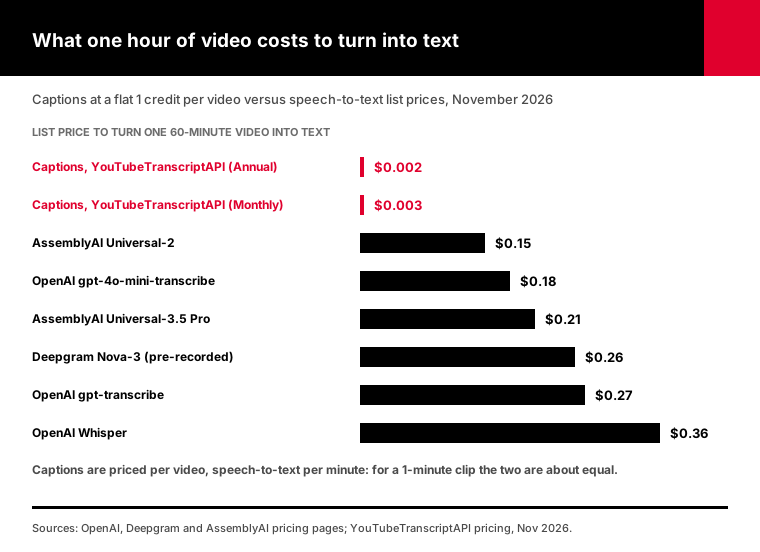
That caption is the honest caveat.
Captions are priced per video and speech-to-text per minute. A one-minute clip costs about the same either way. The gap only gets big for long videos, and long videos are where transcription bills add up.
Current plan prices, including Annual and top-ups, are on our pricing page.
Two more costs don't show up in the table. Speech-to-text needs the audio file, which you have to get from somewhere. And OpenAI's speech-to-text guide caps uploads at 25 MB, so long recordings have to be split into chunks first.
One more date to note. That same guide says whisper-1 and the gpt-4o transcription models shut down on February 26, 2027. If you're starting a new pipeline, build on gpt-transcribe.
Can you download YouTube audio to transcribe it?
Only if YouTube or the rights holder allows it. YouTube's Terms of Service say you may not download content except as expressly authorized by the service, or with prior written permission from YouTube and the rights holders. Your own uploads are fine, since you have the original file. For other people's videos, the caption track is the route that doesn't need the audio at all.
Many "YouTube transcription API" tutorials skip this part.
The usual recipe pulls the audio with a downloader, then sends it to a speech model. It works on a laptop. It also sits on the wrong side of YouTube's terms for videos you don't own, and downloads from cloud servers often run into YouTube's bot checks.
Our guide to the free YouTube transcript API question goes deeper on what YouTube's terms say about scrapers and keyless tools.
If you own the channel, skip the download entirely. Use the file you uploaded, or the caption files YouTube Studio gives you.
If you don't own the videos, start with captions. For the leftovers without captions, ask yourself whether you have the rights before you look for the audio.
That's why the script in the next section never downloads anything.
What does a "no captions" response actually tell you?
A 404 from a transcript API means the video has no caption track you can read right now. It doesn't say why. The video may be too new, silent at the start, in an unsupported language, private or removed. On YouTubeTranscriptAPI that 404 is never charged, so checking a whole list costs only the videos that do have captions. Retry new uploads before you pay for speech-to-text.
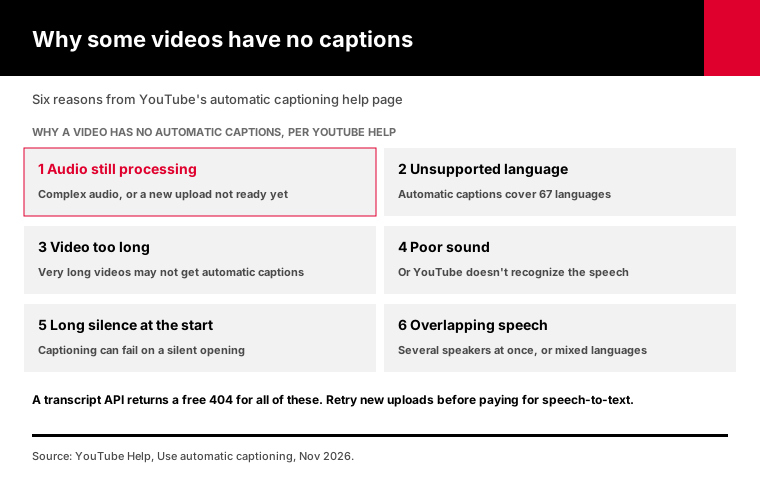
The errors reference lists every status the API returns. For this decision only three matter.
A 404 means no captions. A 422 means the ID or URL you sent isn't a valid video.
A 408 or 503 is a temporary hiccup on the way to YouTube, and it's safe to retry after a few seconds.
Treat those three differently in your code. Only the 404 list is a candidate for speech-to-text.
Here's a rough way to size that list before you spend anything.
Say you have 500 videos and 40 of them come back without captions. If those 40 average 20 minutes, that's 800 minutes of audio, or about $3.60 at gpt-transcribe's list price.
The other 460 cost 460 credits, about $1.38 on the Monthly plan. The script below does this math for you from real video lengths.
How do you combine captions and speech-to-text in one pipeline?
Try captions first for every video, keep the transcripts that come back, and collect the videos that return "no captions" into a separate list. Price that list by its total minutes before you decide anything. With YouTubeTranscriptAPI the first pass costs 1 credit per video that has captions, and the 404s for videos without captions cost nothing, so the check itself is cheap.
I wrote a script for exactly that: captions_first.py.
Nothing to install beyond Python itself. Give it video IDs, a file of URLs, a playlist or a channel:
export YT_API_KEY=your_key
python captions_first.py dQw4w9WgXcQ https://youtu.be/abc123xyz00
python captions_first.py --file video_ids.txt
python captions_first.py --playlist PLxxxxxxxx
python captions_first.py --channel @TED --stt-rate 0.0043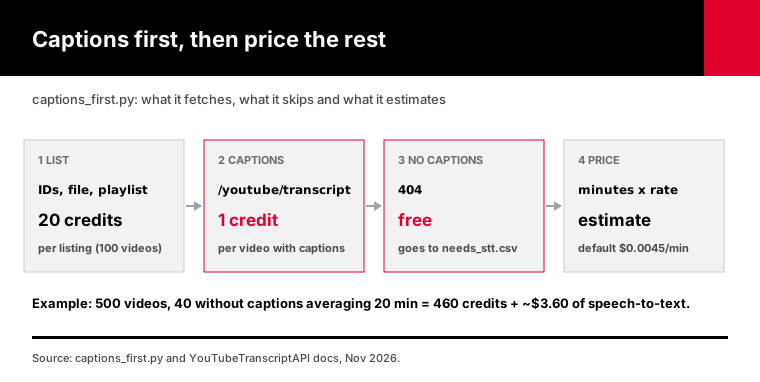
Here's what it does:
1. Collects video IDs from your arguments, a text file, a playlist or a channel. A listing costs 20 credits for up to 100 videos. 2. Fetches each transcript as plain text and saves one file per video, with the title and link on top. 3. Writes every video without captions to needs_stt.csv, with its length when the listing provided one. 4. Adds up those minutes and prices them at a speech-to-text rate you choose. The default is $0.0045 a minute.
It retries 408, 429 and 503 after the Retry-After wait. It stops at a 402 so it doesn't keep calling with an empty balance. Re-running skips videos already saved and checks the leftovers again, which helps with new uploads whose captions weren't ready.
Its test suite runs against a fake local server and covers playlists, channels, files of URLs, 404s, a 429, a 503, a 402 and re-runs. All 26 checks pass.
None of that touched live YouTube data, so look over what your first real run produces before you feed it a big batch.
Which should you choose for your project?
Choose captions when the videos are public on YouTube and have a caption track. Choose speech-to-text when the audio is your own file, when you need speaker labels, or when a video has no captions and you have the rights to its audio. If your list is typical public talks and tutorials, expect captions to cover most of it and speech-to-text to handle a small remainder.
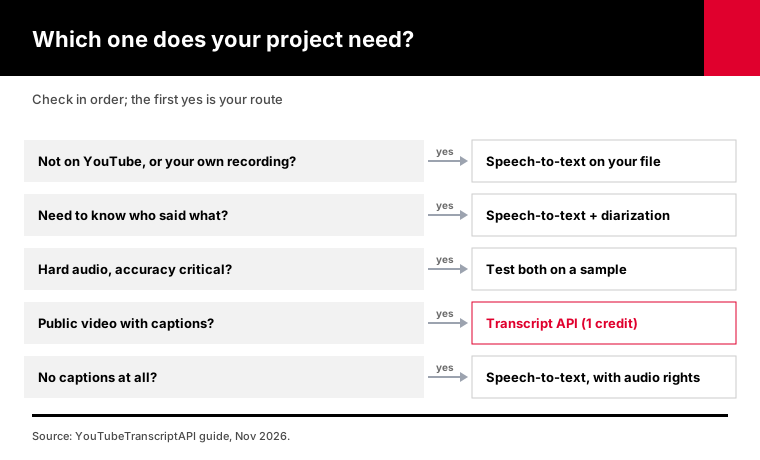
Here's the order I'd check things in:
1. Is the video on YouTube and public? If not, use speech-to-text on your own file. 2. Do you need to know who said what? Then speech-to-text with diarization, even if captions exist. 3. Is the audio hard and accuracy critical? Compare both on a sample before you commit. 4. Does it have captions? Use the transcript API. A 404 costs nothing. 5. No captions at all? Speech-to-text, if you have the rights to the audio.
If you're also making subtitle files, our guide to turning a transcript into SRT and VTT picks up where this one stops.
What about long videos, playlists and other languages?
Long videos are where captions win most clearly, because the price stays at 1 credit no matter the length, while speech-to-text bills every minute and may need the file split into chunks. For whole playlists or channels, list the videos first, then fetch each transcript. For other languages, pass a language code and check which track came back.
Playlists and channels follow the same pattern as the script.
A playlist listing costs 20 credits and covers its first 100 videos. Our playlist transcript guide covers longer playlists and the whole workflow.
If you don't know the videos yet, search for them first. Our YouTube search API guide shows how to search and pull transcripts with the same key.
Languages need one extra check.
YouTube auto-captions 67 languages. If the language you ask for isn't on the video, the API may return another track, so read the language field instead of assuming. A video in a language YouTube doesn't auto-caption is a real case for speech-to-text.
Frequently asked questions
What is the best YouTube transcription API?
It depends on whether the video has captions. For public YouTube videos with captions, a transcript API is fastest and cheapest: YouTubeTranscriptAPI charges 1 credit per video, $0.003 on its Monthly plan. For videos without captions or for your own audio, a speech-to-text API such as OpenAI's gpt-transcribe at $0.0045 a minute or Deepgram Nova-3 at $0.0043 a minute is the right tool.
Is there a free YouTube transcription API?
Partly. A new YouTubeTranscriptAPI account starts with 100 free credits and needs no card. That's enough for 100 caption transcripts, and videos without captions don't use any. Some speech-to-text providers offer free trial credit too. The official YouTube Data API is free, but it only lets you download caption files for videos you're allowed to edit.
How accurate are YouTube's automatic captions?
They're machine speech recognition, so accuracy depends on the audio. Clear single-speaker speech in a supported language usually comes out well. Overlapping speakers and poor sound make them worse, and YouTube's own help page names both as reasons captions fail. For accuracy-critical work, compare captions with a speech-to-text model on a sample of your own videos.
Can I transcribe a YouTube video that has no captions?
Yes, with speech-to-text, but you need the audio, and YouTube's terms don't allow downloading other people's videos without permission. For your own videos, use the original file. Captions also sometimes appear later: YouTube says automatic captions may not be ready right after upload, so it's worth retrying a new video before paying for transcription.
How much does it cost to transcribe an hour of YouTube video?
As of November 2026, reading the captions of an hour-long video through YouTubeTranscriptAPI costs 1 credit, $0.003 on the Monthly plan. Speech-to-text costs between $0.15 and $0.36 for the same hour at list prices: AssemblyAI Universal-2 at $0.15, OpenAI gpt-transcribe at about $0.27, and OpenAI Whisper at $0.36.
What's the difference between a transcript API and a transcription API?
A transcript API fetches text that already exists for a video, usually YouTube's caption track, from a URL or video ID. A transcription API, also called speech-to-text, creates new text from an audio file you send it. Transcript APIs are faster and priced per video. Transcription APIs work on any audio and are priced per minute.
Try captions on your list today
Take the list of videos you were about to send to a speech-to-text API. Run captions_first.py on it with a free key.
You'll get transcripts for every video that has captions, and a CSV of the rest with an estimated speech-to-text bill. Then decide whether that bill is worth paying.