YouTube search API without the 100-a-day limit (2026)
By the YouTubeTranscriptAPI engineering team · Published · Updated
Google gives every project 100 YouTube searches a day. Call 101 fails until midnight Pacific.
The official YouTube search API is the Data API's search.list method. It's free, returns up to 50 results per call, and since June 1, 2026 it runs on its own quota bucket of 100 calls a day. To go past that you need a compliance audit, and search results never include transcripts. If you need more searches than that, or the transcripts of what you find, a hosted YouTube search API that bills per call is the simpler route.
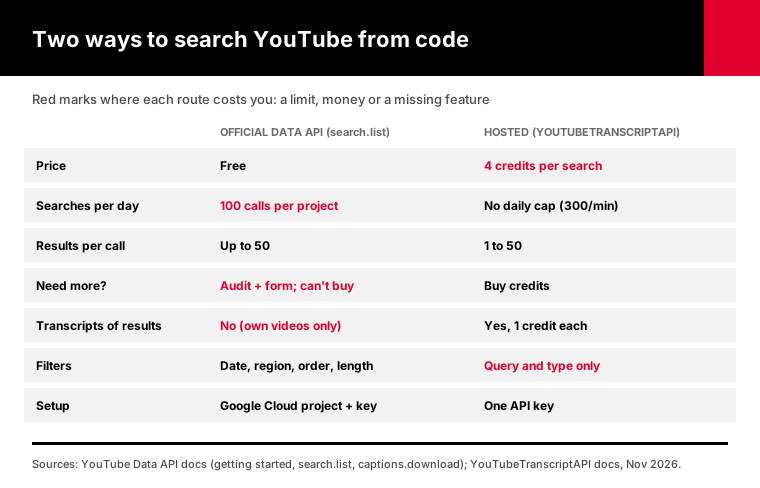
I'll cover what the official limit really is, what it takes to raise it, and how to search videos, channels and playlists, then pull transcripts, with one key.
What is the YouTube search API, and how many searches do you get free?
The YouTube search API is the search.list method of the official YouTube Data API v3. Google's getting started guide gives each project a default of 100 search.list calls a day, separate from the 10,000 units a day shared by every other method. Each call returns at most 50 results, and the daily count resets at midnight Pacific Time.
That separate bucket is new.
Google's revision history dates it to June 1, 2026. That's when the Data API started moving to "granular" quota, with search.list and videos.insert charged to their own buckets.
Before that, one search cost 100 units out of the shared 10,000. Many guides still describe it that way. The math lands in the same place: about 100 searches a day.
Here's what the official quota cost table says today:
| Method | What it does | Cost | Default daily limit |
|---|---|---|---|
search.list | Keyword search for videos, channels, playlists | 1 call in its own bucket | 100 calls |
videos.list | Details for known video IDs | 1 unit | Shared 10,000 units |
channels.list | Channel details, uploads playlist ID | 1 unit | Shared 10,000 units |
playlistItems.list | Videos in a playlist, 50 per page | 1 unit | Shared 10,000 units |
captions.download | Caption file for a video you can edit | 200 units | Shared 10,000 units |
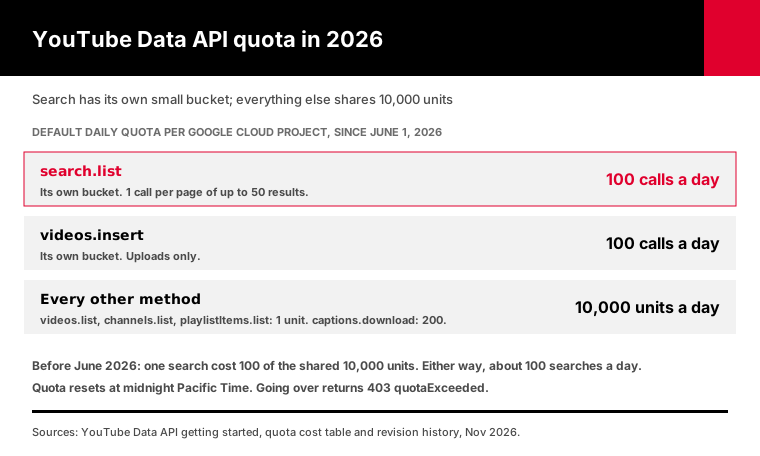
The table also says something easy to miss. Every extra page of results costs another call.
Why do developers hit the YouTube search API limit so fast?
You hit the limit fast because one "search" in your app is rarely one call. Paging through results costs a call per page of 50, every user shares your project's 100, and an AI agent can fire ten searches while answering one question. A single research job that checks 20 keywords, three pages deep, uses 60 of the day's 100 calls before lunch.
Pagination is the first trap.
search.list returns 50 results at most. If you want 200 results for a keyword, that's four calls. Google's search.list reference also caps channel-scoped video searches at 500 results, no matter how many pages you ask for.
Shared projects are the second trap. The 100 calls belong to your Google Cloud project, not to each user. Ten people using your tool at once burn through the day ten times faster.
AI agents are the third, and the newest.
An agent that "researches a topic on YouTube" will rephrase its query, search again, and search inside the channels it finds.
Say one research session takes 12 searches, a fair guess for an agent that rephrases and digs into channels. Nine sessions like that and your free quota is gone.
And when it's gone, the API returns a 403 with the reason quotaExceeded. Retrying doesn't help. Nothing works again until midnight Pacific.
Can you get more YouTube search quota from Google?
Yes, but you can't buy it. Google's quota and compliance audits guide says a project must first pass an audit showing it follows the YouTube API Services Terms of Service. You apply through the Audit and Quota Extension Form, with a working app, a public privacy policy and a description of your use case. Google gives no timeline, and approval isn't guaranteed.
That process makes sense for a real product with a real user base.
It's a poor fit for a weekend prototype, an internal research script, or an agent you're still testing. You need the app built before you can ask for the quota to build it.
There's a second catch. Approved projects take on the YouTube developer policies, which include rules about how long you can keep API data. Google's developer policies guide describes a 30-day refresh and deletion rule for most stored data.
If you plan to store search results or build an index, read those policies before you apply. They shape your whole storage design.
How does a YouTube search API without the quota work?
A hosted YouTube search API runs the search for you and bills per call instead of per day. On YouTubeTranscriptAPI, a search costs 4 credits, returns 1 to 50 videos or channels, and needs only an API key. There's no Google Cloud project to set up and no audit to pass. Failed calls are never charged, and you can send up to 300 requests a minute on one key, with no daily cap.
Here's the whole thing in one request:
curl "https://youtubetranscriptapi.com/api/v2/youtube/search?q=vector+databases+explained&type=video&limit=10" \
  -H "Authorization: Bearer YOUR_API_KEY"
Each video result comes back with videoId, title, channelId, channelTitle, channelHandle, lengthText, viewCountText, publishedTimeText and thumbnails. Set type=channel and you get channels instead, with handle, subscriberCount and an RSS URL.
The search endpoint docs list every field.
The point of the hosted route is what happens next. The videoId you just got is exactly what the transcript endpoint takes, at 1 credit per video, from the same key and the same balance.
Now the trade-off.
The official API has filters this one doesn't: publish date ranges, sort order, region, video duration and caption-only results. If you need "videos from the last week, sorted by views, in Germany," Google's API does that and this one doesn't.
YouTube channel results API: search one channel or list its uploads
To get a channel's videos by API, resolve the channel, then either search inside it or list its uploads. On YouTubeTranscriptAPI, resolving a handle is free, searching inside one channel costs 1 credit for up to 50 results, listing its 100 most recent uploads costs 20 credits, and the latest 15 uploads come free from its RSS feed. Every endpoint accepts an @handle, a URL or a UC ID.
Searching inside a channel is the cheapest call here, and often the right one.
If you know the channel, don't search all of YouTube. Search the channel:
curl "https://youtubetranscriptapi.com/api/v2/youtube/channel/search?channel=@TED&q=climate&limit=20" \
  -H "Authorization: Bearer YOUR_API_KEY"
That's 1 credit instead of 4, and the results can't drift to other creators.
Listing uploads is different. It returns the channel's newest videos, up to 100, whatever their topic. The channel endpoint docs cover all four calls and their response fields.
Here's where I'd point you back to Google, though.
For listing every upload of a big channel, the official route is cheap. channels.list gives you the channel's uploads playlist, and playlistItems.list pages through it at 1 unit per 50 videos. A channel with 2,000 videos costs about 40 units out of your 10,000.
So my rule is simple. Use the Data API to enumerate a large back catalog.
Use the hosted API when you're searching, when you only need recent uploads, or when the next step is transcripts. Our guide to getting a whole channel's transcripts walks through that workflow end to end.
YouTube playlist results API: list any public playlist
The playlist endpoint returns up to 100 videos from any public playlist, for 20 credits a call. It takes the bare playlist ID or a full link that carries list=. The response includes each video's ID, title, channel and length, plus the playlist's title, owner and size. When the playlist runs past 100 videos, has_more is true.
Courses, conference talks and podcast seasons usually live in playlists.
That makes this the fastest way to go from "this playlist" to "these 40 transcripts." One listing call, then one transcript call per video. The playlist endpoint docs show the full response.
For playlists longer than 100 videos, use playlistItems.list on the official API to get the full list of IDs, then feed each ID to the transcript endpoint. Mixing the two works fine, since both speak in the same video IDs.
How do you search YouTube and get transcripts in one script?
Run a search, keep the video IDs, then fetch a transcript for each one. With YouTubeTranscriptAPI that's one search call at 4 credits, or 1 credit inside a single channel, followed by one transcript call per video at 1 credit each. Ten results with transcripts cost 14 credits. A video with no captions comes back as a 404, which is free.
I wrote a small script that does exactly this: search_transcripts.py.
It uses only the Python standard library, so there's nothing to install. Set your key and run it:
export YT_API_KEY=your_key
python search_transcripts.py "vector databases explained" --limit 10
python search_transcripts.py "pricing" --channel @stripe --limit 20
python search_transcripts.py "rag tutorial" --limit 25 --dry-run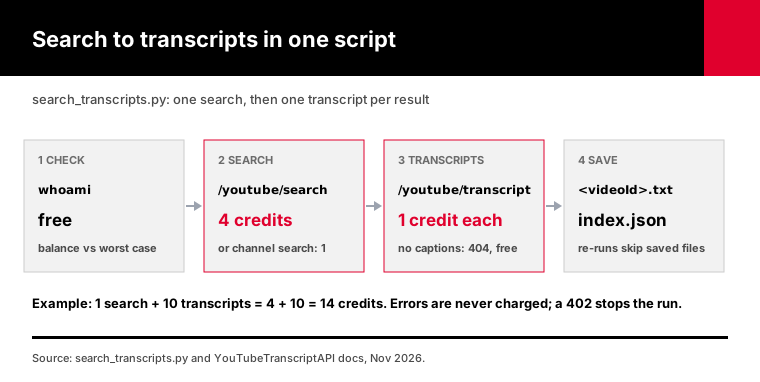
Here's what it does, step by step:
1. Checks your balance with the free whoami call and works out the worst case, the search plus one credit per result. 2. Refuses to start if the worst case is over your balance, or over a --max-credits cap you set. 3. Runs the search, across YouTube or inside one channel with --channel. 4. Fetches each transcript as plain text, skipping videos that already have a file. 5. Writes one text file per video with its title, link and channel, plus results.json and an index.json of what was saved or missing.
The core loop is short:
found = call("/youtube/search", {"q": query, "type": "video", "limit": limit}, key)
for v in found["results"]:
    data = call("/youtube/transcript", {"video_url": v["videoId"], "include_timestamp": "false"}, key)
    save(v, data)
The script adds the parts that bite in production. When it gets a 408, 429 or 503, it waits as long as Retry-After says and tries again.
It treats a 404 as "no captions," which is free. And it stops on a 402 instead of sending more calls into an empty balance.
Start with --dry-run. It runs only the search, prints what it found, and tells you the most the transcripts could cost.
My tests ran it against a fake local server that sends back the statuses that matter: a bad key, 404s, a 429, a 503, a 402 mid-run and a re-run over existing files. All 22 checks pass.
Those tests used a mock, not live YouTube data. Read the output of your first real run before you trust it with a big batch.
YouTube API pricing: what does a search really cost?
The official YouTube Data API costs nothing, but its search stops at 100 calls a day per project. YouTubeTranscriptAPI charges credits instead: as of November 2026, $3 buys 1,000 credits on Monthly, so a search comes to 1.2 cents, and $30 buys 15,000 credits on Annual, 0.8 cents a search. New accounts get 100 free credits once, with no card.
Here's the same job priced both ways:
| Job | Official Data API | YouTubeTranscriptAPI |
|---|---|---|
| 1 search, 10 results | 1 of your 100 daily calls, free | 4 credits |
| 1 search + 10 transcripts | Search free; transcripts not available for other people's videos | 14 credits |
| Search inside one channel | 1 search call (channelId filter) | 1 credit |
| 100 most recent uploads of a channel | About 3 units | 20 credits |
| 300 searches in one day | Blocked after 100, unless audited | 1,200 credits |
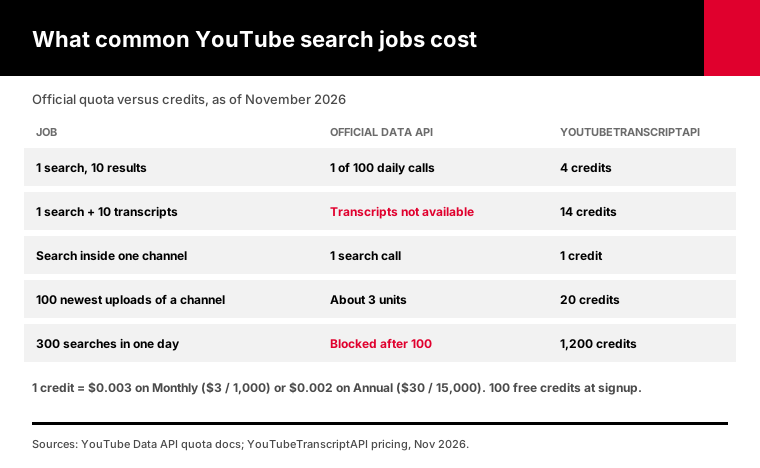
The second row is the one that matters most.
captions.download only works on videos you're allowed to edit, and it costs 200 units. Google's captions.download reference is explicit about that permission. So the official API can find a video for you, and then can't give you its transcript.
That gap is the main reason hosted transcript APIs exist. Our article on why captions.download returns 403 goes into the details.
What does 100 free credits buy? Enough for 25 searches, or one search plus 96 transcripts, or something in between.
That's plenty to build and test the script above before you pay anything. Full prices are on the pricing page.
Which should you use: the Data API or a hosted YouTube search API?
Use the official Data API when you need its filters, when 100 searches a day covers you, or when you're listing a large channel's back catalog cheaply. Use a hosted YouTube search API when you need more than 100 searches a day without an audit, when the next step is transcripts, or when an AI agent is the one searching. Many teams use both, with video IDs as the bridge.
Here's how I'd decide, in order:
1. Need transcripts of the results? Hosted. The official API can't return them for videos you don't own. 2. Need filters like date range, region or sort by views? Official, at least for that step. 3. More than 100 searches a day, starting this week? Hosted, or apply for the audit and wait. 4. Listing thousands of videos from one channel? Official playlistItems.list, then hosted transcripts. 5. An AI agent doing the searching? Hosted, through MCP, so the agent can't burn your project's quota.
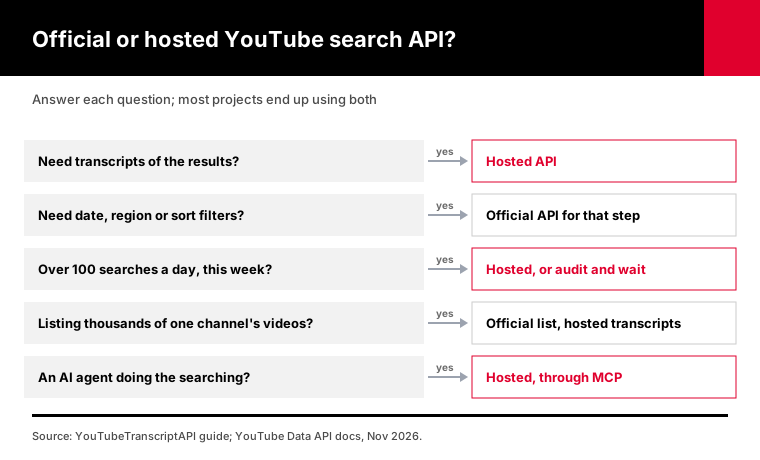
The mixed setup is normal. The Data API is a good index of YouTube, and it stops right before the transcripts.
How do AI agents search YouTube without burning quota?
AI agents search YouTube through tools. Our hosted MCP server gives Claude, ChatGPT, Cursor and other MCP clients a search_youtube tool at 4 credits a call and a search_channel tool at 1 credit, alongside get_transcript at 1 credit. The agent searches, picks videos and reads their transcripts on its own, and every call is billed to one key with no daily cap.
This is where the 100-a-day limit hurts most.
Agents are bad at rationing. They retry with new phrasing, they explore, and they don't know your project shares its quota with the rest of your app.
With credits, the worst case is a known number, not a 403 at 2 p.m. The tool descriptions even tell the agent to prefer search_channel when it already knows the channel, because it's a quarter of the price.
In most clients, setup is pasting a URL and signing in. The MCP server guide has the steps for Claude, ChatGPT, Cursor and the rest.
Frequently asked questions
Is the YouTube search API free?
Yes. The official YouTube Data API's search.list method is free, but each Google Cloud project gets a default of 100 search calls a day, with up to 50 results per call. The count resets at midnight Pacific Time. To get more, you have to pass a compliance audit through Google's quota extension form. Extra quota can't be bought.
How many searches per day does the YouTube API allow?
By default, 100. Since June 1, 2026, search.list has its own quota bucket of 100 calls a day per project, separate from the 10,000 units a day shared by methods like videos.list and playlistItems.list. Each extra page of results counts as another call, so 100 calls means at most 5,000 results a day.
Can I search YouTube without an API key?
Not through the official API. search.list needs an API key from a Google Cloud project. Hosted YouTube search APIs need their own key instead of a Google one. YouTubeTranscriptAPI gives you a key with 100 free credits and no card, which covers 25 searches at 4 credits each.
How do I get all videos from a YouTube channel with an API?
On the official API, call channels.list to get the channel's uploads playlist ID, then page through playlistItems.list at 1 unit per 50 videos. On YouTubeTranscriptAPI, the channel videos endpoint returns the 100 most recent uploads for 20 credits, and the latest endpoint returns the newest 15 for free.
Does the YouTube search API return transcripts?
No. search.list returns video IDs, titles, descriptions and thumbnails, never caption text. The official captions.download method only works for videos you have permission to edit. To get transcripts of search results, pass each video ID to a transcript API: YouTubeTranscriptAPI charges 1 credit per transcript, and videos without captions are free.
Can an AI agent search YouTube for me?
Yes. Connect an MCP server that has a YouTube search tool. YouTubeTranscriptAPI's hosted MCP server exposes search_youtube at 4 credits, search_channel at 1 credit and get_transcript at 1 credit, so Claude, ChatGPT or Cursor can search, pick videos and read their transcripts in one conversation without touching your Google quota.
Run your first search in the next five minutes
Start with the free 100 search calls if you only need titles and IDs. That's what they're for.
Once you need transcripts of what you find, or search call 101, grab a free key and start with a --dry-run of the script. You'll see the results and the worst-case cost before a single transcript credit is spent.