How to summarize YouTube videos with AI (one or 1,000)
By the YouTubeTranscriptAPI engineering team · Published · Updated
A one-hour YouTube video is about 10,000 words. An AI model reads that in seconds, for a fraction of a cent.
To summarize YouTube videos with AI, fetch each video's transcript and send it to a language model with a prompt that asks for key points and timestamps. Text costs far less than video: an hour of speech is roughly 14,000 tokens, while Google's Gemini docs count about 100 tokens per second of video, around 360,000 an hour. With a cheap model, 1,000 one-hour summaries cost under $5 in total.
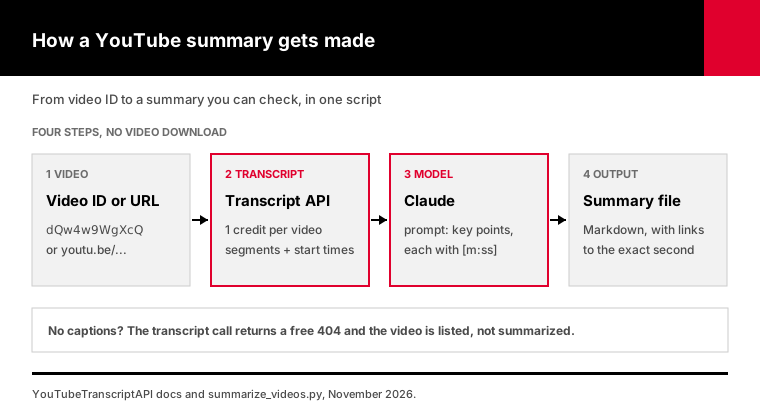
Summarizer websites work fine for one video. They break down when you have a channel, a course or a research backlog.
I'll show you the build: how to get the text, how to prompt for summaries you can check, what to do with three-hour podcasts, what it costs per 1,000 videos, and a script that does all of it.
How do you summarize a YouTube video with AI?
You summarize a YouTube video with AI in two steps. First you get the transcript, the text of everything said in the video, usually from its caption track. Then you give that text to a language model such as Claude with clear instructions: what kind of summary you want, how long, and that every point must cite the moment it comes from. The model never watches the video.
That second part is where most summaries go wrong.
If you paste a transcript into a chatbot and type "summarize this," you get a smooth paragraph you can't check.
Was that claim in the video? At what minute? You'd have to watch it to find out.
So the prompt matters more than the model. Ask for three things:
1. A fixed shape. An overview, then 5 to 8 key points, then one line on who should watch it. 2. A timestamp on every point, copied from the transcript. 3. Permission to say "unclear" instead of guessing.
The timestamps are the trick. They turn a summary you have to trust into a summary you can audit in 30 seconds.
There's one more choice to make early: paste or code.
For a handful of videos, pasting works. For anything regular, like every new upload on 20 channels or a 100-lecture course, you want a script that fetches the transcripts, calls the model and saves the results. That's what the rest of this guide builds.
Where does the transcript come from?
Many public YouTube videos have a caption track, either uploaded by the creator or generated automatically by YouTube's speech recognition. A transcript API returns that track as text with timestamps. YouTubeTranscriptAPI charges 1 credit per video of any length, $0.003 on the Monthly plan, and a video with no captions returns a free 404. Nothing gets downloaded or transcribed.
You can also open the transcript panel on YouTube and copy it by hand. That's fine once.
For code, one request does it. The Get Transcript endpoint takes a video ID or URL and returns segments with a start time and duration:
curl "https://youtubetranscriptapi.com/api/v2/youtube/transcript?video_url=dQw4w9WgXcQ&include_timestamp=true&send_metadata=true" \
  -H "Authorization: Bearer YOUR_API_KEY"
A video fetched for the first time takes 10 to 30 seconds. After that it's stored, and repeat fetches come back in about a second, as the caching docs explain. Set your HTTP timeout to 60 seconds.
Captions come in more than one language on many videos. Pass language=es or language=de to ask for a specific track; the response's language field tells you which one you actually got.
The timestamps are the part people throw away, and they shouldn't. Every segment has a start in seconds, which is exactly what the model needs to cite moments and what a link needs to jump to them.
What about videos with no captions at all?
Then a transcript API has nothing to give you. The route left is speech-to-text on audio you have the rights to.
I covered that trade-off, with prices, in captions or speech-to-text. For most talks, tutorials and podcasts, captions exist.
Why summarize the transcript instead of the video itself?
Summarizing the transcript is cheaper and works with any language model. Google's Gemini API can read a public YouTube URL directly, but its docs count about 100 tokens per second of video, roughly 360,000 tokens an hour. The same hour as text is about 14,000 tokens. Most videos are talking, so the words carry nearly everything a summary needs.
That ratio is about 25 to 1.
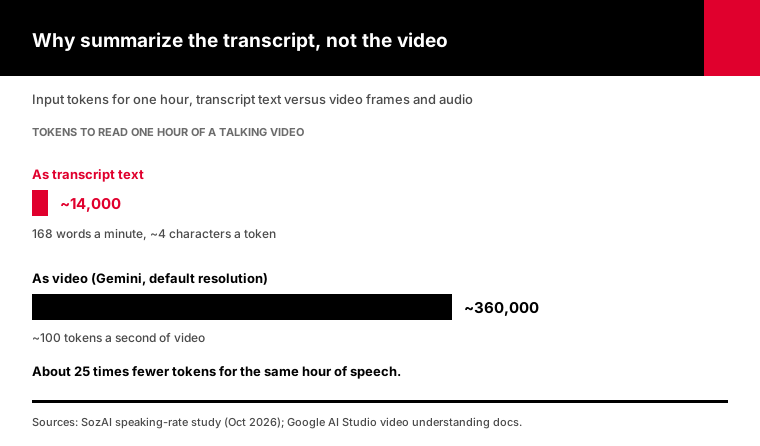
The 14,000 figure is my estimate, and here's the math. SozAI measured 10,446 YouTube videos in October 2026 and found a median English speaking rate of 168 words per minute.
That's about 10,000 words an hour. At roughly 4 characters per token, plus the timestamps, you land near 14,000 tokens.
Your number will move with the speaker. SozAI's podcast median was 178 words per minute and talks were 147.
Gemini's direct route has other limits too. Google's video docs say the YouTube URL feature is in preview, works only with public videos, and caps the free tier at 8 hours of YouTube video a day.
Video input does make sense sometimes. If the point of the video is on screen, like a chart, a code demo or a slide with no narration, the transcript won't have it. For talking-head content, text wins on price and portability.
Which model should you use to summarize YouTube videos?
For bulk YouTube summaries, a small model is usually enough, because summarizing a transcript is mostly picking out what was said. At Anthropic's November 2026 list prices, Claude Haiku 5.5 costs $0.10 per million input tokens and $0.50 per million output tokens. Claude Sonnet 5.5 costs $2 and $10, and Claude Opus 5.5 costs $4 and $20. Test two models on ten of your own videos before choosing.
Here's what one hour-long video costs at those prices, assuming about 14,300 input tokens and 600 output tokens:
| Model | Input $/1M tokens | Output $/1M tokens | One 1-hour video | 1,000 videos |
|---|---|---|---|---|
| Claude Haiku 5.5 | $0.10 | $0.50 | $0.0017 | $1.73 |
| Claude Sonnet 5.5 | $2.00 | $10.00 | $0.035 | $34.60 |
| Claude Opus 5.5 | $4.00 | $20.00 | $0.069 | $69.20 |
Treat those as minimums. All three models think before answering by default, and thinking tokens are billed as output, so I run them at low effort for summaries.
Low effort doesn't mean sloppy here. Pulling the main points out of a transcript is the kind of task where extra thinking adds cost and little else.
My take: start with Haiku 5.5 for volume and switch individual jobs to Opus 5.5 when the output feeds a decision. A dense technical lecture or a legal deposition earns the bigger model. A cooking channel doesn't.
One pricing detail matters for long videos. Anthropic's pricing page says Haiku 5.5 costs more when a single request's prompt is over 100,000 tokens: $0.50 in and $2.50 out. At 168 words per minute, you'd need about seven hours of speech in one request to cross that line.
If you can wait for results, Anthropic's Batch API halves both prices. That suits a backlog you can leave running overnight.
How do you summarize long YouTube videos without losing the middle?
Every current Claude model has a context window big enough for a three-hour podcast, so length isn't the problem. Attention is. The "Lost in the Middle" study by Liu and colleagues, published in TACL in 2024, found that models use information at the start and end of a long input better than the middle. For videos past an hour, summarize in sections, then combine.
Older tutorials split transcripts because the models couldn't fit them. Popular LangChain tutorials still teach that "map-reduce" pattern for that reason.
That's no longer why I chunk. I chunk so the middle gets the same attention as the start.
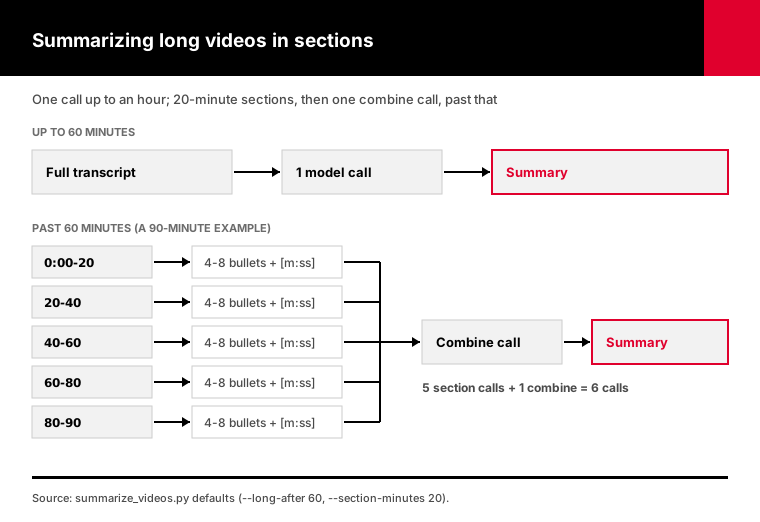
Here's the rule the script uses:
- Up to 60 minutes: one call with the full transcript. - Past 60 minutes: cut at 20-minute marks, summarize each section into 4 to 8 timestamped bullets, then make one more call that combines the section notes into the final summary.
A 90-minute interview becomes five section calls plus one combine call. The extra calls cost little, because each section is short and the combine step only reads notes.
I'll admit 20 minutes is a judgment call. Shorter sections give more detail per minute; longer ones make a smoother final summary. Section notes also make a chapter list almost for free.
How much does it cost to summarize 1,000 YouTube videos?
Summarizing 1,000 hour-long YouTube videos costs about $4.73 with Claude Haiku 5.5 at November 2026 list prices: $3 for transcripts at 1 credit each on the Monthly plan, plus about $1.73 in model tokens. With Claude Sonnet 5.5 it's about $37.60, and with Claude Opus 5.5 about $72.20. Shorter videos cost less on the model side; the transcript price doesn't change.
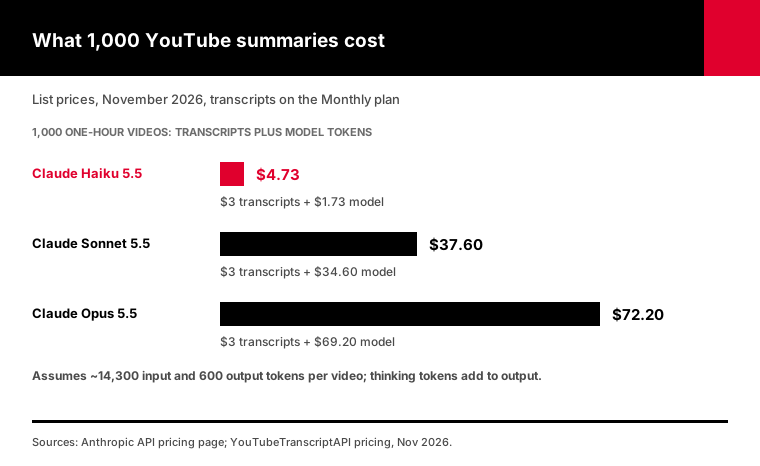
Here's what goes into each number:
- Transcripts: 1,000 credits. On the pricing page, that's $3 a month on Monthly or $2 per 1,000 on Annual. - Listing videos: a playlist or a channel's newest 100 uploads cost 20 credits per listing. - Model tokens: the table in the previous section, times your video count. - Failures: videos without captions cost nothing, and failed requests are never charged.
Don't trust my estimate for your channel, though. Run the script with --estimate first.
It fetches the transcripts, counts characters and prints the model cost for each model, without making a single model call. Then pick.
How do you stop an AI summary from making things up?
You stop most made-up claims with three habits: tell the model to use only the transcript, make it cite a timestamp for every point, and check those timestamps automatically. A point with no timestamp, or one that points past the end of the video, gets flagged for a human. None of this makes a summary perfect, but it makes errors cheap to find.
Summaries fail quietly. A made-up point reads exactly like a real one.
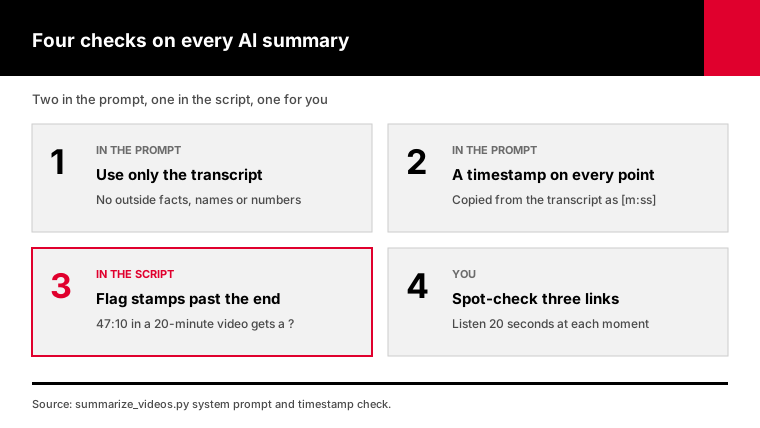
These are the rules I put in the system prompt:
- Use only what the transcript says. No outside facts, names or numbers. - End every key point with its timestamp, copied from the transcript. - Automatic captions misspell names and terms. Keep the wording and flag unclear passages instead of guessing. - If the transcript is too short or garbled, say so in one line.
Then the script checks every cited timestamp against the video's length. A summary that cites 47:10 in a 20-minute video gets a question mark and a line in the report.
The last check is you. Click three timestamp links in a summary and listen for 20 seconds each.
If all three match, the summary is probably sound. If one doesn't, read the transcript for that section yourself.
How do you summarize a whole YouTube channel or playlist?
To summarize a whole channel or playlist, list its videos first, then summarize each one in a loop that saves results to disk and skips finished videos. YouTubeTranscriptAPI lists a playlist or a channel's newest 100 uploads for 20 credits, then charges 1 credit per transcript. The script below does both, keeps going when one video fails, and writes a report of credits, tokens and cost.
I wrote summarize_videos.py for this. It needs Python 3.9 or newer and the official anthropic package. I tested it against mock versions of both APIs: 37 checks covering retries, refusals, sections, caching and cost math.
pip install anthropic
export YT_API_KEY=your_youtubetranscriptapi_key
export ANTHROPIC_API_KEY=your_anthropic_key

# One video
python summarize_videos.py https://www.youtube.com/watch?v=dQw4w9WgXcQ

# Price a channel before spending anything on the model
python summarize_videos.py --channel @TED --estimate

# A playlist as study notes, with the cheap model
python summarize_videos.py --playlist PLxxxxxxxx --style notes --model claude-haiku-5-5
Each video becomes a Markdown file with the title, a link, and a summary whose timestamps open the video at that second.
That makes the output useful beyond reading. Drop the folder into Obsidian or Notion, search it, or feed the summaries into a weekly digest email. The report.json file next to them shows what the run spent, down to the token.
The parts I care most about:
- It caches every transcript in summaries/transcripts/, so you can change the prompt and re-run without paying for transcripts again. - It skips videos that already have a summary, so a stopped run picks up where it left off. - It stops cleanly when your credits run out instead of failing on every video after. - It retries rate limits using the Retry-After header, inside the 300 requests a minute your key allows.
Three styles are built in: brief (overview, key points, who should watch), notes (study notes in the video's order, with review questions) and chapters (a line per topic change). Add --reply-language German to get summaries in another language, even from English captions.
Channels with more than 100 videos need one more step to reach the older ones. My guide to bulk channel transcripts shows how.
What if you don't want to write code?
If you don't want to run a script, connect a YouTube MCP server to Claude or ChatGPT and ask for the summary in chat. The model fetches the transcript itself, so you paste a link and get a timestamped summary back. It's the same pipeline without the code, and each video still costs 1 credit for the transcript.
There's a ready-made version of this: the YouTube video summarizer agent. You set it up once in a Claude or ChatGPT Project, and every link you paste afterward comes back as an overview, timestamped key points and a "worth watching if" line.
The chat route is better when you're reading a few videos a day and want to ask follow-up questions. The script is better for batches, schedules and anything that writes to files.
Frequently asked questions
Can ChatGPT summarize a YouTube video from a link?
Not on its own. ChatGPT can't play a YouTube video, and a bare link may give it nothing to read, depending on the tools it has that day. It summarizes well once it has the transcript. Paste the transcript yourself, or connect a YouTube MCP server so ChatGPT can fetch it, which costs 1 YouTubeTranscriptAPI credit per video.
What is the best AI for summarizing YouTube videos?
Any capable language model summarizes a transcript well. The transcript and the prompt matter more than the brand. For bulk work, a small model such as Claude Haiku 5.5 costs about $0.002 per hour-long video at November 2026 prices. For dense lectures or decisions, a larger model like Claude Opus 5.5 is worth roughly $0.07 per video.
How do I summarize a YouTube video that is 3 hours long?
Split it. A three-hour podcast at about 178 words a minute is roughly 32,000 words, which fits in one request to any current Claude model. Accuracy is the reason to split: summarize each 20-minute section with timestamps, then combine the notes. The script does this for any video longer than 60 minutes.
How do I summarize a YouTube video without captions?
You can't summarize it from a transcript API, because there's no transcript to fetch. YouTubeTranscriptAPI returns a free 404 for those videos. Your options are speech-to-text on audio you have the rights to, or a model that accepts video input, such as Gemini with a public YouTube URL. Captions also appear late on some new uploads, so retry first.
Can AI turn a YouTube video into study notes?
Yes. Ask for notes instead of a summary: a short overview, sections that follow the video's order, definitions and steps as bullets, and a few review questions, each with a timestamp. The script's --style notes option does exactly that, and it works on a whole playlist, which suits a course.
How much does it cost to summarize YouTube videos with an API?
For an hour-long video, about $0.005 with Claude Haiku 5.5 at November 2026 list prices: $0.003 for the transcript on YouTubeTranscriptAPI's Monthly plan plus about $0.0017 in model tokens. With Claude Opus 5.5 it's about $0.07. A new YouTubeTranscriptAPI account includes 100 free credits, enough for 100 transcripts.
Summarize your first ten videos tonight
The fastest way to learn how to summarize YouTube videos well is to do ten. Pick ten you've been meaning to watch.
Get a free key, which comes with 100 credits, and run summarize_videos.py with --estimate, then without it.
Click three timestamp links in each summary. If they hold up, point the script at the channel or playlist you actually care about.