YouTube video analysis with AI: what videos say, as data
By the YouTubeTranscriptAPI engineering team · Published · Updated
Most YouTube video analysis stops at views, watch time and click-through rate. Those numbers tell you how a video did. They don't tell you what it said.
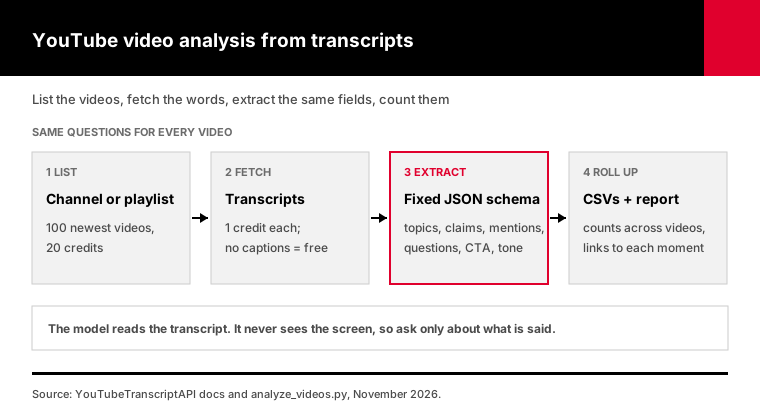
YouTube video analysis with AI means reading what a video says as well as how it performed. You fetch the transcript, then ask a language model for the same fields on every video: topics, claims, brands mentioned, questions answered, call to action. Do that for a whole channel and you get a table you can sort, count and compare against your own content, with a timestamp link behind every finding.
I read five of the pages that rank for this topic. Two are about performance metrics. Three use AI on transcripts, but all three stop at one video at a time or a vendor dashboard.
None of them shows how to analyze 100 videos, check the AI's output, or what it costs. That's what this guide covers, with a script at the end.
What is YouTube video analysis, and what does it miss?
YouTube video analysis usually means performance analytics: views, watch time, retention, click-through rate and engagement. Those come from YouTube Studio for your own channel and from public counts for anyone else's. Content analysis is the other half. It asks what each video says, which topics it covers and which products or claims it pushes. Most tools only do the first half.
Metricool's 2026 YouTube study is a good example of the numbers side. It looked at 799,718 videos from 71,177 accounts and reported on views, Shorts and growth.
That's useful. But no view count will tell you that a competitor named a rival product in, say, 11 of its last 30 videos.
Here's the split:
| Performance analytics | Content analysis | |
|---|---|---|
| Question it answers | How did the video do? | What did the video say? |
| Data source | YouTube Studio, public counts | The transcript |
| Works on other channels | Partly (public counts only) | Yes, if the video has captions |
| Typical output | Charts, dashboards | Topics, claims, mentions, quotes |
| Good for | Timing, titles, thumbnails | Positioning, gaps, research, monitoring |
You want both. This guide is about the second, because that's where AI changes what one person can do in an afternoon.
How do you analyze a YouTube video with AI?
To analyze a YouTube video with AI, get its transcript, then send it to a language model with a fixed list of questions and a required answer format. Ask for topics, specific claims, brands and people mentioned, the questions it answers and the call to action, each with the timestamp where it appears. The model reads the words; it never watches the video.
The fixed format is what makes this analysis rather than a summary.
A summary is prose, different every time. An analysis is a record with the same fields for every video. That's what lets you put 100 of them in a spreadsheet.
Claude's API can enforce this. Its structured outputs feature uses constrained decoding, so the response always matches the JSON schema you pass in.
Getting the transcript is one request. The transcript endpoint returns every caption line with its start time for 1 credit, and videos without captions return a free 404.
For a single video you can do all of this by hand. Paste the transcript into a chat and ask your questions. It stops scaling at around the fifth video.
What can AI pull out of a YouTube transcript?
From a transcript, AI can reliably pull out what was said: the main topics, specific claims with numbers, products and people named, questions the video answers, who it's aimed at and what the speaker asks viewers to do. It can also judge overall tone. It can't see anything shown on screen, and it can't measure performance. Ask only for what the words contain.
These are the fields I use, and what each one is for:
- Summary: two or three sentences, so you know what you're looking at. - Topics: 3 to 8 short tags. Counted across videos, they show what a channel keeps coming back to. - Claims: specific statements presented as true, like "churn fell 12%." Each with a timestamp. - Mentions: brands, products, people and organizations, with context and a timestamp. - Questions answered: a ready-made list of what the audience wanted to know. - Call to action: what the speaker wants viewers to do next. - Sentiment and audience: a rough read on tone and who it's for.
You can add your own question too. "What pricing does the speaker mention?" or "Which tools do they recommend?" becomes one more column.
Keep topics short and lowercase. "Pricing," "pricing strategy" and "Pricing " will otherwise count as three different things, and your totals will lie to you.
How do you analyze a whole YouTube channel?
To analyze a whole YouTube channel's content, list its videos, run the same analysis on each transcript, then count the results. Topics that appear in most videos are the channel's core themes. Names that keep coming up show who they partner with or position against. With YouTubeTranscriptAPI, listing a channel's 100 newest uploads costs 20 credits and each transcript costs 1.
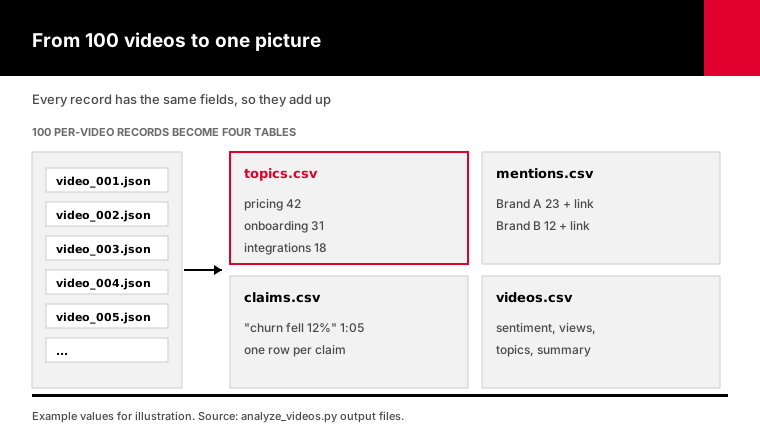
The channel endpoint also returns each video's title, length and view count text. Add those to the table and you can see which topics get watched.
Most "channel analyzer" tools stop at subscribers, views and upload frequency. Those are public numbers, and they're useful for spotting outlier videos.
They can't tell you why an outlier worked. The transcript can. When a channel's most-watched video is the only one that talks about pricing, that's a lead worth following.
Three columns are worth reading first. Topics, because counts across 100 videos are hard to argue with. Mentions, because they show who a channel works with.
And calls to action, because they tell you what the channel is actually selling, which isn't always what its About page says.
One caution: the newest 100 uploads aren't the whole channel. For older videos, my guide to bulk channel transcripts shows how to reach them.
How do you do YouTube competitor analysis from transcripts?
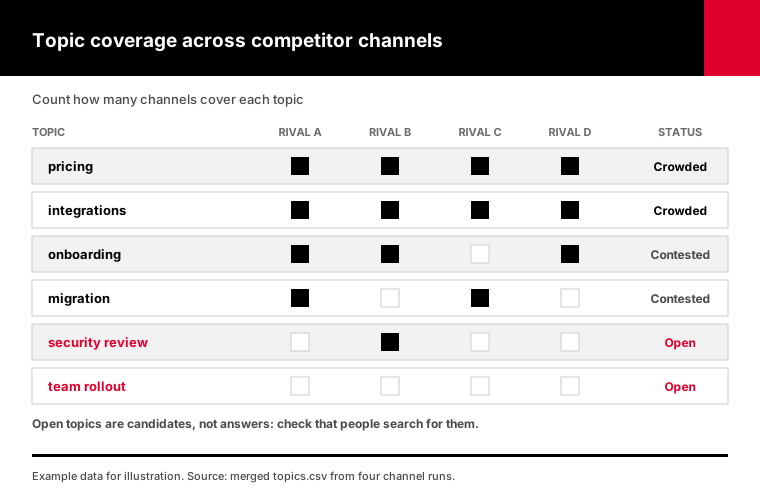
For YouTube competitor analysis, run the same analysis on three to six competitor channels, then compare topic counts. Topics every channel covers are crowded. Topics one channel covers and the others skip are gaps you can take. Mentions show which products each competitor recommends, compares itself to or never names. Because every finding has a timestamp, you can check any surprise in seconds.
Here's the workflow I'd run:
1. Pick three to six channels your buyers actually watch. 2. Analyze each channel's recent uploads with identical settings. 3. Merge the topic tables and count how many channels cover each topic. 4. Read the claims and mentions for your own product category. 5. Click the timestamps on anything that surprises you.
Step 5 is where the value is. A count tells you a competitor mentions your product. The clip tells you whether they're praising it or taking it apart.
A gap isn't automatically an opportunity, though. Nobody covering a topic sometimes means nobody wants it. Check search demand before you film.
To keep watching after the first pass, the channel monitor guide fetches every new upload's transcript automatically. Run the analysis on those and your competitor table stays current.
How do you keep AI video analysis accurate?
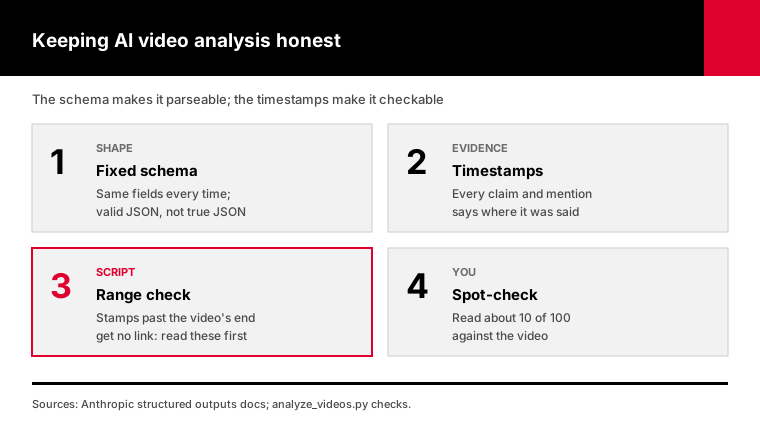
Keep AI video analysis accurate with three controls: a strict schema so every answer has the same shape, a rule that every claim and mention carries the timestamp where it was said, and automatic checks that flag timestamps that don't fit the video. Then spot-check a sample by clicking the links. A schema guarantees the format of the answer, not that the answer is true.
People miss this.
Anthropic's docs describe structured outputs as ensuring valid, parseable output. Valid JSON can still hold a wrong claim. If a field is required and the transcript has nothing for it, a model may fill it with something plausible.
So the instructions matter as much as the schema:
- Use only what the transcript says, with no outside facts. - Keep names as the captions spell them, because automatic captions misspell brands. - Leave a list empty rather than inventing an entry.
Then the script checks every timestamp against the video's length and drops the link for any that don't fit. Those are the first ones to read by hand.
Academic researchers who code YouTube content use the same idea with people. In one 2025 study of ADHD content, two researchers coded a sample of videos independently, compared their results and revised the codes before splitting the rest. Do a lighter version: read 10 of your 100 results against the video before you trust the totals.
Re-run a few videos too. If the topic tags change a lot between runs, your instructions are too loose, so tighten them before the full channel.
What should you do with YouTube video analysis results?
Turn each output into a decision. Topic counts become your content plan: fill gaps, skip crowded topics or cover them better. Claims become sales notes, so your team knows what competitors promise. Questions answered become FAQ pages and video ideas. Mentions show partners, rivals and creators worth contacting. Without a decision attached, a 100-row spreadsheet is just homework.
Here's how I'd split the work:
- Content team: topics.csv, sorted by how many channels cover each topic. - Sales and product: claims.csv, filtered to claims about pricing, speed or features. - Support and SEO: the questions answered, merged and deduplicated into a list of pages to write. - Partnerships: mentions.csv, sorted by how often each name comes up.
The same analysis works on your own channel.
Run it on your last 50 videos and compare with a competitor's. If you talk about features while they talk about problems, that's a cheap thing to fix.
Repeat the run every quarter. The second run is more useful than the first, because now you can see what changed.
How much does it cost to analyze 100 YouTube videos?
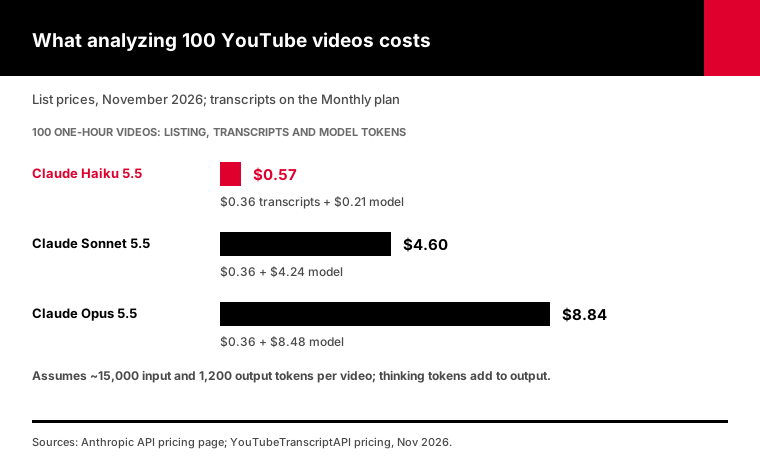
Analyzing 100 hour-long YouTube videos costs about $0.57 with Claude Haiku 5.5 at November 2026 list prices: 120 credits to list the channel and fetch transcripts, about $0.36 on the Monthly plan, plus roughly $0.21 in model tokens. With Claude Sonnet 5.5 it's about $4.60, and with Claude Opus 5.5 about $8.84. Shorter videos cost less on the model side.
Here's the math, so you can redo it for your channel.
An hour of speech is about 10,000 words: SozAI measured a median of 168 words per minute across 10,446 YouTube videos in October 2026. With timestamps and instructions that comes to roughly 15,000 input tokens, and an analysis record is about 1,200 output tokens.
At Anthropic's list prices, Haiku 5.5 costs $0.10 per million input tokens and $0.50 per million output tokens. Sonnet 5.5 is $2 and $10, and Opus 5.5 is $4 and $20.
Treat these as minimums. Current Claude models think before they answer, and thinking is billed as output, so run analysis at low effort.
Which model? Start with Haiku 5.5 for the full channel, then re-run the 10 videos that matter most with Opus 5.5 and compare.
If the answers match, keep the cheap one. The pricing page has the transcript side.
What can't transcript-based analysis see?
Transcript-based analysis can't see anything that isn't spoken. Charts, on-screen text, product demos and thumbnails are invisible to it, and so are videos with no captions. Automatic captions also misspell names and jargon, which affects mention counts. For talking-head content, interviews, podcasts and tutorials, the words carry most of the meaning, so this matters less than it sounds.
Video models can see the screen, but they cost far more to run at scale.
Google's Gemini docs estimate about 100 tokens for each second of video at default resolution, around 360,000 tokens an hour. The same hour as transcript text is roughly 15,000 tokens. That's a 24-fold difference before you've asked a single question.
My approach is transcripts for the whole channel, then a video model for the few videos where the visuals are the point.
Videos without captions are skipped. The script lists them, and they cost nothing.
Language is the last limit. The script asks for English captions by default. Pass --language for another track, and expect topic tags from non-English videos to need a second look before you merge them.
How do you run the analysis script?
The script takes video IDs, a playlist or a channel, fetches each transcript, sends it to Claude with a fixed JSON schema and writes the results as CSV files and a Markdown report. It needs Python 3.9 or newer and the anthropic package. It caches transcripts, skips videos it has already analyzed and checks every timestamp. The --estimate flag prices a run before any model call.
Grab analyze_videos.py and run it like this:
pip install anthropic
export YT_API_KEY=your_youtubetranscriptapi_key
export ANTHROPIC_API_KEY=your_anthropic_key

# Price a competitor's channel before spending anything on the model
python analyze_videos.py --channel @competitor --estimate

# Analyze it with the cheap model
python analyze_videos.py --channel @competitor --model claude-haiku-5-5

# Add your own question to every video
python analyze_videos.py --playlist PLxxxxxxxx --question "Which tools does the speaker recommend?"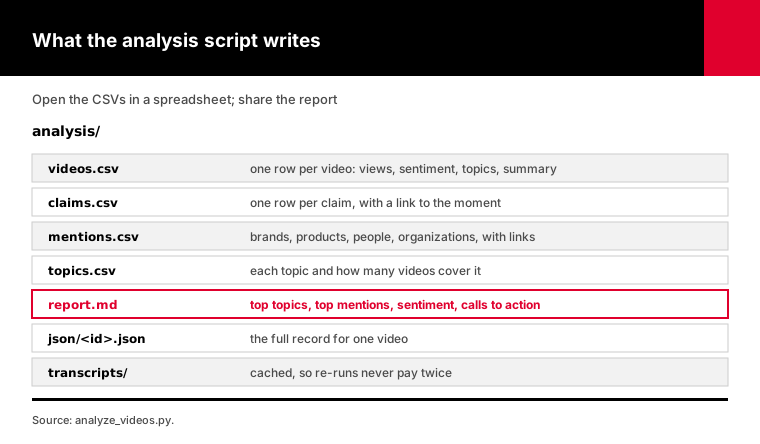
What you get in the analysis folder:
- videos.csv: one row per video, with views, sentiment, topics, mentions and the summary. - claims.csv and mentions.csv: one row each, with a link to the exact moment. - topics.csv: every topic with the number of videos that cover it. - report.md: top topics, top mentions, sentiment and calls to action, ready to share.
I tested it against mocks of both APIs: 30 checks covering the schema request, links, timestamp checks, roll-ups, resuming, refusals and running out of credits.
Want to ask questions in a chat instead of building tables? The channel researcher agent does a lighter version inside Claude or ChatGPT. For plain summaries, there's a guide on how to summarize YouTube videos with AI.
Frequently asked questions
Can AI analyze a YouTube video?
Yes, through its transcript. AI models like Claude and ChatGPT can't watch a YouTube video, but they analyze its transcript well: topics, claims, mentions, questions and tone. Fetch the transcript first, paste it or send it through an API, and ask for fixed fields with timestamps. Video models like Gemini can also read visuals, at many times the token cost.
How do I analyze a competitor's YouTube channel?
List the channel's recent uploads, fetch each transcript, and run the same AI analysis on every video: topics, claims, brands mentioned and calls to action. Count topics and mentions across videos to see what they focus on. With YouTubeTranscriptAPI, a channel's 100 newest uploads cost 20 credits to list plus 1 credit per transcript.
What is the best YouTube video analysis tool?
It depends on the question. For views, retention and click-through on your own channel, YouTube Studio is the source. For public stats on other channels, channel analyzer tools work. For what videos actually say, you need transcripts plus an AI model with a fixed schema, either in a hosted tool or a script that writes results to CSV files you control.
How much does it cost to analyze YouTube videos with AI?
At November 2026 list prices, analyzing 100 hour-long videos costs about $0.57 with Claude Haiku 5.5, including $0.36 for listing the channel and fetching 100 transcripts on YouTubeTranscriptAPI's Monthly plan. With Claude Opus 5.5 it's about $8.84. Shorter videos cost less, and videos without captions are skipped at no cost.
Can AI find brand mentions in YouTube videos?
Yes, when the brand is spoken. AI reads the transcript and lists brands, products and people named, with the timestamp of each mention. Automatic captions sometimes misspell names, so search for likely variants and check a sample. Logos or products shown on screen without being named won't appear in the transcript, so they need a video model.
How accurate is AI analysis of YouTube transcripts?
Accurate enough for counts and leads, not for unchecked quotes. A strict schema makes every answer the same shape, but valid output can still hold a wrong claim. Require a timestamp on every claim and mention, flag timestamps that don't fit the video, and read a sample of about 10 percent against the video before trusting the totals.
Analyze one competitor this week
Pick the competitor whose channel your buyers watch most. Run the script with --estimate, then for real with Claude Haiku 5.5.
Open topics.csv and mentions.csv, sort by count, and click the five timestamps that surprise you most. That's your positioning brief for next quarter.