YouTube channel monitor: transcripts of every new upload
By the YouTubeTranscriptAPI engineering team. Last updated November 4, 2026.
A competitor posts a video at 9 a.m. You hear about it at lunch, from someone who watched it.
A YouTube channel monitor fixes that. It checks the channels you follow on a schedule, spots each new upload, fetches its transcript, and sends the text wherever your team reads it. The script in this guide does that with a free check for new videos and 1 credit per transcript. It also waits and retries when YouTube hasn't finished the captions yet. None of the five monitoring guides I read before writing this one handle that.
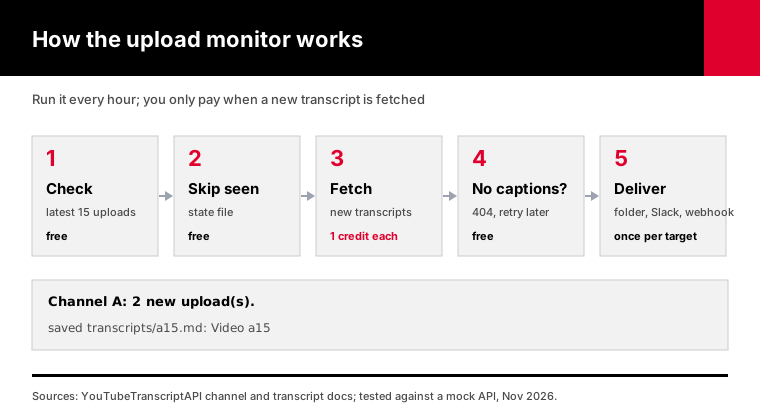
Here's the tested script, plus everything around it: the alternatives, the caption delay, delivery, scheduling and cost.
How do you get the transcript of every new YouTube upload automatically?
Run a small script on a schedule that does three things. It checks each channel's newest uploads, remembers which video IDs it has already handled, and fetches a transcript only for IDs it hasn't seen. With YouTubeTranscriptAPI the check is free and each transcript costs 1 credit, so a run with nothing new costs nothing at all.
The memory part matters more than it sounds.
Leave it out and every run sees the channel's last 15 videos as brand new. That means 15 Slack messages an hour, and paying for the same transcripts over and over.
So the script keeps a small state file, monitor_state.json. Each video ID gets a status: old, waiting, saved, delivered, or gave up.
On a channel's first run, it records what's already there and fetches nothing. From then on, only uploads published after you started show up. If you do want the existing videos too, pass --backfill.
The check uses the channel latest endpoint, which returns a channel's 15 newest uploads and costs no credits. The transcripts come from the transcript endpoint at 1 credit each.
How do the ways to monitor a YouTube channel compare?
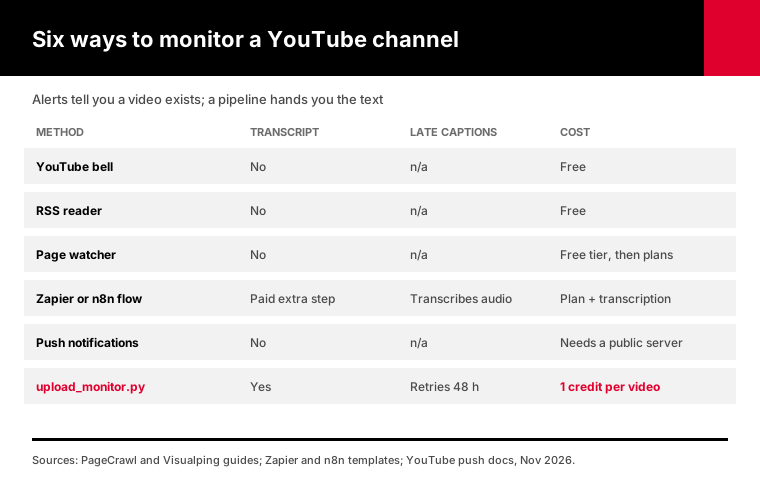
The ways to monitor a YouTube channel split into alerts and pipelines. The bell icon, RSS readers and page watchers tell you a video exists. Zapier, n8n and a script like this one also do something with it. Only the pipelines hand you the transcript. Pipelines that read YouTube's captions must also retry, because captions often show up hours after the video.
| Method | Tells you | Gets the transcript | Handles late captions | Cost |
|---|---|---|---|---|
| YouTube bell notification | You, on your phone | No | n/a | Free |
| RSS reader | You, in the reader | No | n/a | Free |
| Page watcher (Visualping, PageCrawl) | Email or Slack | No | n/a | Free tier, then a plan |
| Zapier or n8n flow | Any app | With an extra paid step (Rev, Gemini) | n/a, they transcribe the audio | Plan + transcription |
| YouTube push notifications | Your server | No | n/a | Free, needs a public server |
| This script | Folder, Slack, Discord, webhook | Yes | Yes, retries for 48 hours | Free checks, 1 credit per transcript |
Page watchers compare snapshots of the channel page. PageCrawl's guide suggests checking an active channel every 6 to 12 hours.
Visualping can check as often as every 5 minutes. Neither touches the transcript.
The n8n template I read checks channels weekly and costs $20. It sends each video to Gemini to transcribe, and if a video fails, it moves on without retrying.
Zapier's own transcript guide pairs its YouTube trigger with Rev, a paid transcription service, and drops the result into Google Docs.
If you want an AI summary, no code, and no script, our YouTube AI agents page has ready-made upload digests for Claude and ChatGPT.
Why is a new video's transcript often missing?
A new video's transcript is often missing because YouTube hasn't made its automatic captions yet. Google's help page says automatic captions "may not be ready at the time that you upload," and that processing time depends on the audio. Stanford's accessibility team says it can take up to 24 hours. A monitor that fetches once, at the moment it spots the video, gets nothing.
This is the bug I'd bet most homemade monitors have.
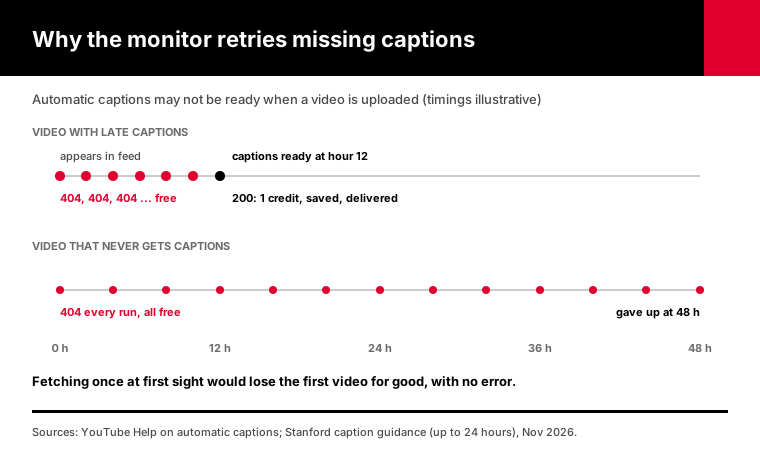
The video often shows up in the feed hours before its captions do. The script fetches the transcript right away. The API answers 404, no captions, and the script marks the video as done.
That video is now lost for good, and nobody notices, because nothing threw an error.
So this script treats a 404 on a new video as "not yet." The video stays in the waiting list, and every later run tries it again. A 404 costs nothing, so waiting is free.
Whenever the captions land, the next run fetches, saves and delivers the transcript.
Some videos never get captions. Google's list of reasons includes speech YouTube doesn't recognize, poor audio, a long silent opening, and languages automatic captions don't support.
After 48 hours of 404s the script gives up on the video and says so. Change that with --give-up-hours.
How do you set up the YouTube upload monitor in Python?
Setting up the upload monitor takes four steps: grab upload_monitor.py, pip install httpx, export your key as YTT_API_KEY, and name the channels to follow. The first run records each channel's current uploads and fetches nothing. Every run after that fetches transcripts only for videos published since, and saves each one as a Markdown file named after the video ID.
Download upload_monitor.py. Any Python from 3.10 up works, and httpx is the only dependency.
pip install httpx
export YTT_API_KEY=tk_live_your_key_here
python upload_monitor.py @TED @veritasium --out transcripts
The first run prints something like this:
TED: first run, 15 existing uploads recorded, nothing fetched.
Veritasium: first run, 15 existing uploads recorded, nothing fetched.
Delivered 0, gave up on 0, 0 still waiting.
When something new shows up on a later run, you get a file like transcripts/VIDEO_ID.md. It has the title, link, channel, publish date and caption language at the top, then every caption line with its timestamp.
For more than a handful of channels, list them in a text file, one per line, and pass --channels-file channels.txt. Lines that start with # are ignored, so you can leave notes.
The script accepts @handles, channel URLs or UC IDs. The API resolves handles for you, so you never have to dig a channel ID out of the page source the way RSS readers require.
I tested every path against a mock of the API before publishing:
- A video whose captions appear one run later is fetched then, and charged once. - A video that never gets captions is dropped after the give-up window. - A channel that posts more than 15 videos between runs triggers a warning. - Running out of credits (402) stops cleanly, and the waiting videos carry over.
How do you send new transcripts to Slack, Discord or a webhook?
Pass a webhook URL and the script posts each new transcript as it arrives. Use --slack with a Slack incoming webhook, --discord with a Discord channel webhook, or --webhook with any URL that accepts JSON. Slack and Discord get the title, link and a 500-character excerpt. The generic webhook gets the full transcript, ready for Zapier, Make, n8n or your own code.
python upload_monitor.py --channels-file channels.txt \
  --slack https://hooks.slack.com/services/T000/B000/XXXX \
  --discord https://discord.com/api/webhooks/123/abc
Making the Slack URL takes two minutes: create a Slack app, turn on incoming webhooks, and pick a channel. Slack's guide walks through it.
Discord takes even less time: in the channel's settings, go to Integrations, then Webhooks, and copy the URL. Discord caps a message at 2,000 characters, so the script trims to fit.
Treat both URLs like passwords. Anyone who has one can post into your channel.
The generic webhook sends JSON with the video ID, title, channel, publish date, link and the full transcript as one string. Point it at an n8n or Make webhook trigger and you can summarize the transcript with an AI model, file it in Notion, or email it, without touching the script.
Deliveries are tracked one destination at a time. If Discord is down but Slack works, Slack gets the message once, and the next run retries only Discord, from the saved file. You never pay for the transcript twice.
How often should you check a YouTube channel for new videos?
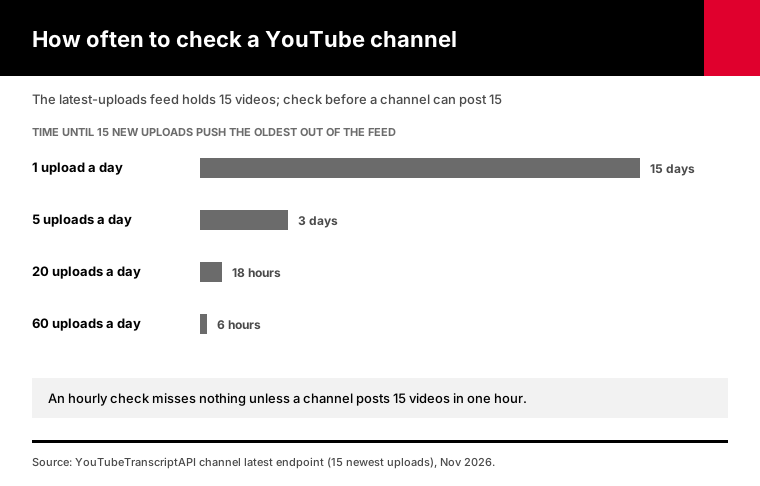
Check most channels once an hour. The latest-uploads check is free, so the only limit is the feed itself: it lists a channel's 15 newest videos. A channel that posts more than 15 videos between two checks will push some out of view before you see them. Hourly is plenty for nearly every channel, and the script warns you if all 15 are new.
Faster than hourly rarely helps, because the captions are the slow part. A video spotted five minutes after upload often waits hours for its transcript anyway.
Small channels can go slower. If a creator posts once a week, checking once a day is plenty.
What about push instead of polling? YouTube supports push notifications through PubSubHubbub. Google's hub calls your server when a channel uploads, or when it edits a video's title or description.
That's fast, but you need a public server to receive the calls, you have to handle edits that aren't new uploads, and captions still lag. For most teams an hourly check is simpler and catches the same videos.
If you need a big catch-up after a gap, use the channel transcripts script. It lists up to 100 uploads at once.
How do you run the monitor on a schedule for free?
Run it with cron on a Mac or Linux box, Task Scheduler on Windows, or GitHub Actions if you don't want a machine on. GitHub's scheduled workflows can run as often as every 5 minutes, and the job can commit the state file and new transcripts back to the repo, so the next run remembers what it already handled.
With cron, one line runs it at 17 minutes past every hour:
17 * * * * cd /home/me/monitor && YTT_API_KEY=tk_live_... python upload_monitor.py --channels-file channels.txt --slack https://hooks.slack.com/services/...On Windows, create a basic task in Task Scheduler, set it to repeat every hour, and have it launch python.exe with the arguments from the cron line. Set "Start in" to the script's folder so the state file lands in the same place every time.
For GitHub Actions, put upload_monitor.py and channels.txt in a private repo, add YTT_API_KEY and SLACK_WEBHOOK as repository secrets, and save this as .github/workflows/monitor.yml:
name: youtube-upload-monitor
on:
  schedule:
    - cron: "17 * * * *"
  workflow_dispatch:
permissions:
  contents: write
jobs:
  check:
    runs-on: ubuntu-latest
    steps:
      - uses: actions/checkout@v4
      - uses: actions/setup-python@v5
        with:
          python-version: "3.12"
      - run: pip install httpx
      - run: python upload_monitor.py --channels-file channels.txt --slack "$SLACK_WEBHOOK"
        env:
          YTT_API_KEY: ${{ secrets.YTT_API_KEY }}
          SLACK_WEBHOOK: ${{ secrets.SLACK_WEBHOOK }}
      - run: |
          git config user.name "upload-monitor"
          git config user.email "upload-monitor@users.noreply.github.com"
          git add monitor_state.json transcripts
          git commit -m "New transcripts" || echo "Nothing new"
          git push
Two things from GitHub's docs are worth knowing. Scheduled runs can start late when GitHub is busy, which doesn't matter for an hourly check. And in a public repo, schedules switch off after 60 days without activity, one more reason to keep this repo private.
I picked minute 17 on purpose. GitHub names the start of every hour as a high-load time, when delays are worst.
What can you do with each new transcript?
Each new transcript is plain text with timestamps, so you can read it, search it, or hand it to another tool. Good uses include tracking competitors' product announcements, reading podcasts instead of playing them, and passing each transcript to an AI model for a short summary. The Markdown files also become a searchable archive that grows on its own.
A few setups I'd copy.
For competitor tracking, follow every competitor's channel and send the Slack excerpt to a #competitors channel. Someone skims the excerpt and clicks the link only when it matters.
For podcasts, use the folder output and open the Markdown file instead of the episode. Skimming the text is faster than listening to a 40-minute conversation, and the timestamps tell you where to jump in when you want to hear a part.
For summaries, point --webhook at an n8n or Make scenario that sends the transcript to an AI model and posts the summary back to Slack. The script stays simple, and you can change the prompt without touching it.
For research, let the folder build up for a few months. Every file has the channel, date and link at the top, so a plain text search across the folder already works. For phrase queries and ranking, load it into a proper index.
One caution: transcripts are other people's words. Quote them with a link back to the video, the way you would any source.
What does it cost to monitor YouTube channels?
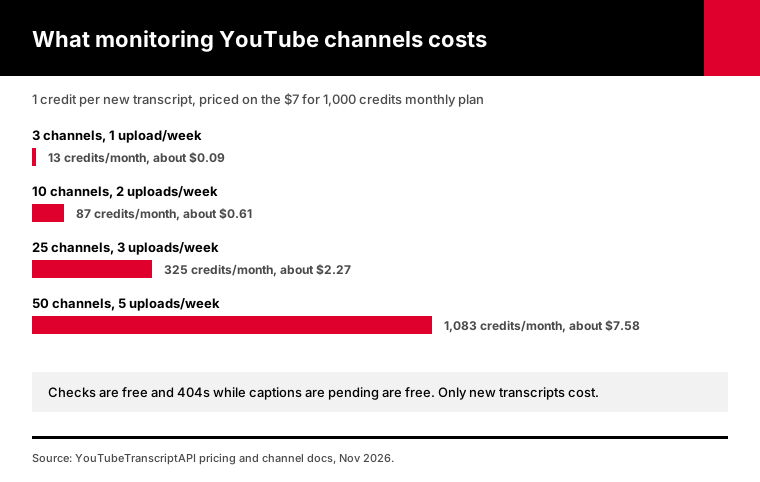
Monitoring costs nothing until a channel uploads. The check for new videos is free, so hourly checks on any number of channels add no credits. Each new video's transcript costs 1 credit, and the 404s while captions are pending are free. Ten channels posting twice a week add up to about 87 transcripts a month, roughly $0.61 on the $7 monthly plan.
Here's how it scales:
| Channels | Uploads per channel per week | Transcripts a month | Credits | On the monthly plan |
|---|---|---|---|---|
| 3 | 1 | about 13 | 13 | about $0.09 |
| 10 | 2 | about 87 | 87 | about $0.61 |
| 25 | 3 | about 325 | 325 | about $2.27 |
| 50 | 5 | about 1,083 | 1,083 | about $7.58 |
The free account's 100 credits cover the 10-channel case for a full month. The free check does need at least 1 credit on the account to run.
Hourly checks on 50 channels mean 50 calls in a burst, well under the 300 requests a minute each key allows.
Monthly billing is $7 a month for 1,000 credits, while annual is $60 for 15,000, which works out near $4 per 1,000. See pricing for both.
On a page watcher, faster checks put you on a pricier plan, and you still end up without the transcript. Here, an hourly check and a five-minute check cost exactly the same, which is nothing.
If you later want to search everything the monitor has collected, our transcript search guide builds a full-text index you can query by phrase.
Frequently asked questions
How do I get notified when a YouTube channel uploads?
For yourself, subscribe and tap the bell icon, and YouTube's app notifies you. For a team, run a monitor that checks the channel on a schedule and posts new uploads to Slack, Discord or email. The script in this guide checks for free and adds the transcript, so the message includes what the video says, not only that it exists.
Does YouTube still have RSS feeds for channels?
Yes. Every channel has a public feed at youtube.com/feeds/videos.xml with the channel ID as a parameter, listing its 15 newest uploads. YouTube doesn't advertise it on channel pages, and the feed needs the UC channel ID rather than the @handle. The YouTubeTranscriptAPI latest endpoint wraps the same data and accepts handles.
Why is there no transcript for a new YouTube video?
Automatic captions usually aren't ready when a video first goes up. Google says processing time depends on the audio, and Stanford's accessibility team says it can take up to 24 hours. Some videos never get captions at all, for example when YouTube can't recognize the speech. Try again in a few hours, or let a monitor retry for you.
Can I get new YouTube videos sent to Slack?
Yes. Zapier, Make and n8n all have a "new video in channel" trigger that posts a link to Slack. To include the transcript, run the upload monitor script with a Slack incoming webhook URL. Each new video then arrives as a message with its title, link and a 500-character excerpt, and the full text is saved alongside it.
Does the YouTube RSS feed include Shorts?
Yes. Shorts and regular uploads appear in the same channel feed, and the feed doesn't mark which is which. A monitor built on it sees Shorts as new uploads too. Google's automatic captions cover Shorts too, so their transcripts come through like any other video, and Shorts with no speech end up in the "gave up" list.
Can I monitor a YouTube channel without the YouTube API?
Yes. The RSS feed needs no API key, and page watchers like Visualping read the channel page directly. The upload monitor in this guide doesn't use Google's API either. It calls YouTubeTranscriptAPI, so there's no Google Cloud project, no OAuth and no daily quota to manage, and the check for new uploads is free.
Start with three channels
Pick the three channels you'd most hate to miss. Open a free account, run upload_monitor.py once with those handles to record what's there, then add one line to cron or Task Scheduler. The next upload will land in your folder, or your Slack, without anyone checking YouTube.
About the authors: the YouTubeTranscriptAPI engineering team builds and runs the hosted transcript API used in this guide. We tested upload_monitor.py against a mock of the documented API responses, including late captions and failed deliveries, and checked the YouTube, Slack, Discord and GitHub details against their documentation in November 2026.