YouTube transcript search: find every mention on a channel
By the YouTubeTranscriptAPI engineering team. Last updated November 3, 2026.
You remember a creator saying something. You don't remember which of their 300 videos it was in.
YouTube can't find it for you. Its search box is for finding videos, not sentences inside them, and the transcript panel searches one video at a time. To search YouTube transcripts across a whole channel, you pull every transcript once, put them in a local full-text index, and query that. With SQLite's FTS5 and a transcript API, a 100-video channel costs about 120 credits to index, every search after that is free, and each hit links to the second it was said.
Below: the options side by side, a tested script to download, the query syntax, the reasons searches come up empty, and the full credit math.
Can you search YouTube transcripts across a whole channel?
Yes, but not on YouTube itself. The transcript panel under a video lets you press Ctrl+F inside that one video, and YouTube's search box ranks videos by topic rather than by what was said in them. To search what a channel said in every video at once, you need the transcripts outside YouTube, pulled out in bulk and indexed so a phrase query comes back with timestamps.
There are three ways people get there.
Some paste transcripts into a document one by one and use Find. That works for five videos. It falls apart at fifty.
Others ask a tool to scan the channel for every question. Each run costs money, and you wait while it reads every video again.
The third way is to build an index once. You fetch each transcript a single time, store it, and run as many searches as you like against your own copy. That's the approach in this guide, and it's the one I'd pick for any channel you'll search more than twice.
How do the ways to search YouTube transcripts compare?
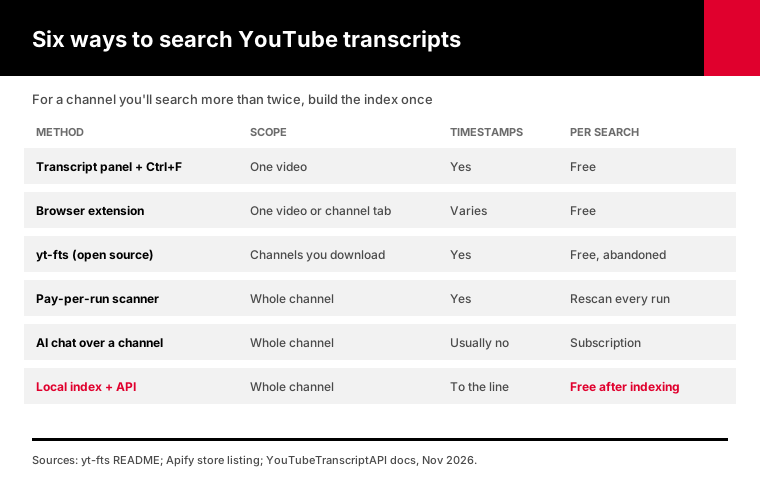
The right YouTube transcript search tool depends on how many videos you need and how often you'll ask. For one video, the built-in transcript panel is free and instant. For a whole channel you'll search again and again, a local index wins: you pay once to fetch the transcripts, then every search is free, runs in milliseconds, and returns links to the exact second.
| Method | Scope | Timestamps | Cost per search | Keeps up with new uploads |
|---|---|---|---|---|
| Transcript panel + Ctrl+F | One video | Yes | Free | n/a |
| Browser extension | One video, or a channel tab | Varies | Free | No |
| yt-fts (open source CLI) | Channels you download | Yes | Free | Manual update |
| Pay-per-run channel scanner | Whole channel | Yes | Pays to rescan every run | Rescans |
| AI chat over a channel | Whole channel | Usually no | Subscription | Syncs |
| Local index + transcript API | Whole channel | Yes, to the caption line | Free after indexing | Free check, 1 credit per new video |
Some notes on that table.
yt-fts was the best-known open source option, with about 1.8k GitHub stars. Its README now says the project is abandoned, it caps search strings at 40 characters, and it scrapes YouTube through yt-dlp, which breaks whenever YouTube changes its pages.
Pay-per-run scanners are convenient for a one-off question. One listing on the Apify store estimates about $0.50 per 100 videos scanned and 15 to 25 minutes for a 500-video channel. The catch is that each new question starts a new scan.
AI chat tools answer in sentences, which is great for "what does this creator think about X." They usually can't tell you the minute it was said, and you can't check the exact wording.
How does a channel-wide transcript search work?
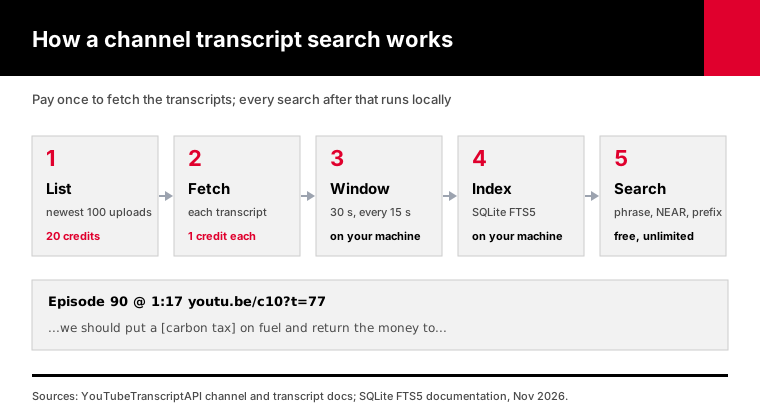
A channel-wide transcript search has five steps. List the channel's videos, fetch each transcript with its timestamps, cut the caption lines into overlapping 30-second windows, store those windows in a SQLite FTS5 full-text table, and query it. Each match maps back to the caption line where the words start, and that line's start time becomes a link such as youtu.be/VIDEO_ID?t=77.
The overlapping windows matter more than they look.
YouTube stores captions as short lines, a few words each with its own start time. A sentence like "we should put a carbon tax on fuel" often ends up split, with "carbon" closing one line and "tax" opening the next.
Search line by line and the phrase "carbon tax" isn't in either line. Zero results, even though the creator said it clearly.
So the script joins lines into 30-second windows and starts a new window every 15 seconds. Any phrase shorter than about 15 seconds of speech lands whole inside at least one window. Because windows overlap, the same moment can match twice, and the script keeps only the better-ranked hit.
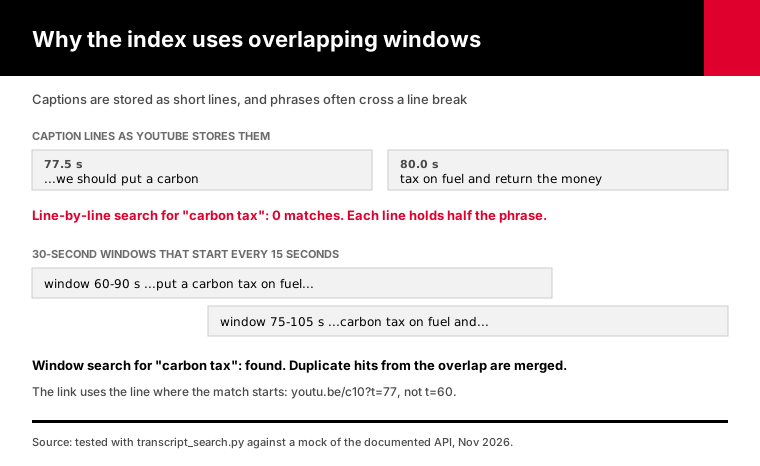
Then there's the link. Clicking through to a window's start can drop you 15 seconds before the words, which gets old fast. The script asks FTS5 to mark the matched words, finds the caption line inside the window where the first marked word appears, and links to that line instead.
The search itself runs on SQLite's FTS5 extension. It has shipped with SQLite since version 3.9.0 in October 2015, it ranks results with BM25, and it builds excerpts with the match highlighted. In my tests, the sqlite3 module built into Python 3.12 (SQLite 3.49.1) had FTS5 ready, with nothing extra to install.
How do you build a YouTube transcript search with Python?
To build a YouTube transcript search with Python, download transcript_search.py, install httpx, set your API key, and run the index command on a channel handle. It lists the newest 100 uploads, fetches each transcript, and writes a SQLite file. Then run the search command with any phrase. Searches never call the API, so they're free and come back in milliseconds.
Download transcript_search.py. It needs Python 3.10 or newer and one package.
pip install httpx
export YTT_API_KEY=tk_live_your_key_here
python transcript_search.py index @TED --db ted.db --dry-run
The dry run resolves the channel, lists it, and tells you how many transcripts it would fetch. The listing costs 20 credits, but it's saved in the database, so the real run doesn't pay for it twice. Then run it for real:
python transcript_search.py index @TED --db ted.db
python transcript_search.py search '"carbon tax"' --db ted.db
Output looks like this:
Episode 90 @ 1:17  https://youtu.be/c10?t=77
    ...we argue that we should put a [carbon tax] on fuel and return the money to...
Episode 80 @ 0:02  https://youtu.be/c20?t=2
    people don't like new taxes but a [carbon tax] works when it is simple to...
2 matches in 102 indexed videos.
That's real output from my test run against a mock of the API, where I planted "carbon" and "tax" on two separate caption lines. The search found the phrase and linked to 1:17, the line where "carbon" starts.
Want the matches in a spreadsheet? Add --csv hits.csv and each row gets the title, start time, excerpt and link. I use it when collecting clips for an edit.
Under the hood, index calls three endpoints from the channel API: resolve (free), the uploads list (20 credits for the newest 100), and optional in-channel searches. Then it calls the transcript endpoint for each video at 1 credit per successful fetch.
A few things I built in after testing:
- The video list is saved inside the database, so a run that stops halfway doesn't pay for the listing again. - Videos without captions are recorded, so later runs skip them. - A 429 waits and retries. A 402 (out of credits) stops cleanly, and the next run picks up where it left off. - Searching for text with an apostrophe, like "don't", would normally trip FTS5's query parser. The script retries it as plain words.
Already exported a channel with the script from our channel transcripts guide? Run python transcript_search.py import transcripts.jsonl --db channel.db and you're indexed with zero API calls.
What can you type into a transcript search?
A transcript search built on FTS5 accepts more than plain words. Quote a phrase to match it exactly, add an asterisk for prefixes, combine terms with AND, OR and NOT in capitals, and use NEAR to find words said close together. The index also stems English words, so "taxes" finds "tax", and it ignores accents, so a search for cafe also matches the accented spelling.
Here's the syntax I use most:
| You type | It finds |
|---|---|
carbon tax | Both words anywhere in the same 30-second window |
"carbon tax" | The exact phrase, even across two caption lines |
divid* | dividend, dividends, divide, divided |
carbon OR emissions | Either word |
carbon NOT fuel | Windows with carbon but not fuel |
NEAR(carbon dividend, 15) | Both words within 15 tokens of each other |
FTS5 operators are case-sensitive. AND, OR, NOT and NEAR must be in capitals, or they're treated as ordinary words.
NEAR without a number means within 10 tokens, per the FTS5 docs. That's tight for speech, where people ramble. I start at 15 or 20.
Plain words with no operator mean AND. The search climate policy returns windows where both words appear, in any order.
Ranking uses BM25. A window that repeats your words, close together, outranks one that mentions them once in passing. If you want the newest videos first instead, the CSV has video IDs you can sort against the channel list.
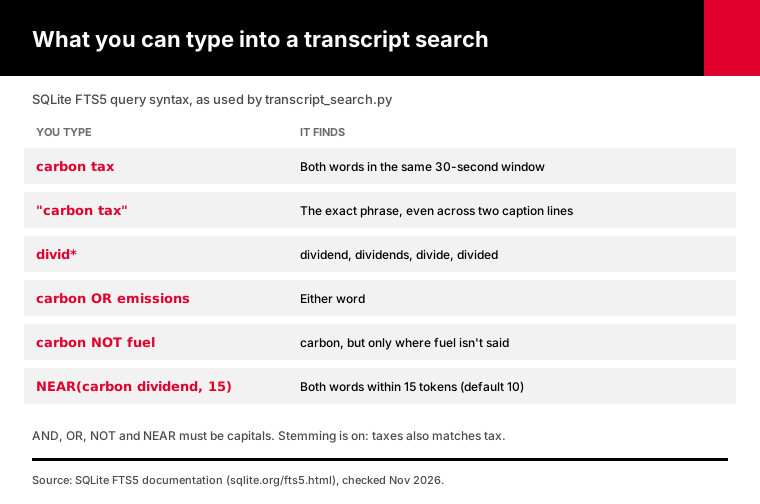
One trap: stemming is on. It's what you want for discovery, but it means "carbon taxes" also matches "carbon tax." If you need the literal wording for a quote, open the link and listen.
Why does a transcript search miss words you know were said?
A transcript search misses words for four reasons: automatic captions misheard them, the phrase was split across caption lines, the video has no captions at all, or the captions are in another language. The index here handles split lines with overlapping windows and records caption-less videos. Misheard words are the hard one, because the wrong word is what got stored.
Start with misheard words. Most channels rely on YouTube's automatic captions. In its 2017 post "One billion captioned videos", YouTube said it had auto-captioned over a billion videos and that its English captions had become 50 percent more accurate.
Better isn't perfect. Names and jargon still come out wrong all the time.
My fix is to search for what the machine would have heard. If a creator says "Kubernetes" and you get nothing, try kube* or the words around it. Prefix searches and NEAR queries forgive a lot of caption errors.
Split lines are handled by the 30-second windows described above. You don't have to think about them.
No captions means no text. The transcript endpoint returns 404 for those videos and doesn't charge for it. The script logs the count at the end of each run, so you know how much of the channel you can't search.
Language matters too. The script asks for English by default, so for a Spanish channel, pass --language es.
If a video has no track in that language, the API may return another one. The database records which language came back.
How do you link to the exact second something was said?
To link to the exact second a phrase was said, add the t parameter with the start time in whole seconds to the video's short link, such as youtu.be/VIDEO_ID?t=77. That's the same parameter YouTube adds when you tick "Start at" in its Share panel. The transcript API returns a start time for every caption line, so a search can build the link automatically.
YouTube's Share help page describes the manual version: open Share, tick "Start at," type a time, copy the link. Fine for one clip. Painful for forty.
The script does it for every hit. It takes the start time of the matching caption line, drops the decimals, and prints the link.
Dropping decimals rounds down, so a line that starts at 77.5 seconds links to 77. Landing half a second early is better than starting mid-word.
These links work anywhere you can paste a URL. If you're building clip lists for an editor, the CSV gives them a column of links they can click one after another.
How much does it cost to search a channel's transcripts?
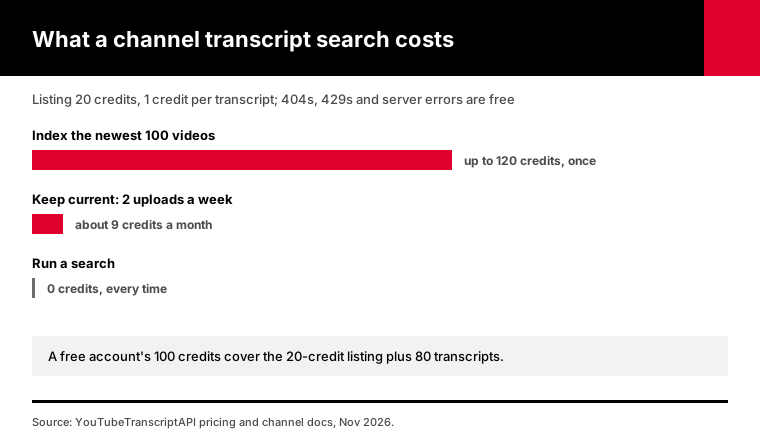
Indexing a channel's newest 100 videos costs 20 credits for the list plus 1 credit per transcript, so about 120 credits at most. That's roughly $0.84 on the $7 monthly plan, or about $0.48 on the annual plan. Searching the index is free and unlimited. You aren't charged for a 404 on a caption-less video, a 429, or a server error.
Here's the math for a few common jobs:
| Job | Credits |
|---|---|
| Index the newest 100 videos | 20 + up to 100 = up to 120 |
| Reach older videos on one topic | 1 per in-channel search (up to 50 videos), plus 1 per new transcript |
| Weekly update on a channel posting twice a week | About 2 per week, so 8 to 9 a month |
| Search the index | 0 |
The free account comes with 100 credits. That covers the 20-credit listing and the first 80 transcripts, which is enough to try this on a real channel before you pay anything.
Now picture a scanner that bills every run. Ask ten questions about a 100-video channel and you've paid for ten scans. With the index, you pay for the transcripts once, and question number ten costs the same as question number one: nothing.
For bigger jobs, see pricing. The monthly plan is $7 per 1,000 credits, and the annual plan works out to about $4 per 1,000.
Older back catalogs take more thought, because the uploads list stops at the newest 100.
To go further back, pass --search with a topic. For 1 credit, every topic you pass brings back as many as 50 videos from anywhere in the channel's history.
It matches titles and descriptions, so pick words a creator would put in a title.
How do you keep a channel's transcript search up to date?
Run the update command on a schedule. It reads the channel's 15 newest uploads from the free latest endpoint, compares them with the database, and fetches only videos it hasn't indexed, at 1 credit each. A channel that posts twice a week costs about 8 credits a month to keep current, and a run with nothing new costs nothing.
python transcript_search.py update @TED --db ted.dbOn macOS or Linux, a cron line runs it every morning:
0 7 * * * cd /path/to/search && YTT_API_KEY=tk_live_... python transcript_search.py update @TED --db ted.dbOn Windows, Task Scheduler does the same job. Point it at python.exe with the same arguments.
The update only sees 15 uploads. If a channel posts more than that between runs, run index --refresh once to list the newest 100 again. Already-indexed videos are skipped, so you only pay the 20-credit listing plus the new transcripts.
You can also put several channels in one database file and search them together. Every hit shows the video title, and the CSV has the video ID, so you can tell sources apart.
If you'd rather ask questions in plain English than type queries, connect the YouTube MCP server to Claude or another AI client. It fetches transcripts on demand. The local index is still better for exact quotes and timestamps, so I use both.
Frequently asked questions
Can you search all transcripts of a YouTube channel?
Yes. Fetch every transcript once with a transcript API, store them in a full-text index such as SQLite FTS5, and search the index. YouTube has no built-in way to do this. Indexing a channel's newest 100 videos costs about 120 credits on YouTubeTranscriptAPI, and every search afterwards is free and returns links to the exact second each phrase was spoken.
Does YouTube search look inside video transcripts?
No. YouTube's search box finds videos about a topic, mostly from their titles and descriptions, rather than the moment someone said a phrase. The transcript panel under a video does let you press Ctrl+F, but only inside that one video. To search speech across many videos, you have to collect the transcripts and index them yourself.
How do I find which YouTube video someone said something in?
Index the creator's channel and search for the phrase in quotes. The search returns each matching video's title, an excerpt with the words highlighted, and a link that opens at the right second. If the exact phrase finds nothing, the captions may have misheard it, so try a prefix search with an asterisk or NEAR with two words you remember.
How do I search a YouTube transcript for a word?
For a single video, open the description, click "Show transcript," and press Ctrl+F (Cmd+F on a Mac). Matching lines highlight in the panel, and clicking one jumps the video there. This works on desktop browsers for videos with captions. For more than a handful of videos, a search index is faster, because it checks every transcript at once.
Can I search YouTube transcripts for free?
For one video, yes: the transcript panel and Ctrl+F cost nothing. For a whole channel, the transcripts have to come from somewhere. A YouTubeTranscriptAPI free account includes 100 credits, which covers listing a channel and fetching 80 transcripts. The search script is free to download, and searching your local index never uses credits.
Can ChatGPT or Claude search a YouTube channel's transcripts?
They can read transcripts you give them, and Claude can fetch them through an MCP server. That works well for summaries and "what did they say about X" questions. For exact quotes and timestamps across hundreds of videos, a full-text index is more reliable, because it returns every literal match with the second it was said instead of a paraphrase.
Index one channel tonight
Pick the channel you search most often. Open a free account, paste the key into your shell, and run index with --dry-run to see the credit cost. Then index it, search a phrase you know is in there, and click the link. The quickstart covers the key setup if you haven't made one yet.
About the authors: the YouTubeTranscriptAPI engineering team builds and runs the hosted transcript API used in this guide. We tested transcript_search.py against a mock of the documented API responses and checked the FTS5 details against SQLite's documentation in November 2026.