Supadata alternative for YouTube transcripts (2026)
By the YouTubeTranscriptAPI engineering team · Published · Updated
Supadata does a lot: YouTube, TikTok, Instagram, X, Facebook, files and web pages, all behind one API. But what if all you ever send it is YouTube links?
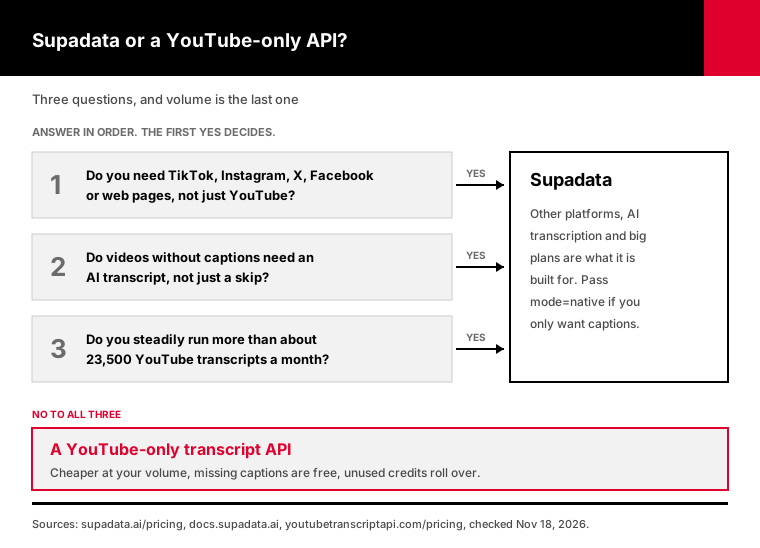
The best Supadata alternative for YouTube transcripts is a YouTube-only transcript API, if your videos have captions and you fetch fewer than about 23,500 a month. Below that volume it costs less, it doesn't charge for videos without captions, and unused credits roll over. Stay with Supadata if you need other platforms, AI transcripts for captionless videos, or steady volume above 30,000 a month.
A fair warning first: we make YouTubeTranscriptAPI, one of the alternatives. So read this as a competitor's comparison.
I've tried to make it a useful one anyway. Every Supadata price and rule below comes from its own pricing page and docs, checked on November 18, 2026, with links so you can check them yourself.
What is the best Supadata alternative for YouTube transcripts?
The best Supadata alternative depends on which Supadata feature you actually use. For YouTube videos with captions, a YouTube-only transcript API is cheaper at low and mid volume. For captionless videos, you need speech-to-text. For TikTok, Instagram or web pages, you need a multi-platform API, and Supadata is a good one. Check which of those jobs you actually run before comparing prices.
The realistic options, sorted by the job they do:
1. A YouTube-only transcript API, like ours. You get captions as JSON, plus search, channel and playlist endpoints, but no AI transcription. 2. A multi-platform social data API, which adds profiles, comments and posts across several networks. Worth it if transcripts are one part of a bigger research job. 3. A scraper marketplace, where you pay per run for a ready-made YouTube transcript scraper. Each scraper has its own inputs, outputs and prices. 4. An open-source library you host yourself. There's no subscription, but YouTube tends to block requests from cloud servers, so you pay for proxies and your own time instead. 5. A speech-to-text API. It transcribes audio you already have, and it doesn't fetch YouTube videos for you.
I'd start by checking your own request logs. If 95% of the URLs are youtube.com, you're paying for platforms you don't use.
What does Supadata do well?
Supadata is a broad video and web data API. One endpoint takes a YouTube, TikTok, Instagram, X or Facebook link, or a public file up to 750 MB and 12 hours, and returns a transcript. If a video has no captions, its default mode transcribes the audio with AI. It also has batch jobs of up to 5,000 videos, web scraping, SDKs and an MCP server.
That fallback is the feature to respect. According to Supadata's transcript docs, mode=auto fetches existing captions and generates a transcript when there are none.
We can't do that. We return the captions YouTube has, and if there are none, you get a 404.
Supadata is also built for scale. Its batch endpoint takes a channel or playlist and processes up to 5,000 videos in one job. That's on Pro and above, and Shorts and live streams are skipped.
Rate limits are generous too: 10 requests a second on Pro, 50 on Mega and 100 on Giga. We allow 300 a minute per key, which is 5 a second.
So if you transcribe TikToks, need whole back catalogs, or run hundreds of thousands of videos a month, Supadata is the better pick. The rest of this page is for everyone else.
How much does Supadata cost per 1,000 transcripts?
Supadata costs between $0.90 and $16.67 per 1,000 credits, depending on the plan, on its pricing page as of November 18, 2026. An existing transcript is 1 credit. Pro is $17 a month for 3,000 credits, or $5.67 per 1,000. Mega is $47 for 30,000, or $1.57. The price per credit falls sharply as plans grow, and credits don't roll over.
The full table, from Supadata's pricing page:
| Plan | Price | Credits a month | Per 1,000 credits | Rate limit |
|---|---|---|---|---|
| Free | $0 | 100 | free | 1 a second |
| Basic | $60 a year | 300 | $16.67 | 10 a second |
| Pro | $17 a month | 3,000 | $5.67 | 10 a second |
| Mega | $47 a month | 30,000 | $1.57 | 50 a second |
| Giga | $297 a month | 300,000 | $0.99 | 100 a second |
| Supa | $897 a month | 1,000,000 | $0.90 | 100 a second |
Basic is annual only. Supadata says the other plans have yearly versions at a discount, but it doesn't publish those prices, so I've used the monthly ones.
When you run out, Auto Recharge buys more: $10 per 1,000 credits on Basic and Pro, $10 per 5,000 on Mega.
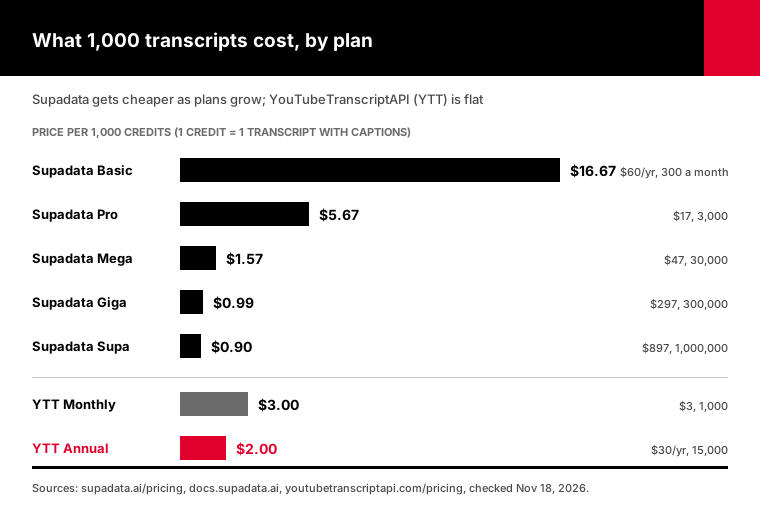
For comparison, our Monthly plan is $3 for 1,000 credits and Annual is $30 a year for 15,000, which works out to $2 per 1,000. Top-ups are $2.50 or $2 per 1,000. Those are the prices on our pricing page today.
One thing the table hides. Supadata's credits don't roll over, per its own FAQ. Ours roll over at renewal, up to two terms' worth, and top-up credits never expire.
Supadata vs YouTubeTranscriptAPI: what's different?
Supadata covers five video platforms, files and web pages, and transcribes captionless videos with AI. YouTubeTranscriptAPI does YouTube captions and nothing else. Supadata charges 1 credit when a transcript is unavailable, while our 404s are free, and its credits expire monthly where ours roll over. Above roughly 23,500 transcripts a month, Supadata is cheaper. Below it, we are.
Side by side, with both pricing pages checked on November 18, 2026:
| Supadata | YouTubeTranscriptAPI | |
|---|---|---|
| Sources | YouTube, TikTok, Instagram, X, Facebook, files, web pages | YouTube |
| Video without captions | AI transcript at 2 credits a minute (default), or 206 at 1 credit | 404, not charged |
| Cheapest paid plan | $60 a year for 300 a month | $3 a month for 1,000 |
| Price per 1,000 at 10,000 a month | $4.70 (Mega) | $2.00 (Annual) |
| Unused credits | Expire monthly | Roll over, top-ups never expire |
| Channel or playlist | Batch up to 5,000 videos (Pro and up) | 100 newest videos per listing |
| Rate limit | 10 to 100 a second | 5 a second |
| MCP server, n8n, SDKs | Yes | MCP and n8n yes, REST for code |
The channel row matters if you archive whole channels. Our channel endpoint lists the 100 newest videos for 20 credits. Supadata's batch goes back much further.
The rate limit row rarely matters for transcripts. At 5 a second you can fetch 18,000 an hour, more than most monthly plans include.
Which is cheaper at your monthly volume?
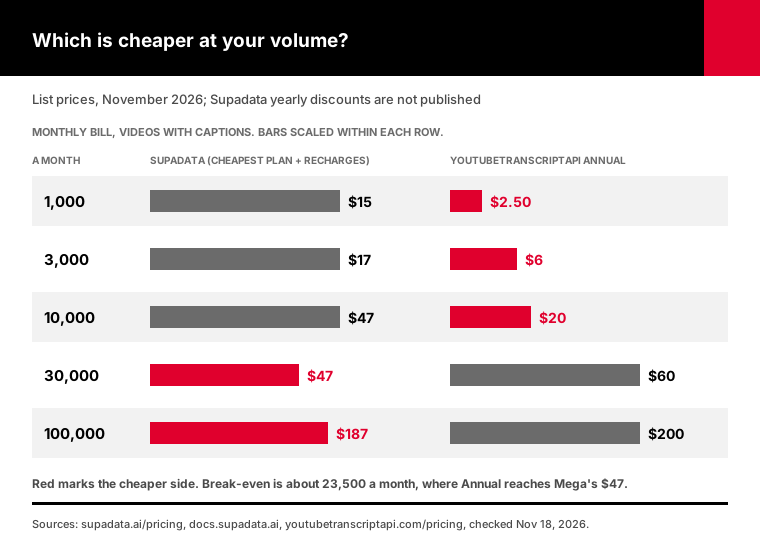
For YouTube videos with captions, YouTubeTranscriptAPI is cheaper up to about 23,500 transcripts a month, and Supadata is cheaper above it. At 1,000 a month we cost $2.50 to $3 and Supadata costs $15. At 10,000 it's $20 against $47. At 30,000 Supadata's Mega plan wins: $47 against $60. At 100,000 it's $187 against $200.
These numbers come from the cost command in the script at the end of this guide. It picks the cheapest Supadata plan plus Auto Recharge for your volume, and compares it with both of our plans:
| Transcripts a month | Supadata | YouTubeTranscriptAPI Monthly | YouTubeTranscriptAPI Annual |
|---|---|---|---|
| 1,000 | $15 (Basic + 1 recharge) | $3.00 | $2.50 |
| 3,000 | $17 (Pro) | $8.00 | $6.00 |
| 10,000 | $47 (Mega) | $25.50 | $20.00 |
| 30,000 | $47 (Mega) | $75.50 | $60.00 |
| 100,000 | $187 (Mega + 14 recharges) | $250.50 | $200.00 |
Why does it flip? Our price is flat: $2 per 1,000 on Annual at any volume. Supadata's falls to $1.57 on Mega and $0.99 on Giga. Once you can fill a big plan, the big plan wins.
The catch is the word "fill." Supadata's credits expire each month. If you buy Mega for a 30,000 month and then run 8,000 the next, you pay $47 both times.
Ours carry over, so an uneven workload costs what you actually use. If your volume jumps around, run the numbers on a real year of logs, not on your busiest month.
What does Supadata charge for videos without captions?
On Supadata's default auto mode, a YouTube video without captions is transcribed with AI at 2 credits per minute, so a 20-minute video costs 40 credits instead of 1. With mode=native it returns a 206 instead, which still costs 1 credit. Supadata's own team estimated in July 2025 that 10 to 15% of typical videos have no transcript.
That estimate comes from a reply on Supadata's feedback board, for "worthwhile" non-music videos in common languages. Your share depends on what you fetch, so treat it as a rough guide.
Now do the math on 1,000 videos a month where 12% have no captions and average 20 minutes:
- Supadata on auto: 880 transcripts plus 120 videos times 40 credits, which is 5,680 credits. That's Pro plus three recharges, $47. - Supadata on native: 880 plus 120 unavailable responses at 1 credit, which is 1,000 credits. About $15. - YouTubeTranscriptAPI: 880 credits. The 120 misses are free. $3 a month.
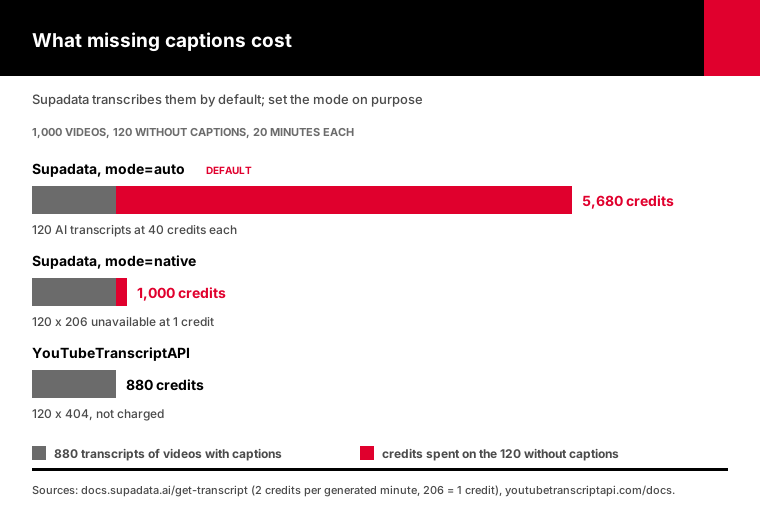
To be fair, the auto run gave you 120 more transcripts. If you need them, that's a good deal: Supadata fetches the audio and transcribes it for you.
It's easy to miss, though. The default is auto, and a timeout on your side still counts, according to Supadata's docs. If you only want captions, pass mode=native today, whichever way you go.
If you do need captionless videos, price it both ways. 40 credits for 20 minutes is $0.40 at Supadata's $10 recharge rate. AssemblyAI lists Universal-2 at $0.15 an hour, so 20 minutes is $0.05, but you have to get the audio file yourself.
Getting that audio is the hard part, and it's where a lot of DIY setups get blocked. I compared the options in our guide to captions vs speech-to-text.
My rule of thumb: if under 5% of your videos lack captions, skip them and log the IDs. If it's 30% or more, keep an API that transcribes them for you.
When should you stay with Supadata?
Stay with Supadata if you transcribe TikTok, Instagram, X or Facebook videos, if you need AI transcripts for videos without captions, if you archive whole channels beyond their 100 newest videos, or if you steadily use more than 30,000 YouTube transcripts a month. In each of those cases it does something a YouTube-only API can't, or does it for less.
I'd add one more: if your current setup works and costs you $17 a month, switching saves you maybe $11. That's real, but it isn't urgent.
Look at the numbers before you move. "Supadata" gets about 880 searches a month in the US, according to DataforSEO data we pulled in November 2026. "Supadata alternative" gets about 10.
So most people who look Supadata up are users, not switchers. And a lot of them are probably on the right plan already.
Switching makes sense when:
- Your requests are almost all YouTube links. - You use fewer than 20,000 transcripts in a typical month, or your volume swings a lot. - You're paying for auto transcripts you didn't mean to order. - You're on Basic or Pro and keep hitting the limit mid-month.
If two or more of those fit, test a switch. It's an afternoon of work.
How do you switch from Supadata to a YouTube-only API?
Switching takes three changes: the endpoint, the auth header and the response fields. Supadata's url becomes video_url, the x-api-key header becomes Authorization: Bearer, and Supadata's millisecond offset becomes start in seconds. A 206 becomes a free 404. There are no async jobs to poll, because there's no AI transcription. The adapter below keeps your old response shape.
The field map:
| Supadata | YouTubeTranscriptAPI |
|---|---|
GET api.supadata.ai/v1/transcript | GET youtubetranscriptapi.com/api/v2/youtube/transcript |
x-api-key: KEY | Authorization: Bearer KEY |
url | video_url (URL or 11-character ID) |
lang | language |
text=true | format=text |
content[].offset, duration in milliseconds | transcript[].start, duration in seconds |
lang, availableLangs | language |
| 206 unavailable, 1 credit | 404, free |
202 + jobId for AI jobs | Not used |
x-billable-requests header | X-Credits-Charged header |
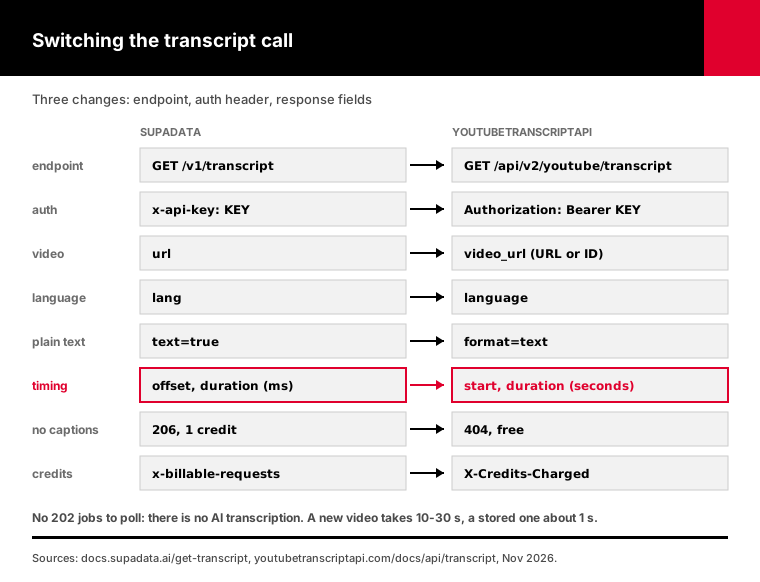
The timing units are where migrations break. If you divide our seconds by 1,000, every timestamp lands in the first second of the video.
Don't want to touch the rest of your code? Use the drop-in function from switch_from_supadata.py. It calls our API and returns Supadata's shape:
from switch_from_supadata import get_transcript, TranscriptUnavailable

try:
    result = get_transcript("https://www.youtube.com/watch?v=dQw4w9WgXcQ", lang="en")
except TranscriptUnavailable:
    result = None  # Supadata answered 206 here; this 404 cost nothing

if result:
    for chunk in result["content"]:
        print(chunk["offset"], chunk["text"])  # offset in milliseconds, as before
One difference to plan for. A transcript we haven't fetched before takes 10 to 30 seconds, and a stored one takes about a second, per our transcript endpoint docs. Set your timeout to 60 seconds.
Not calling Supadata from code? If it runs inside n8n or an AI agent, the switch is a settings change, not a rewrite.
In n8n, replace the Supadata node with an HTTP Request node pointed at the endpoint above, with your key in the Authorization header. In Claude, Cursor or ChatGPT, add our YouTube MCP server and remove Supadata's. The agent picks up the new transcript tool on its own.
If you used Supadata's batch to pull channels, the same job here is two calls: list the channel, then fetch each transcript. Our guide to YouTube channel transcripts in bulk has a script for it. Remember it covers the 100 newest videos per channel.
The other difference: availableLangs only holds the language we returned. We don't list a video's other tracks. Ask for the one you want with language.
How do you test a Supadata alternative before switching?
Test any Supadata alternative on 50 to 100 of your own URLs before moving traffic. Fetch each one from both APIs with captions only, then compare which videos returned text, the credits each charged, the language, and how closely the words match. The compare command in our script does this and writes one CSV row per video, so you can read the mismatches by hand.
Pull the URLs from your real logs, not a demo list. Include long videos, non-English ones, and a few you know have no captions.
Then run:
export YT_API_KEY=your_key            # 100 free credits, no card
export SUPADATA_API_KEY=your_key      # your existing key
python switch_from_supadata.py compare urls.txt --out compare.csv
It calls Supadata with mode=native, so the test never starts an AI transcription on your account.
Each row gets both status codes, both credit counts and a word-overlap score from 0 to 1. Both APIs read YouTube's own caption tracks, so on most videos the overlap should be close to 1.
Read every row below about 0.9. Usually it's a different language track or a manual caption track against an auto-generated one. Both are easy to fix with the language parameter.
Then run cost with your real monthly volume and your measured share of captionless videos. Now the choice has a dollar figure on it.
Frequently asked questions
What is the best Supadata alternative?
For YouTube videos with captions, a YouTube-only transcript API such as YouTubeTranscriptAPI is the closest swap and costs less below about 23,500 transcripts a month. For TikTok, Instagram or X videos, you need another multi-platform API. For videos without captions, you need speech-to-text. Pick by the Supadata feature you actually use, not by the longest feature list.
Is there a free Supadata alternative?
YouTubeTranscriptAPI gives 100 free credits once, with no card, which is 100 transcripts. Supadata's own free plan gives 100 credits a month at 1 request a second. Open-source libraries cost nothing to install, but YouTube tends to block cloud servers, so production use usually means paying for proxies. For steady use, the cheapest paid plan is often cheaper than the workarounds.
How much does Supadata cost per 1,000 transcripts?
On Supadata's November 2026 pricing page, 1,000 credits cost $16.67 on Basic, $5.67 on Pro, $1.57 on Mega, $0.99 on Giga and $0.90 on Supa. An existing transcript is 1 credit. A transcript Supadata generates with AI costs 2 credits per minute of video, so captionless videos raise the real price per 1,000.
Do Supadata credits roll over?
No. Supadata's pricing FAQ says credits don't roll over, and each month starts with your plan's allowance. If you run out, paid plans can buy more through Auto Recharge. YouTubeTranscriptAPI plan credits roll over at renewal, up to two terms' worth, and top-up and free credits never expire, which suits workloads that change month to month.
Why does Supadata charge for videos with no transcript?
Supadata's docs say a request that returns 206, transcript unavailable, costs 1 credit. On the default auto mode, a captionless video is transcribed with AI instead, at 2 credits per minute. Pass mode=native to stop the AI charges. YouTubeTranscriptAPI returns a 404 for a video without captions and doesn't charge for it.
Can I switch from Supadata by changing the API key?
No. The endpoint, auth header, parameter names, timing units and status codes all differ. Supadata returns offsets in milliseconds; YouTubeTranscriptAPI returns start times in seconds. Our switch_from_supadata.py script includes a get_transcript function that returns Supadata's response shape, so most code only needs the call itself changed. Test it on your own URLs first.
Run the cost check before you renew
Before your next Supadata renewal, pull last month's YouTube URLs from your logs. Run compare on 50 of them and cost with your real volume.
If the YouTube-only route wins, switch the transcript call and keep Supadata only for what it does that we don't. If it doesn't, stay, and set mode=native so you only pay for captions.