YouTube transcript API or tool? How to choose (2026)
By the YouTubeTranscriptAPI engineering team · Published · Updated
Most people asking "API or tool?" are really asking a different question: how many videos, and where does the result need to end up?
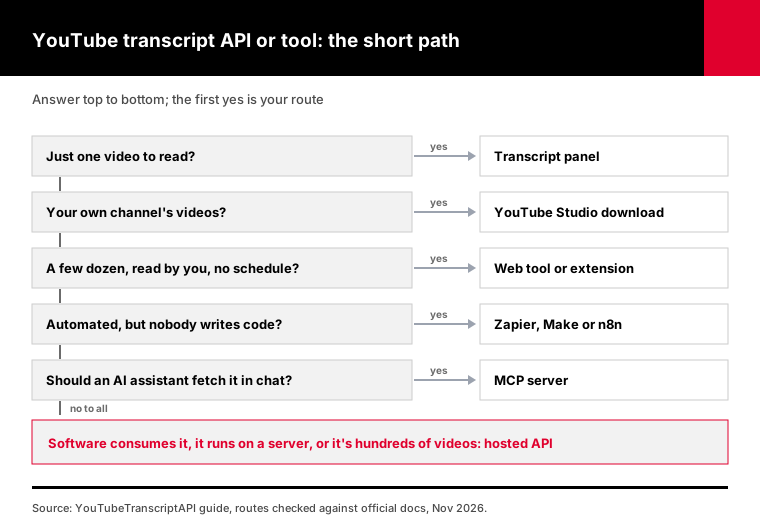
Once you know those two things, the choice gets easy. Use YouTube's own transcript panel or a web tool for a handful of videos you'll read yourself. Use a no-code flow in Zapier, Make or n8n when transcripts should land in a sheet or Slack without code. Use a YouTube transcript API when the text feeds an app, a server job or a batch of hundreds. Use an MCP server when an AI assistant should fetch transcripts itself.
I'll go route by route, with the catch for each one, then the costs side by side.
Should you use a YouTube transcript API or a tool?
Use a tool when a person reads the transcript, and an API when software does. A tool means YouTube's transcript panel, a web tool or a browser extension, and it's best for one to twenty videos at a time. An API fits apps, servers, scheduled jobs and batches of hundreds. No-code flows sit between the two: an API underneath, with no code for you to write.
That's the short version, and it covers most cases.
The long version has more edge cases. A marketer who needs 300 transcripts for a content audit is a "tool" person with an "API" problem. A developer prototyping on a laptop can get away with a free library for a week, then hit a wall on deploy.
So the rest of this guide answers four questions for every route: how many videos it handles, whether it runs on a server, what it costs as of November 2026, and where it breaks.
What are the ways to get a YouTube transcript?
There are seven realistic routes in 2026: YouTube's own transcript panel, YouTube Studio for your own videos, web tools and browser extensions, no-code automation in Zapier, Make or n8n, the official YouTube Data API, open-source libraries, and hosted transcript APIs. An eighth, the MCP server, plugs a hosted API into AI assistants. They differ mostly on volume and on where they run.
| Route | Best for | Volume | Runs on a server? | Cost as of Nov 2026 |
|---|---|---|---|---|
| YouTube transcript panel | Reading one video | 1 at a time | No, it's manual | Free |
| YouTube Studio download | Your own videos | Your channel | No, it's manual | Free |
| Web tool or extension | A few videos, no setup | Dozens | No | Free tiers, then paid |
| Zapier, Make or n8n | Transcripts into sheets, Slack, CRMs | Hundreds | Yes, hosted for you | Platform plan plus a transcript source |
| YouTube Data API | Captions on videos you can edit | 40 a day by default | Yes | Free quota |
| Open-source library | Scripts on your own computer | Small batches | Often blocked | Free, plus proxies on servers |
| Hosted transcript API | Apps, servers, big batches | Thousands | Yes | 1 credit per transcript |
| MCP server | Claude, ChatGPT, coding agents | Whatever the chat needs | Yes | Same credits as the API |
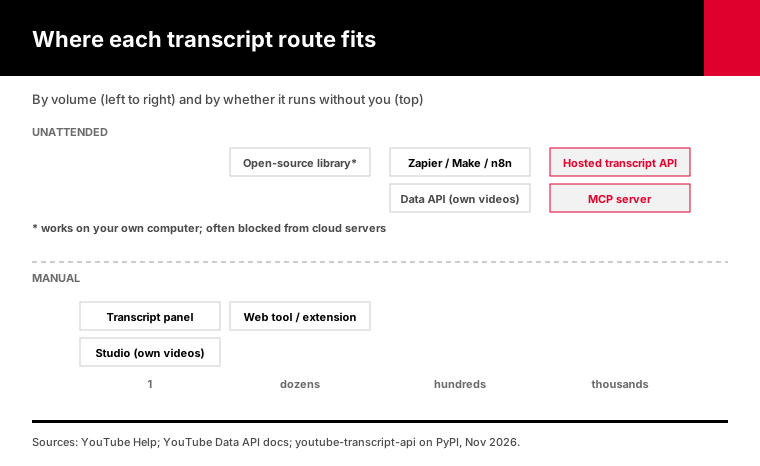
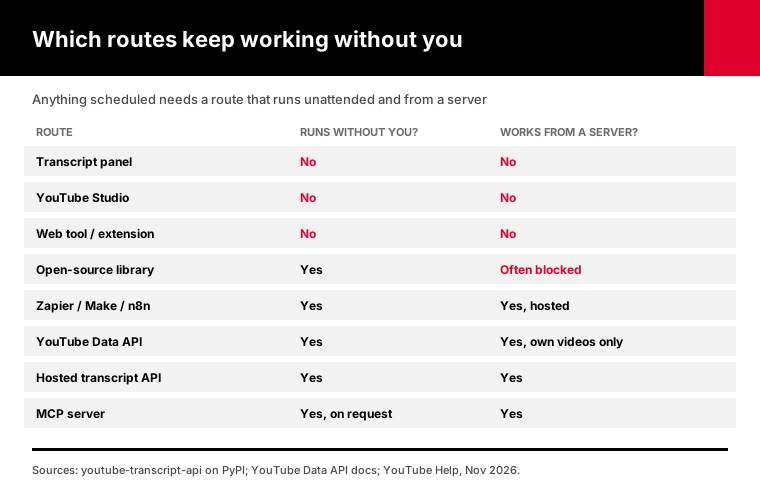
The table hides one important detail. "Free" usually means "free for you to do by hand." The moment a job runs at 3 a.m. without you, the free routes start dropping out.
When is YouTube's own transcript panel enough?
The transcript panel is enough when you need one video's text and you're at a desktop browser. Open the video, find Show transcript in the description, and copy the lines, per YouTube's help page. It costs nothing and needs no account. It's slow past a few videos, and the captions are only as good as YouTube's automatic speech recognition, which its own help pages say can misrepresent what was said.
YouTube's help center describes it in one line: in the video description, click Show transcript. Clicking a line jumps the video to that moment.
The quality caveat is YouTube's own. Its automatic captions page warns that captions might misrepresent the spoken content because of mispronunciations, accents, dialects or background noise.
If the video is yours, skip the copying. YouTube Studio lets you download your subtitles from the Subtitles page as a file, timing included.
I use the panel constantly for quick checks. I'd never use it for more than five videos in a row. The copy-paste gets old fast, and you lose the timestamps unless you're careful.
When does a web tool or browser extension make sense?
A web tool or browser extension makes sense for a few videos to a few dozen, when you want a clean download and don't want to write code. You paste a link and get text, SRT or a summary. The catch is limits: free tiers are small and change often, and an extension that reads every site you visit is a privacy question worth asking before you install it.
Web tools are the easiest step up from the panel. Paste a URL, get a file.
Extensions put the transcript next to the video, which is handy if you watch a lot and take notes as you go.
Before installing one, look at what site access it asks for. A transcript extension only needs YouTube. Chrome lets you limit an extension to run only when you click it, or only on specific sites, which is the safer setting for any extension you don't fully trust.
The limits are the other catch. Free plans in this category tend to cap you at a handful of videos a day or a month, and those caps move. When you find yourself pasting the 40th link of the afternoon, you've outgrown the tool.
Tools also don't run without you. Nothing happens unless you open the page and press the button.
When should you use Zapier, Make or n8n?
Use a no-code platform when transcripts should arrive somewhere automatically, like a Google Sheet, Slack or a CRM, and nobody on the team writes code. The platform handles triggers and scheduling. It doesn't fetch transcripts by itself, so each flow calls a transcript API inside it. As of November 2026, Zapier's free plan covers 100 tasks a month on two-step Zaps.
This is the route I recommend most to marketing and research teams.
You get the "runs at 3 a.m." part without anyone writing code. A new upload, a row added to a sheet or a form submission can trigger a transcript, and the result can go straight to wherever the team reads it.
The numbers to know, from each platform's own pricing page as of November 2026:
- Zapier's free plan includes 100 tasks a month and two-step Zaps. Its Professional plan starts at $19.99 a month billed annually, per Zapier's pricing page. - n8n can be self-hosted from its GitHub release. Its cloud Starter plan is listed at 20 euros a month billed annually, with a free trial, per n8n's pricing page.
Every one of these flows needs a transcript source in the middle, and that's usually a hosted API called with an HTTP step. Our n8n recipe shows the whole flow, with the node settings filled in.
When do you need a YouTube transcript API?
You need a YouTube transcript API when transcripts feed software: an app, a backend job, a RAG index, a scheduled report or a batch of hundreds of videos. An API returns structured JSON with timestamps, handles errors in code and runs on servers. The official YouTube Data API only serves captions for videos you can edit, so for public videos you'll use an open-source library or a hosted API.
Here's the part most "tool" articles skip. There are three very different APIs hiding behind the word.
The official YouTube Data API is free within quota, but it's built for channel owners. Google's captions.list docs say plainly that listing tracks returns no caption text, and fetching the text itself is reserved for accounts allowed to edit that video.
Open-source libraries read YouTube's caption data directly and need no key. They work well on a laptop. On cloud servers they often don't: the youtube-transcript-api project's own PyPI page warns that YouTube now refuses most traffic coming from AWS, Google Cloud, Azure and other cloud address ranges.
Hosted APIs do the fetching on their own infrastructure and return JSON to your code over HTTPS. That's what we run.
One call costs 1 credit, and a video without captions comes back as a 404 that isn't charged. The transcript endpoint reference lists every option, from plain text to timestamps and video metadata.
If you're writing Python, the Python guide has a tested client with retries and async batches. The quickstart gets a first call working in about two minutes.
What about getting transcripts inside Claude or ChatGPT?
If you want an AI assistant to read YouTube for you, connect it to an MCP server instead of pasting transcripts by hand. MCP, the Model Context Protocol, is an open standard for connecting AI applications to external systems. A transcript MCP server gives Claude, ChatGPT or a coding agent tools like "get transcript" and "search a channel," so you can just ask about a video in plain language.
This route is newer. When the real goal is an answer about a video rather than the transcript file, it can replace both the tool and the API.
You ask "summarize the last three videos from this channel and pull every mention of pricing," and the assistant calls the tools itself. No copying, no code.
Setup is a URL and a sign-in. Anthropic's help center says custom connectors work on Claude's Free, Pro, Max, Team and Enterprise plans, with Free users limited to one custom connector.
That one-line definition is the Model Context Protocol site's own wording.
Our hosted YouTube MCP server uses the same credits as the API, so a transcript fetched in chat costs the same 1 credit as one fetched by code.
How much does each route cost at 10, 100 and 1,000 videos?
At 10 videos almost every route is free. At 100, manual routes cost you an afternoon and free tool tiers usually run out. At 1,000, only automated routes are realistic: a hosted API at 1 credit per transcript, a no-code flow on a paid plan, or a library with paid proxies on a server. Labor, not license fees, is the biggest cost at the low end.
| Videos | Transcript panel | Web tool | No-code flow | Hosted API (our plans) |
|---|---|---|---|---|
| 10 | Free, about 15 minutes of copying | Usually free | Free tier | Free (100 credits on signup) |
| 100 | Free, a long afternoon | Often past the free tier | Free tier is tight | Free (100 credits) |
| 1,000 | Not realistic | Paid plan, still manual | Paid plan plus transcript source | $3 on Monthly |
| 10,000 a month | Not realistic | Not realistic | Paid plan plus transcript source | About $20 a month on Annual |
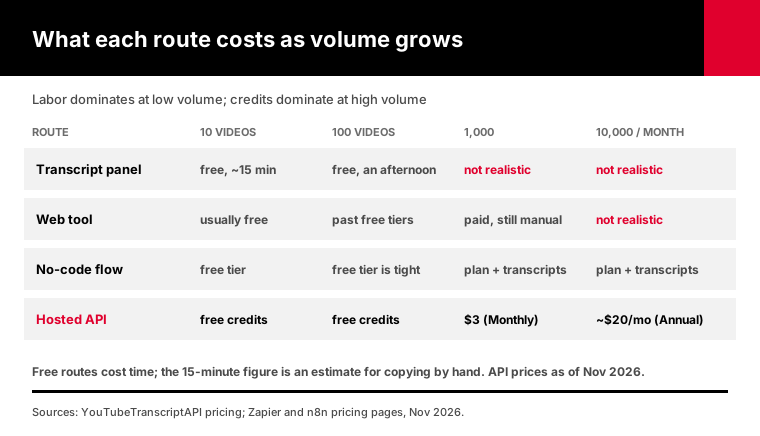
The 15-minutes figure is my own estimate for copying ten transcripts by hand, not a measured benchmark. Your speed will vary, but it won't scale.
For the API column: new accounts get 100 credits with no card, Monthly is $3 for 1,000 credits, and Annual is $30 for 15,000. At 10,000 transcripts a month you'd use Annual credits plus top-ups at $2 per 1,000. The pricing page has the live numbers.
Errors never cost credits, so a batch full of videos without captions doesn't burn your balance.
Which option should you pick?
Choose by the reader and the volume. If a person reads it and it's under twenty videos, use the panel or a web tool. If a team needs it delivered somewhere without code, use a no-code flow. If software consumes it, or it runs on a server, use a hosted API. If an AI assistant should fetch it during a conversation, connect an MCP server. Your own channel's captions are the one case for Studio.
Here's the same advice in "choose X if" form:
1. Choose the transcript panel if you need one video, you're at a desktop, and you'll read it yourself. 2. Choose YouTube Studio if the videos are yours and you want the caption file with timing. 3. Choose a web tool or extension if you need a few dozen transcripts, want a clean file, and don't mind doing it by hand. 4. Choose Zapier, Make or n8n if transcripts should land in a sheet, Slack or a CRM on a trigger, and nobody wants to write code. 5. Choose a hosted API if your app, backend, RAG pipeline or scheduled job needs transcripts, or you need hundreds at once. 6. Choose an MCP server if you want Claude, ChatGPT or a coding agent to fetch and work with transcripts on request.
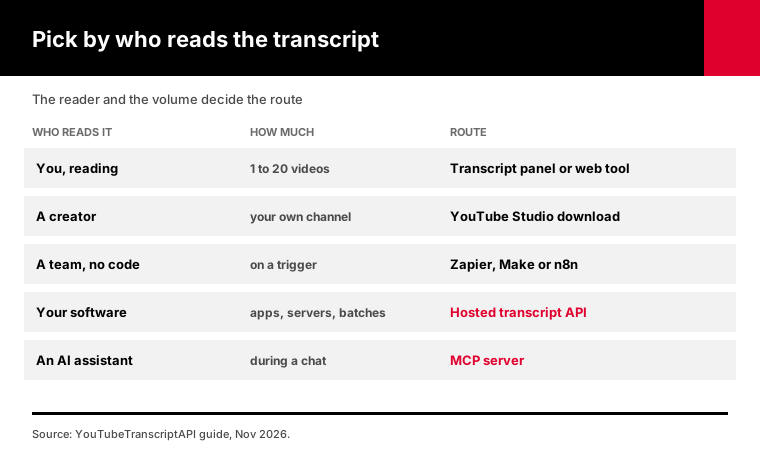
You can mix them, and most teams do. Someone checks one video in the panel, a weekly digest runs through n8n, and the product reads transcripts through the API.
Can you combine a tool and an API?
Yes, and it's usually the cheapest setup. Use the free transcript panel or a web tool for one-off checks, and send anything repeated or bulk through an API or a no-code flow built on one. The tool costs nothing for occasional use. The API only charges for transcripts it actually returns, so you never pay for the videos you checked by hand.
The trap is the middle ground.
Teams start with a tool, the job grows, and someone ends up pasting fifty links every Monday morning. That's the moment to automate, and it usually comes earlier than anyone admits.
A rule I like: if you've done the same manual transcript job three weeks in a row, move it to a flow or a script. The setup takes an hour. The copy-paste never ends otherwise.
Going the other way works too. If an automated job only ever needs two or three videos, keep it simple and stay with the panel.
Frequently asked questions
Do I need an API to get YouTube transcripts?
No, not for a few videos. YouTube's own transcript panel shows the text of any video with captions, and web tools turn a link into a file. You need an API when transcripts feed software, run on a schedule or come in hundreds. No-code platforms like Zapier, Make and n8n use an API underneath, so you don't write any code yourself.
What is the best way to get transcripts from many YouTube videos?
For dozens, a web tool or a no-code flow is enough. For hundreds or thousands, use a hosted transcript API: it lists a channel's or playlist's videos, fetches each transcript as JSON, and runs on a server unattended. YouTubeTranscriptAPI charges 1 credit per transcript and nothing for videos without captions, and a fresh account starts with 100 credits.
Can Zapier or n8n get YouTube transcripts?
Yes, with a transcript source inside the flow. Zapier, Make and n8n handle triggers and delivery, but they don't fetch transcripts on their own, so each flow calls a transcript API through an HTTP step or an app integration. As of November 2026, Zapier's free plan includes 100 tasks a month, and n8n can be self-hosted.
Are YouTube transcript browser extensions safe?
They can be, but check the site access an extension asks for before installing. A transcript extension only needs YouTube, so access to every site you visit is a warning sign. Chrome lets you restrict an extension to run only when you click it or only on specific sites. Prefer extensions that are recently updated and clear about what data they send.
Can I download the captions of my own YouTube videos?
Yes. In YouTube Studio, open Subtitles, choose the video and language, and use the download option on that caption track. You get a file with the timing included. This only works for videos on your own channel, or channels you manage. For anyone else's videos, use the transcript panel, a tool or a transcript API.
Can ChatGPT or Claude read YouTube transcripts?
Yes, through an MCP server. MCP is an open standard that lets AI apps call external tools, so a transcript MCP server gives the assistant a "get transcript" tool it can use mid-conversation. Claude supports custom connectors on its Free plan, limited to one, and on paid plans. YouTubeTranscriptAPI runs a hosted MCP server that uses the same credits as its API.
Pick your route in the next five minutes
Count the videos you need this month and write down where the text has to end up. Under twenty and read by you: open the transcript panel now. Anything automated or bigger: open a free account, run one API call or connect the MCP server, and see if 100 free credits cover the job.
About the authors: the YouTubeTranscriptAPI engineering team builds and runs the hosted transcript API and MCP server described in this guide. We checked the YouTube, Zapier, n8n, Anthropic, MCP and YouTube Data API details against their official pages on November 10, 2026. Prices for other platforms change often; treat them as of that date.