Can Claude or ChatGPT watch YouTube videos? (2026)
By the YouTubeTranscriptAPI engineering team. Last updated October 29, 2026.
Paste a YouTube link into Claude and ask for a summary. You'll get a polite refusal, or worse, a confident summary of a video it never saw.
Can Claude watch YouTube videos? No. Claude and ChatGPT read text and still images, and neither can play a YouTube link by itself. What they can do is read the video's transcript, and that covers most talks, tutorials and podcasts. Add a transcript connector once and Claude fetches the words for any public video with captions. Gemini is the exception: Google built YouTube into it.
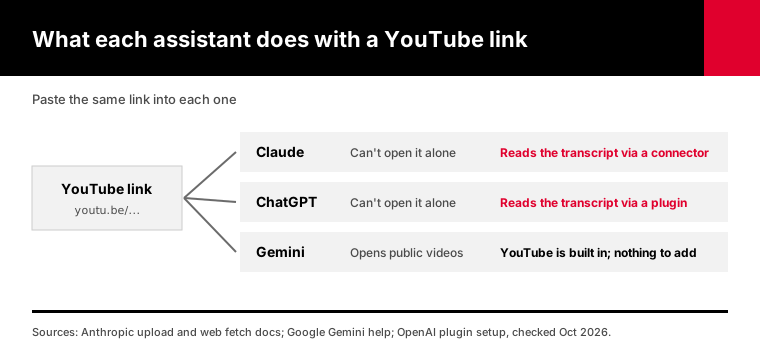
Below: what each one does with a video, and the two-minute fix for Claude and ChatGPT.
Can Claude watch YouTube videos?
No, Claude doesn't watch YouTube videos. Anthropic's file upload page, updated July 23, 2026, lists documents and images only: no video or audio formats. Claude's web fetch tool reads text, HTML and PDF, and doesn't support pages built with JavaScript, which is how YouTube's player loads. So a bare link gives Claude a URL and a title at most. Give it the transcript and it can work with everything that was said.
People are surprised by this, because Claude is so good at reading.
But reading is the whole trick. Claude has two inputs that matter here: text and still images.
Anthropic's upload page lists PDF, DOCX, CSV, TXT, HTML, ODT, RTF, EPUB, JSON and XLSX for documents, and JPEG, PNG, GIF and WebP for images. Chats take up to 20 files of 500MB each. There's no MP4 on the list.
The web fetch tool docs say it handles "only text, HTML, and PDF" and doesn't support sites rendered with JavaScript.
So what happens when you paste a link anyway?
Usually one of two things. Claude says it can't open videos, or it guesses from the title and what it already knows. The second is the trap, because it sounds right.
Claude Code and Claude Desktop are in the same spot. Nothing in them plays video. They can run tools, though, and that's where the fix comes from.
Can ChatGPT watch YouTube videos?
ChatGPT can't watch YouTube videos from a link either. It answers from text: what you paste, what it finds in a web search, or what a connected tool hands it. A YouTube URL on its own doesn't give it the spoken words. The fix matches Claude's: a transcript, pasted by hand or fetched by a custom MCP plugin, on plans that allow custom plugins.
You'll see a lot of mixed answers about this online.
Part of the confusion is that ChatGPT can search the web. A search can find the video's title, description and sometimes a write-up of it, so the answer looks informed.
It isn't reading the video. Ask it about minute 23 of a talk that nobody wrote about, and it has nothing to go on.
The fix is the same one Claude needs: give it the words.
In ChatGPT that means a custom MCP plugin, added once on chatgpt.com. Our ChatGPT setup guide has the steps.
One catch: OpenAI limits custom MCP plugins by plan. Business, Enterprise and Edu get full support, and Pro gets read-only tools, which is fine for transcripts.
For Plus, OpenAI's own pages disagreed when we checked the steps on October 18, 2026. And the phone apps can't add a plugin at all.
On a plan without plugins, paste the transcript by hand. Open the video on YouTube, click "Show transcript" under the description, copy it and paste it into the chat.
Which AI can actually watch a YouTube video?
Gemini is the only big assistant with YouTube built in. Google's Gemini help page says it "uses public information from YouTube" to help you understand a video, as long as you're signed in and Activity is on. Claude and ChatGPT need the transcript handed to them. NotebookLM takes public YouTube links as sources and reads their transcripts, with a cap of 50 sources in each free notebook.
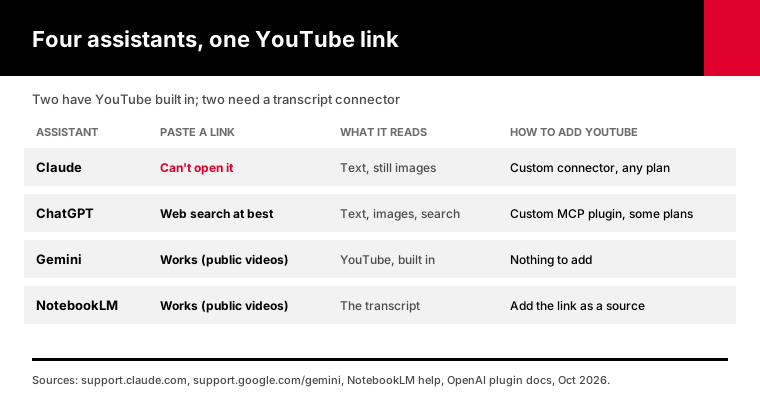
Here's how the four compare on a plain YouTube link:
| Assistant | Paste a link and ask | What it reads | How to add YouTube |
|---|---|---|---|
| Claude | Can't open it | Text and still images | A custom connector, on any plan |
| ChatGPT | Answers from web search at best | Text, images, search results | A custom MCP plugin, on plans that allow it |
| Gemini | Works for public videos | YouTube data, built in | Nothing to add |
| NotebookLM | Works for public videos | The video's transcript | Add the link as a source |
Gemini has limits worth knowing. Google's help page says the feature needs you signed in with Activity on, and it isn't available in Live chats or in Gemini inside Google Messages.
So why not just use Gemini?
If you already work in Gemini, do. But most people who search this question live in Claude or ChatGPT all day, with projects, files and history there. Switching apps for one video gets old fast.
NotebookLM is great for a study pile. Google's upgrade page caps the free plan at 50 sources per notebook, so a big course playlist fills it fast. Our playlist guide shows how to fit a whole course into a handful of files.
What does "watching" a video mean for an AI?
For an AI model, watching a video means one of two things: reading the transcript, which is everything that was said, or looking at frames, which are still images pulled from the video. Transcripts carry talks, tutorials, interviews and podcasts well. Frames carry what's on screen: slides, code, charts, a product demo with no voice-over. Most questions people ask about a YouTube video are answered by the transcript alone.
Think about the last video you wanted summarized.
It was probably someone talking. A conference talk, a lecture, a founder interview, an explainer.
For those, the transcript is the video. Everything that matters was said out loud.
Frames matter when the answer is on screen and nobody reads it out.
Picture a coding tutorial where the presenter types in silence, a chart the speaker only points at, or a cooking video with music instead of narration.
How it splits by type of video:
- Talks, lectures and keynotes: the transcript is enough - Podcasts and interviews: the transcript is enough - Tutorials with narration: mostly enough, until the code matters - Slide-heavy webinars: the transcript misses what's only on the slides - Silent demos and music videos: the transcript has little or nothing
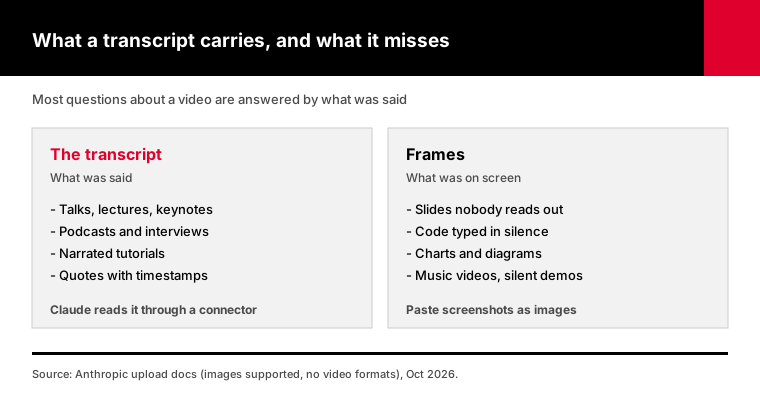
Claude can read frames if you give it screenshots, since images are on its upload list. That's a manual job, though, and it's rarely the part you need.
How do you connect YouTube to Claude?
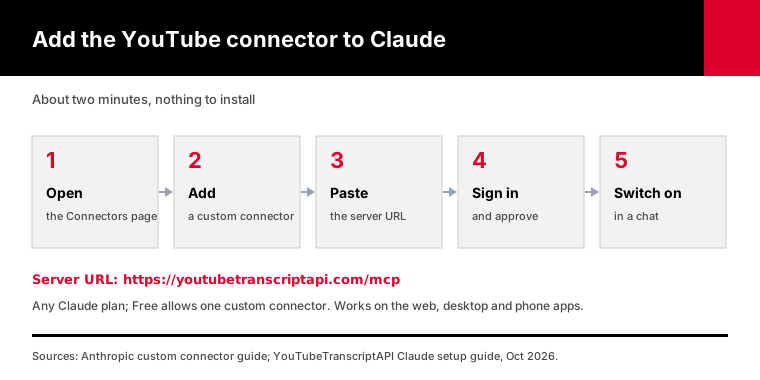
You connect YouTube to Claude with a custom connector. In Claude, open Customize, then Connectors, click Add custom connector, paste the server URL and sign in. Claude can then fetch transcripts for any public video, search YouTube and list a channel's uploads. Anthropic allows custom connectors on every plan, including Free, which is limited to one. Adding one takes about two minutes on the web or desktop app.
The steps, on claude.ai or Claude Desktop:
1. Open Customize in the sidebar, then Connectors 2. Click + Add, then Add custom connector 3. Name it YouTube and paste https://youtubetranscriptapi.com/mcp 4. Sign in to youtubetranscriptapi.com and approve the connection 5. In a chat, open the + menu, then Connectors, and switch YouTube on
The first time Claude uses a tool, it asks. All seven tools only read data, so "Always allow" is safe.
Anthropic's custom connector guide lists Free, Pro, Max, Team and Enterprise, with Free capped at one custom connector. Once it's added on the web, it shows up in the phone apps too.
Then test it. Paste a link and ask for three bullet points.
You'll see Claude call get_transcript, then answer from the actual words. If the video has chapters you care about, ask about them by timestamp.
The full walkthrough with screenshots is in our Claude setup guide. If you're choosing between YouTube connectors, our MCP server comparison on the blog covers seven of them.
Can Claude Code read YouTube videos?
Claude Code can read YouTube transcripts once you add a YouTube MCP server, which takes one terminal command. Run claude mcp add with the server URL, then sign in through /mcp. After that, Claude Code can pull a video's transcript while it works, which is handy for coding tutorials and conference talks. If you already added the connector on claude.ai with the same subscription, it shows up automatically.
The command:
claude mcp add --transport http youtube https://youtubetranscriptapi.com/mcpThen start Claude Code, run /mcp, pick youtube and approve the sign-in in your browser. claude mcp list should show it as connected.
By default the server is saved for the current project only. Add --scope user to use it everywhere.
Why would a developer want this?
Because a lot of what you learn lives in videos. A framework's launch talk, a debugging walkthrough, a 40-minute migration guide that never made it into the docs.
With the connector on, you can say "read this talk and apply its caching advice to our API client," and Claude Code works from what the speaker said.
For CI or a shared machine, our Claude Code setup page shows how to send an API key as a header instead of signing in.
What if the YouTube video has no captions?
If a video has no captions, no transcript tool can read it, because there are no words to fetch. The transcript endpoint returns a 404 for those videos, and a 404 costs nothing. Most public videos do have captions: YouTube said in February 2017 that its automatic captions covered over 1 billion videos. For the rest, Gemini or an audio transcription tool is your fallback.
YouTube makes automatic captions for most videos with clear speech. They aren't perfect, but they're good enough for a summary.
The ones that end up without captions tend to be short, silent, music-only or in a language YouTube doesn't caption automatically. Creators can also turn captions off.
That 1 billion figure is old. YouTube shared it on its official blog in 2017, and we didn't find a newer count.
What does the connector do when captions are missing?
It tells Claude the video has no transcript, and Claude tells you. Nothing is charged, and nothing is made up. The transcript endpoint docs list the 404 and the other edge cases, none of which are billed.
Private, members-only and removed videos fail the same way. If you can't watch it logged out, the connector can't read it.
How much does it cost to let Claude read YouTube videos?
Reading one video costs 1 credit through YouTubeTranscriptAPI, and failed calls cost nothing. A free account starts with 100 credits, so you can read about 100 videos before paying. Repeat reads of the same video within 24 hours are free through the connector, and so are the later parts of a long transcript. After that, the Monthly plan is $7 for 1,000 credits.
The seven connector tools, from our MCP reference:
| Tool | What Claude gets | Credits |
|---|---|---|
| get_transcript | A video's transcript, with timestamps | 1 |
| search_youtube | Videos or channels for a query | 4 |
| search_channel | Videos inside one channel | 1 |
| list_channel_videos | Up to 100 recent uploads from one channel | 20 |
| list_playlist_videos | Up to 100 videos from one playlist | 20 |
| get_latest_videos | The last 15 uploads, for checking what's new | Free |
| resolve_channel | A channel ID from an @handle or URL | Free |
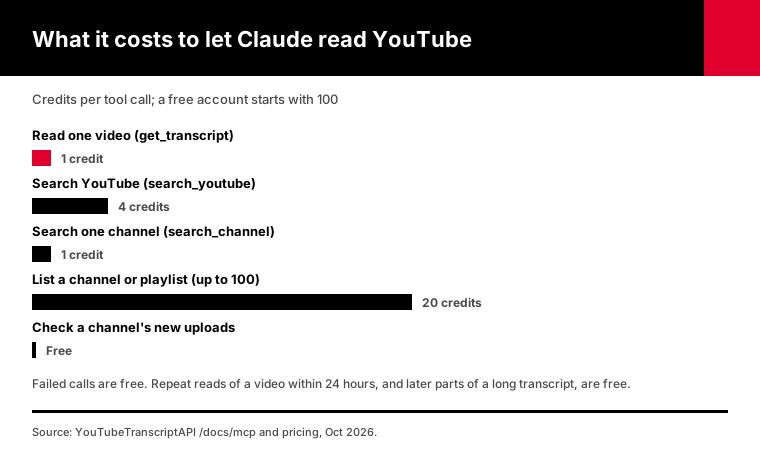
Long videos are where people expect a big bill. They don't get one.
A two-hour podcast comes back in parts, and only the first part costs a credit. The rest are free.
If you ask a follow-up about the same video an hour later, that's free too. So a long back-and-forth about one talk costs 1 credit.
Plan prices are on the pricing page. On Annual, 15,000 credits cost $60.
What can you ask Claude once it can read the video?
Once Claude can read the transcript, you can ask anything that the spoken words can answer: summaries, quotes with timestamps, comparisons between videos, and notes in your own format. Ask for timestamps every time, so you can check any claim by jumping to that moment. Claude can also search YouTube and pull a channel's uploads, so one prompt can cover several videos.
Prompts we use every week:
1. "Summarize this video in five bullets, with a timestamp for each" (then paste the link) 2. "What does the speaker say about pricing? Quote it and give the time" 3. "Compare what these two talks say about onboarding" (paste both links) 4. "Turn this lecture into study notes with headings, plus 10 quiz questions" 5. "Find the three newest videos from @channelname and tell me which one covers X" 6. "Is this 90-minute video worth watching for someone who knows Y? Answer in two lines"
That last one saves us the most time. Plenty of long videos make their one real point early, and the rest is warm-up.
One habit helps a lot. When an answer matters, click the timestamp and listen for ten seconds. Claude is reading real words, but it can still misread who said what in a panel.
For whole courses or playlists, the per-video chat gets slow. Our playlist guide shows how to pull every transcript at once and load them into a Claude Project.
Frequently asked questions
Which AI can watch YouTube videos?
Gemini has YouTube built in and can work with public videos when you're signed in with Activity turned on. NotebookLM accepts public YouTube links as sources. Claude and ChatGPT can't open YouTube links on their own, but both can read transcripts through a connected MCP tool, which works well for talks, lectures and podcasts.
Can Claude watch YouTube videos?
No. Claude reads text and still images, and its upload list has no video or audio formats. Pasting a YouTube link gives Claude a URL, not the video. Add a YouTube transcript connector instead, and Claude reads everything that was said in any public video with captions, for 1 credit a video. That covers most talks, lectures, tutorials and podcasts.
Can ChatGPT watch YouTube videos?
Not from a link. ChatGPT may find a video's title and description through web search, but it can't read what was said. To give it the words, paste the transcript, or add a custom MCP plugin on chatgpt.com that fetches transcripts. OpenAI limits custom plugins by plan: Business, Enterprise and Edu have full support, and Pro allows read-only tools.
How do I connect YouTube to Claude?
Open Customize, then Connectors, in Claude on the web or the desktop app. Click Add custom connector, paste https://youtubetranscriptapi.com/mcp, sign in and approve. Then switch the connector on in a chat. Anthropic allows custom connectors on every plan, with one on Free. Once added, the connector also works in the Claude phone apps.
Can Claude transcribe YouTube videos?
Claude can't transcribe audio, because it doesn't accept audio or video files. It can read a YouTube video's existing captions through a transcript connector, which returns the text with timestamps for 1 credit. For videos without captions, there's nothing for the connector to read, so you would need Gemini or a separate audio transcription tool.
Can Claude see what's on screen in a YouTube video?
Not through a transcript, which only holds the spoken words. Claude can read images, so you can screenshot a slide or a chart and paste it into the chat. For most talks and tutorials, the narration carries the content. Silent demos, slide-only webinars and music videos are where you'll need screenshots or a different tool.
Give Claude the transcript today
Create a free account, add the connector in Claude with the five steps above, and paste a link to the next long video you were about to watch. Ask for five timestamped bullets. It costs 1 credit, and you'll know in thirty seconds whether the video is worth your hour.
About the authors: the YouTubeTranscriptAPI engineering team builds and runs the hosted transcript API and the YouTube connector used in this guide. We checked the Claude, ChatGPT and Gemini details in this article against each vendor's help pages in October 2026.